Track campaigns with UTM tags
Add UTM tags to the links you share so your analytics show which post, ad, email or poster sent each visitor.
UTM tags are labels you add to the end of your page's address. Linkbase reads them from every visit, so the Campaigns card shows which post, ad or email sent people, even when the app they came from hides it. The Campaigns card is on every plan.
How a tagged link looks
Add a question mark after your page's address, then the tags, joined with &:
…/yourname?utm_source=instagram&utm_medium=social&utm_campaign=spring-sale
Linkbase reads three tags:
| Tag | Says | Examples |
|---|---|---|
utm_source | Where the link was placed | instagram, newsletter, poster |
utm_medium | What kind of channel it is | social, email, cpc |
utm_campaign | Which campaign it belongs to | spring-sale, launch-week |
Other tags, such as utm_content and utm_term, can stay in the address, but they don't appear in your analytics. Each value is kept up to 100 characters.
Tag a link
- Copy your page's address. Share your page shows where to find it.
- Add
?utm_source=and the place you'll share it, such as?utm_source=tiktok. - Add any other tags, each starting with
&, such as&utm_medium=social&utm_campaign=spring-sale. - Paste the tagged address where you're sharing it: your bio, an ad, an email or a video description.
- Open the tagged address once to check that your page loads.
Within seconds, that visit appears on Analytics in the Campaigns card.
To send people to one tab, tag that tab's address instead, such as …/yourname/shop?utm_source=newsletter. See Link straight to one tab of your page.
Read the results
- Select Analytics in the sidebar, and choose the page and dates in the row of filters.
- Scroll to the Campaigns card.
- At the top of the card, switch between Source, Medium and Campaign. None is visits without that tag.
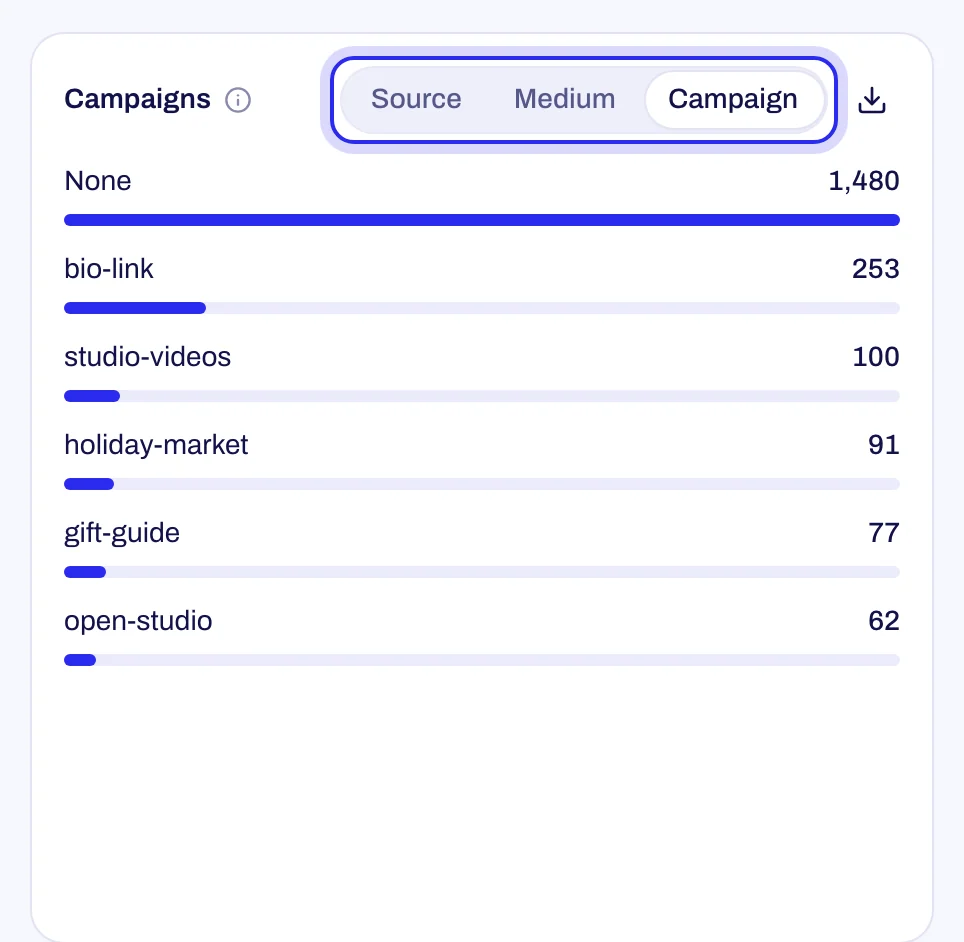
- To rank campaigns by the clicks they led to, select the Clicks tile at the top of the dashboard.
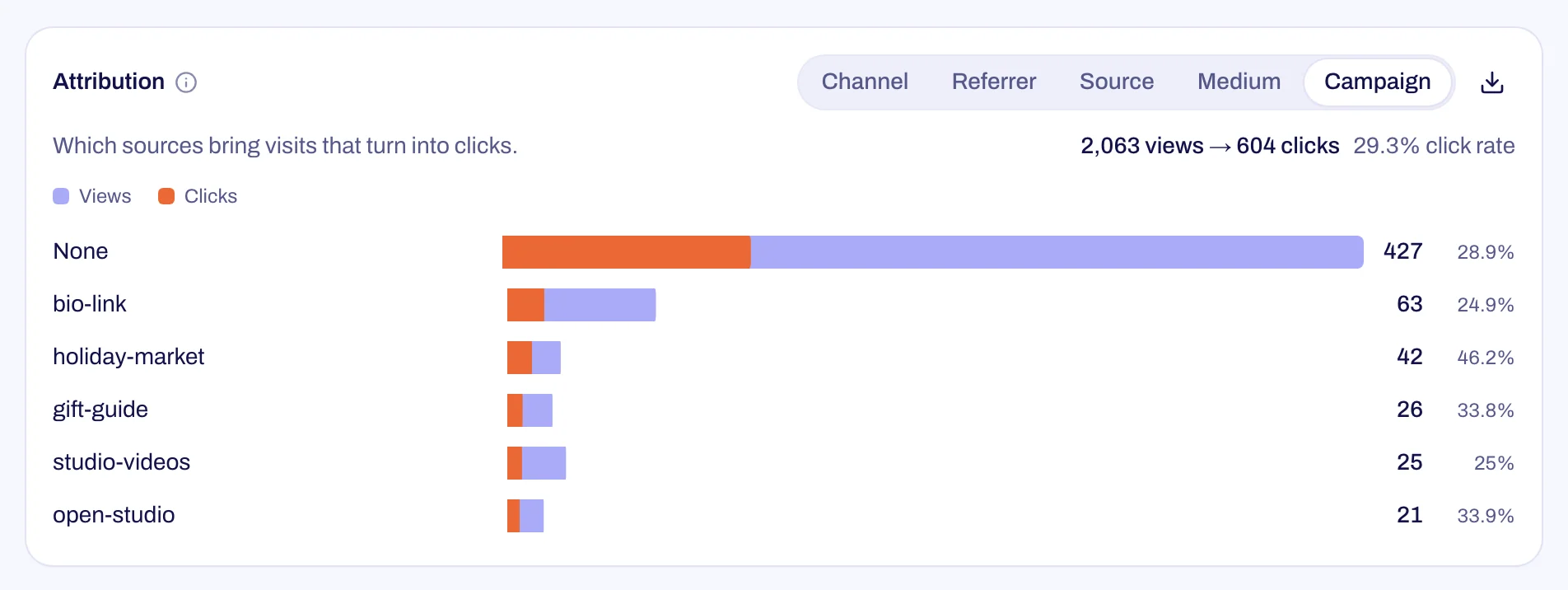
On Pro and Team, the Attribution card shows views and clicks for each source, medium and campaign side by side, with each one's click rate. Choose Source, Medium or Campaign at the top of the card.
On Pro and Team, utm_medium also decides the channel: social goes to Social, email or newsletter to Email, and cpc, ppc or paid to Paid. A tagged visit with no referring site, such as one from a printed link, goes to Tagged links. The full rules are in Use advanced analytics.
Keep your tags consistent
- Pick one spelling. Tags are case-sensitive in your reports:
Instagramandinstagramare two separate rows. - Use hyphens, not spaces:
spring-sale, notspring sale. - Always include
utm_source. A link tagged only withutm_campaignstill shows under Campaign, but when the visit has no referring site, Channels counts it as Direct. - Tag each place separately. Give your Instagram bio and your TikTok bio different sources, or their visits add up together.
Tags travel with the first page a visitor opens. If they switch to another tab of your page, that tab's views and clicks are counted without the tags.
Printed links and QR codes
A QR code for your page opens your page's plain address unless you change where it leads, so those visits show as Direct or unknown, with no tags. The scans themselves are counted under Links → Analytics. To tag them, open the code's dialog and, under Where scans go, choose Web address with your tagged page address, such as …/yourname?utm_source=poster.
A page has one QR code, so to tell several printed pieces apart in your page's analytics, create a short link for each one whose destination is your tagged page address, such as …/yourname?utm_source=poster, and use that short link's QR code. Each piece then gets its own scan count, and your page's analytics show what those visitors went on to click. See Create short links and Create and style a QR code.
Save the source with form replies
A form can record a tag with every reply. Add a Hidden field and set its Address parameter to utm_source. When a visitor arrives with that tag, its value is saved with their answers. See Build a form.
If you don't see your campaign
- It shows under None. Check the spelling of the tag name: it must be exactly
utm_source,utm_mediumorutm_campaign, in lowercase. - Nothing appears at all. Only published pages are counted, and preview links aren't. Open the tagged address of your live page.
- The visit is there, but not its clicks. If the visitor switched to another tab of your page before tapping, those clicks are counted without the tags.