Create short links
Make short, trackable links for flyers, bios and campaigns, change where they lead at any time, and see every click.
A short link is an address like …/s/summer-menu that sends people to any web page and counts every click. Use one for a flyer, a bio or a campaign: you can change where it leads after you've shared it, and each link can have its own QR code.
Before you start
Short links are on the Pro and Team plans. Compare them on the pricing page.
- Editors, admins and owners create and change short links. Everyone else in the workspace can see them and their clicks.
- Short links belong to the whole workspace. Members limited to some pages can't use them; they get QR codes for their pages in the editor instead.
- With a custom domain connected, new and existing links also work on your domain, like
links.yourbrand.com/s/summer-menu, and Links shows that address. See Connect your own domain.
Create a short link
- In the sidebar, select Links.
- Select New short link.
- In Destination, enter the full web address people should reach, such as
https://example.com/menu. - Optional: in Back-half, type the end of the short address, such as
summer-menu. Leave it empty and Linkbase picks one. - Optional: in Name, add a label only your team sees, such as "Summer menu flyer".
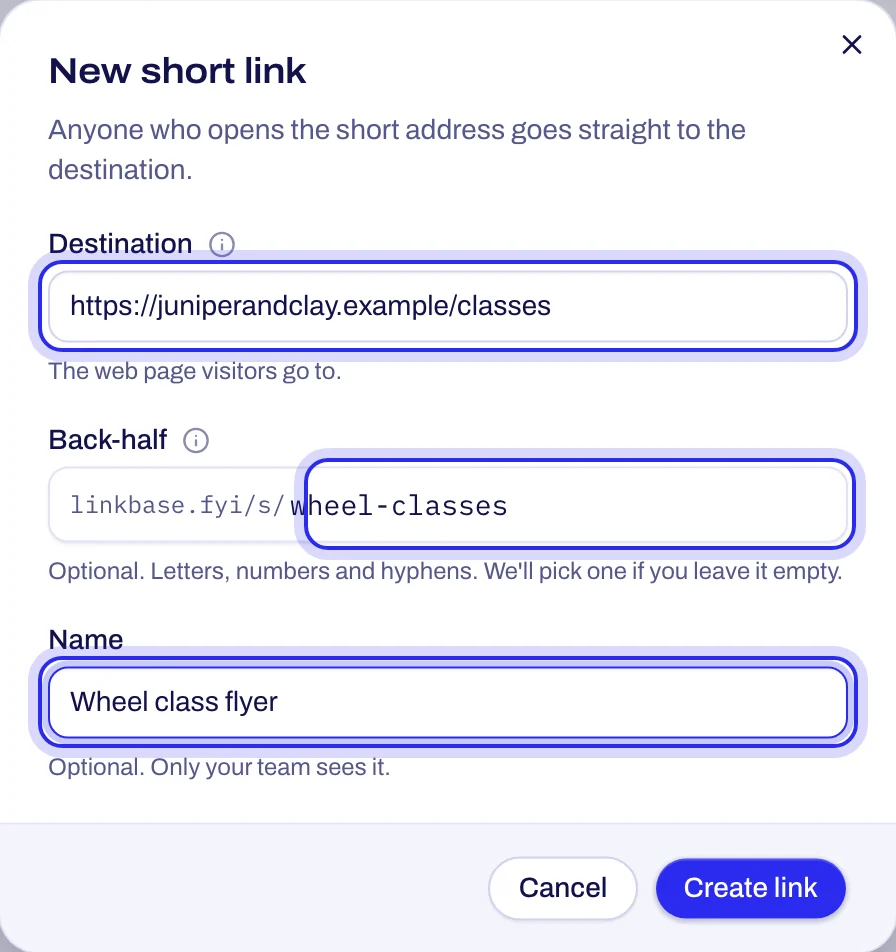
- Select Create link.
You'll see Short link created, and the link appears at the top of the list with its name, short address, destination and click count. Select the copy button beside the short address to copy it.
Choose a back-half
The back-half is the part after /s/. Pick words people can read aloud and type.
- Use 3 to 50 characters: lowercase letters, numbers and single hyphens, with no hyphen at the start or end.
- Capitals don't matter:
…/s/Summer-Menuopens the same link as…/s/summer-menu. - Each back-half is unique across Linkbase. If you see That back-half is taken. Try another one., add a word or a year.
- A back-half can't be changed once the link exists. To use different words, create a new link.
- A deleted link's back-half is never given to anyone else, so an address you printed can't be taken over. The one exception is deleting the whole workspace: its back-halves become free again 30 days later.
Back-halves Linkbase picks are 7 characters and leave out look-alikes such as 0 and o, or 1 and l.
What a short link can lead to
Any web page that starts with http:// or https://, up to 2,048 characters. That includes your own page or one of its tabs, such as …/yourname/menu.
A short link can't lead to an email address or phone number, or to another short link or QR code.
Change, pause or delete a link
Open the menu (⋯) beside a link's click count:
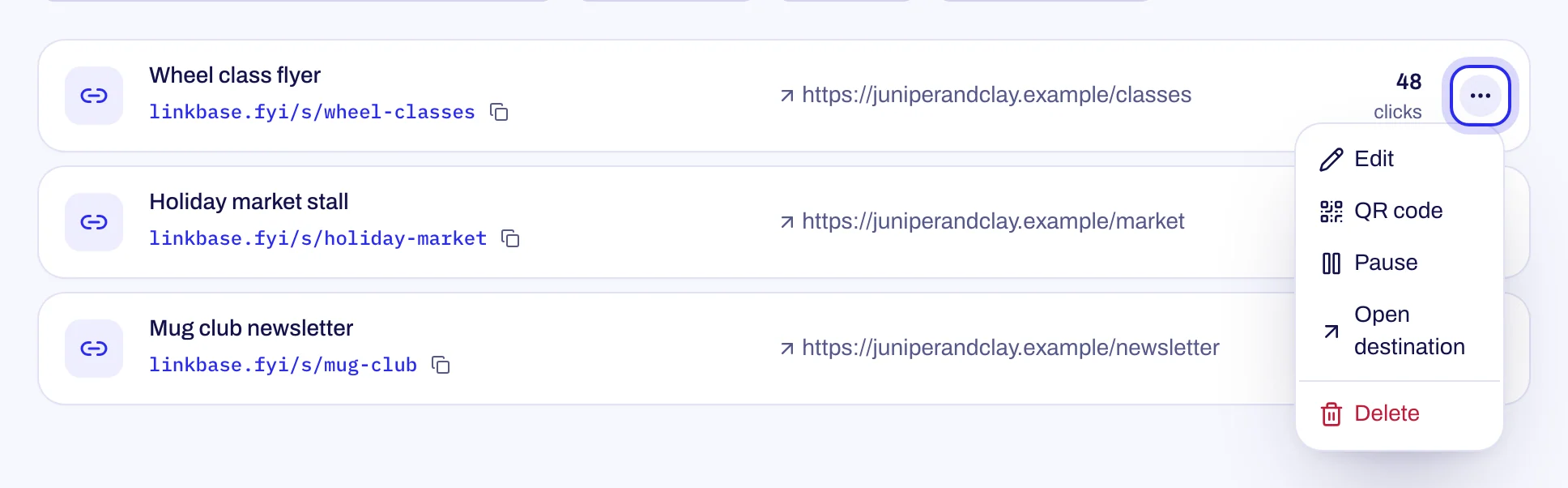
- Edit changes the Destination or Name. The short address stays the same, and the next click goes to the new destination.
- QR code opens the link's QR code. See Create and style a QR code.
- Pause stops the link. Visitors see a page saying it isn't available until you choose Resume.
- Open destination opens where the link leads, in a new tab.
- Delete asks you to confirm with Delete link. The address stops working for good.
See your clicks
The number beside each link is its click count, including scans of its QR code. Select it to open the link's own report, or open the Analytics tab at the top of Links to compare every link and code. See Track scans and change where a QR code points.
To split one link's clicks by campaign, add UTM tags to the short address you share, such as …/s/summer-menu?utm_source=flyer. They appear under Campaigns in the link's report. They aren't passed on to the destination, so if your own site's analytics need them, put them in the Destination too. See Track campaigns with UTM tags.
Find a link
Once you have two or more links, use Search links to find one by back-half, destination or name. You can also filter by status (Active or Paused), by With a QR code or Without a QR code, and sort by Newest first, Oldest first, Most clicks or Name (A–Z).
Limits and downgrades
- Pro and Team include as many short links as you need. Each workspace can create up to 60 new links every 10 minutes.
- A short link's QR code counts toward your plan's QR codes, like a page's.
- If your plan stops including short links, existing links keep working. You can still pause, delete or get QR codes for them, but creating and editing links needs Pro or Team again. See Upgrade, downgrade or switch billing.