Use advanced analytics
Read channels, attribution, cities and the click heatmap on Pro and Team, and see who's on your page right now on any plan.
Advanced analytics add four things to the Analytics dashboard: channels, attribution, cities and a click heatmap of each page. Use them to see which kinds of sources bring visitors who tap, and which blocks on your page get the taps. Live visitors come with every plan.
Channels, attribution, cities and the heatmap are on the Pro and Team plans. Live visitors are on every plan. Compare plans on the pricing page.
Live visitors
In the row of filters, after Compare with, a pill shows how many people are on your pages now, such as "3 visitors now". It counts visitors from the last 5 minutes and updates every 20 seconds while the dashboard is open.
- In Page, choose All pages.
- Select the pill. Right now, by page lists each page with visitors on it.
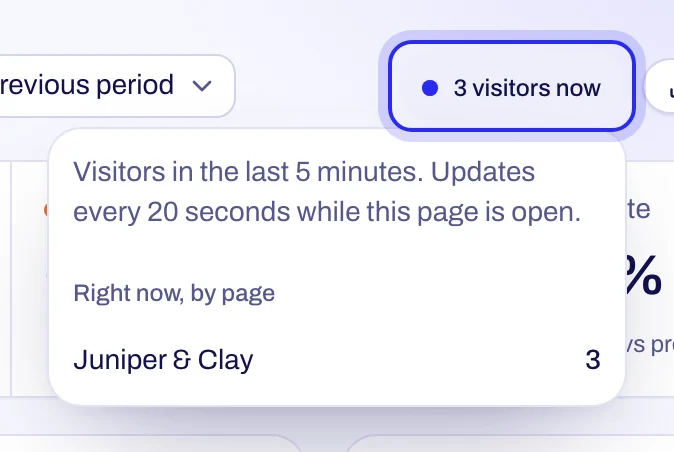
With one page chosen, the pill counts that page only.
Channels
The Channels card groups every visit by kind of source. Linkbase sorts each visit with these rules, in order, and the first that matches wins:
| Channel | When |
|---|---|
| Paid | utm_medium is cpc, ppc, cpm, cpv, display, banner, ad or ads, or starts with paid, such as paid_social |
utm_medium is email or newsletter, or the visit came from webmail such as Gmail or Outlook | |
| Social | utm_medium is social or social-media, or the visit came from a social network or messaging app |
| Search | The visit came from a search engine |
| Other sites | The visit came from any other site |
| Tagged links | No referring site, but the link had a utm_source or utm_medium tag |
| Direct | No referring site and no tags |
Select Social, Search, Email or Other sites in the card to see the sites behind it. All channels takes you back.
Attribution
Attribution answers which sources bring visits that turn into clicks.
- Find the Attribution card below the chart.
- At the top of the card, choose what to compare: Channel, Referrer, Source, Medium or Campaign.
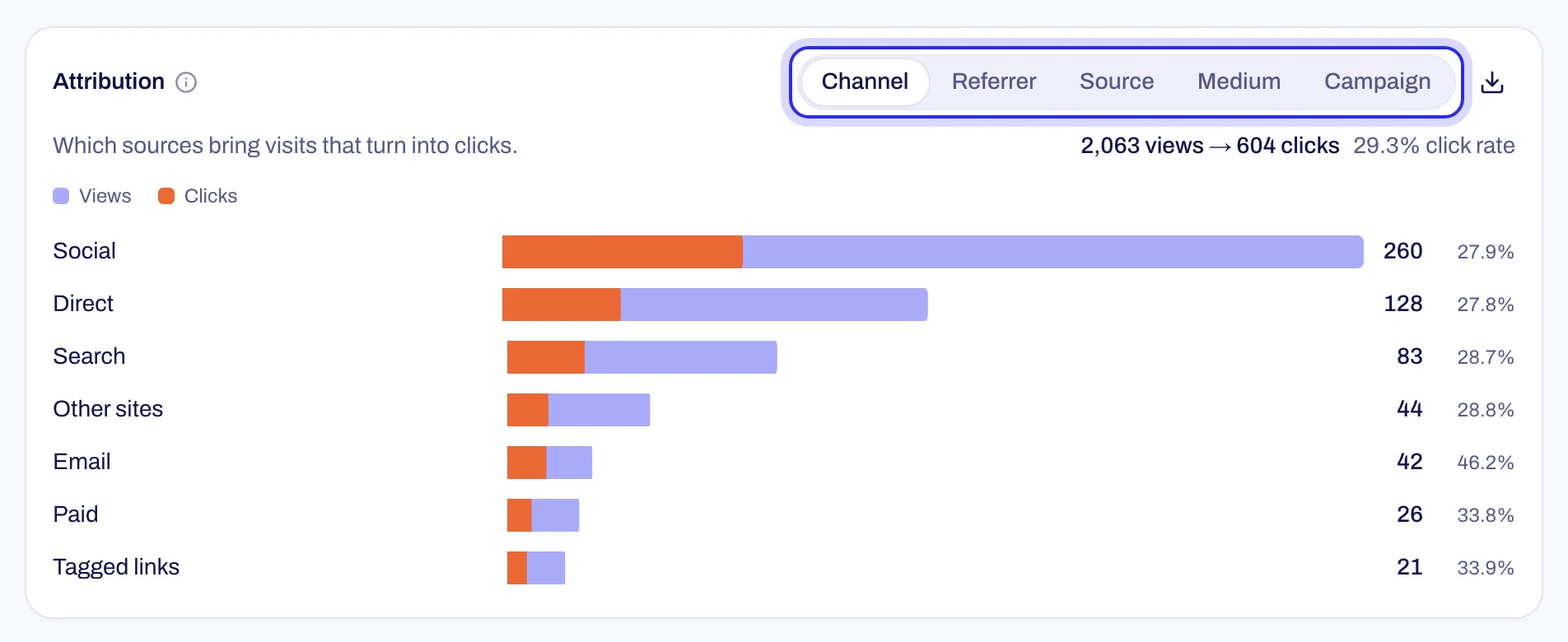
Each row is one source. The faint bar is its views and the solid bar inside it is the clicks those visits led to, followed by the number of clicks and the click rate. Rows are ranked by clicks, and the line at the top gives the whole period, such as "1,200 views → 300 clicks".
A source with many views and few clicks often sends people who don't find what they came for. Check that the link you shared there leads to the right tab or link.
A click is credited to the source of the visit it happened in. If a visitor switches to another tab of your page, that tab opens without the original source, so clicks there count as having none: Direct among channels, None among tags. When you promote one tab, share a link straight to that tab with its own tags, so visitors land there with their source.
Cities
The Countries card gets a City tab, with cities named like "Los Angeles, United States". You can also select a country to see Cities in that country, and All countries to go back.
Visitors whose browsers ask not to be tracked are counted in their country, never in a city.
Click heatmap
The heatmap shows your page as it's published, with each block shaded by its share of the page's clicks in the period. Darker is more.
- In Page, choose one page. The Click heatmap card appears below the chart.
- If the page has several tabs, choose one with Tab.
- Point to a block, or to its row in the list beside it, to highlight both and see its clicks and share.
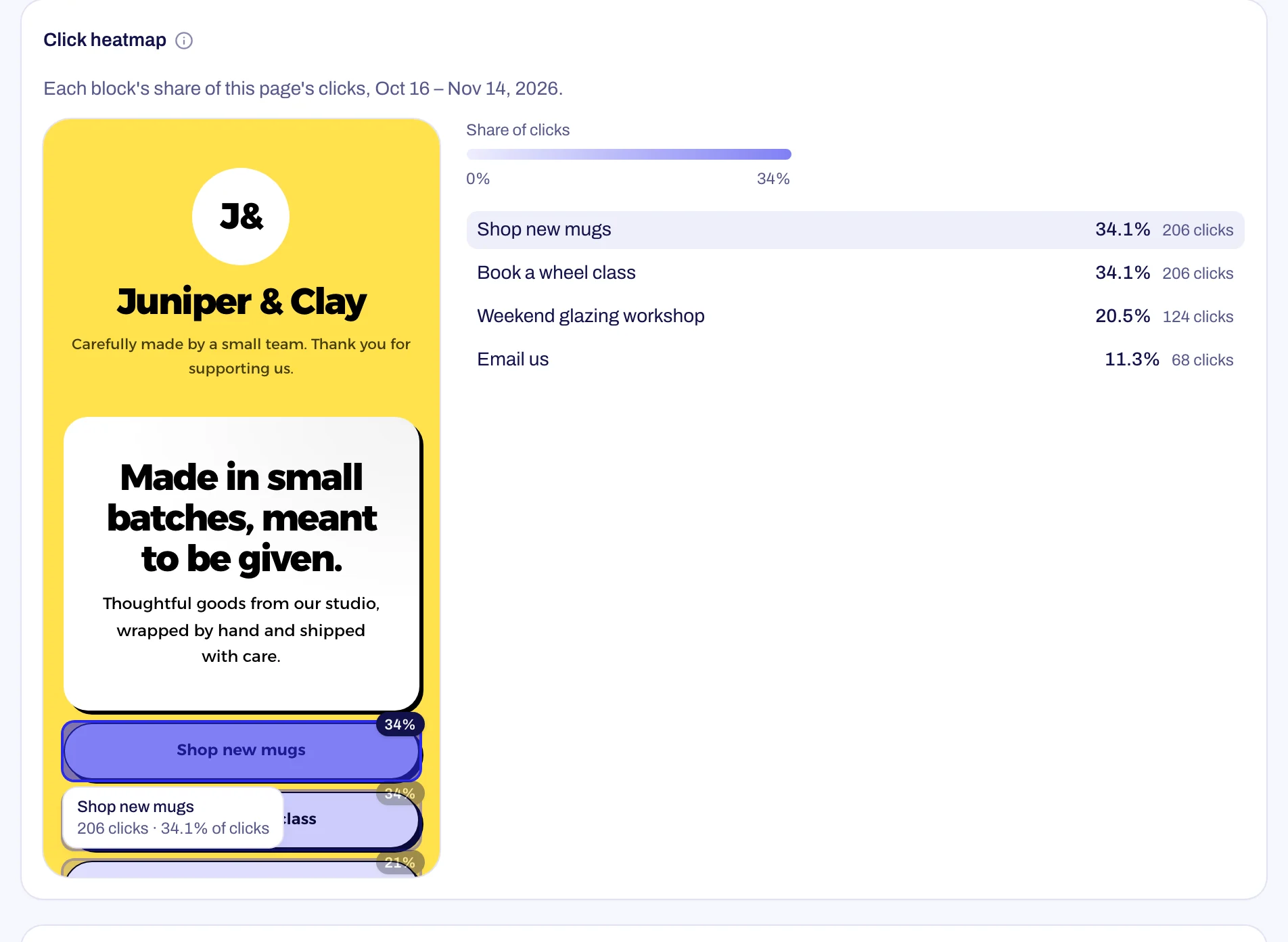
Under the list, a note can give the share of clicks on things the heatmap can't show: header icons, other tabs, or blocks that were removed. A page that isn't published shows "Publish this page to see where visitors click."
The heatmap draws the page as it's published now. If you moved a block during the period, its clicks show where it sits today.
Without advanced analytics
On a plan without them, the dashboard shows an Advanced analytics panel where attribution would be, with Upgrade to Pro for the workspace's owner. Other members are asked to talk to the owner, because the workspace uses the owner's plan. There's no Channels card, no City tab and no heatmap. Live visitors and the Campaigns card stay on every plan.
Linkbase records the same details on every plan, so after an upgrade, channels, cities and the heatmap cover earlier visits too, as far back as your new plan's history goes.
To take these numbers elsewhere, see Export analytics and schedule reports.