Track scans and change where a QR code points
See how many people scan each QR code, from where and when, and send a printed code somewhere new without reprinting it.
Every Linkbase QR code holds a short Linkbase address rather than your destination, so each scan is counted, and you can send a printed code somewhere new without reprinting it. A page's code can open the page or one of its tabs on every plan, or any web address on Pro and Team. A short link's code follows its short link.
See how many scans a code has
The quickest count is in the code's own dialog:
- Open the QR code dialog: from the editor's top bar for a page's code, or from a short link's menu in Links.
- Look under Address in the code. The count shows there, such as 37 scans.
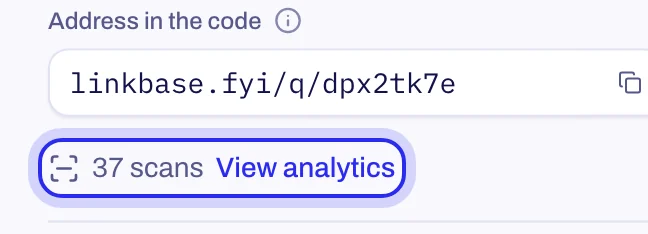
- Select View analytics for the full report.
To compare codes, go to Links in the sidebar and open the Analytics tab. Use the picker at the top to choose one short link or QR code, or All links and QR codes for everything together, with Top links and codes ranked by visits.
A code's report shows:
- Scans and Unique visitors over the period you choose.
- Countries, and cities on plans with advanced analytics.
- Devices, with browsers and systems.
- Languages of your visitors' browsers.
- Busiest hours, by day of the week and hour on the workspace's clock.
QR codes have no Referrers card: a scan doesn't come from another website. Reports reach back as far as your plan's analytics history.
How scans are counted
- A scan counts when the phone opens the code's address. Bots and link checkers aren't counted.
- Unique visitors are counted without cookies, once a day for each code. See How Linkbase counts visits without cookies.
- A short link's Clicks include scans of its QR code, and its report shows QR code scans on their own.
- Scans are counted under Links, not as views or clicks of your page. Your page's analytics count the visit that follows like any other.
New scans show up within seconds.
Change where a printed code leads
What you change depends on what the code belongs to. Either way, the address inside the code stays the same, so every copy you've already printed follows the change from the next scan.
A page's QR code
A page's code opens your page's main address until you choose somewhere else. You can change it as often as you like. The page and its tabs are on every plan, and a web address needs Pro or Team:
- Open your page in the editor and select QR code in the top bar.
- Under Where scans go, choose one:
- Your page: the page's main address. Once you connect a custom domain, scans open the domain; remove it and they open your Linkbase address again.
- A tab: then pick it under Tab. This choice shows when your page has more than one tab.
- Web address: type the address, such as
https://example.com/menu, and select Save.
- Saved. The next scan goes there. confirms the change, and Scans open shows the new address.
Good to know:
- Scans are counted the same way, whatever the destination. The code's count and report include the scans from before the change.
- A tab opens once visitors can see it. If the tab is hidden, deleted or not published yet, scans open your main address, and the dialog says so. Publish the page, or show the tab again.
- A web address follows the short link rules. It must start with
http://orhttps://, can't hold a username and password, and can't lead to a short link or another QR code. - If your plan stops including web addresses, scans open your page instead. The address stays saved, and works again if your plan includes web addresses later.
- The code works while your page is published. If you unpublish the page, or Linkbase takes it down, scans show the "not available" page, even when the code leads to a web address.
To send everyone who opens your page's address somewhere else for a while, not only people who scan, turn on Send visitors straight here on a link instead. See Spotlight a link or send visitors straight to it. While that's on, a code set to Your page goes to that link too, because it opens your main address. A code set to a tab or a web address doesn't.
A short link's QR code
A short link's code opens wherever the short link leads, and you can change that at any time:
- Select Links in the sidebar.
- Open the menu (⋯) beside the short link and choose Edit.
- In Edit short link, change the Destination.
- Select Save.
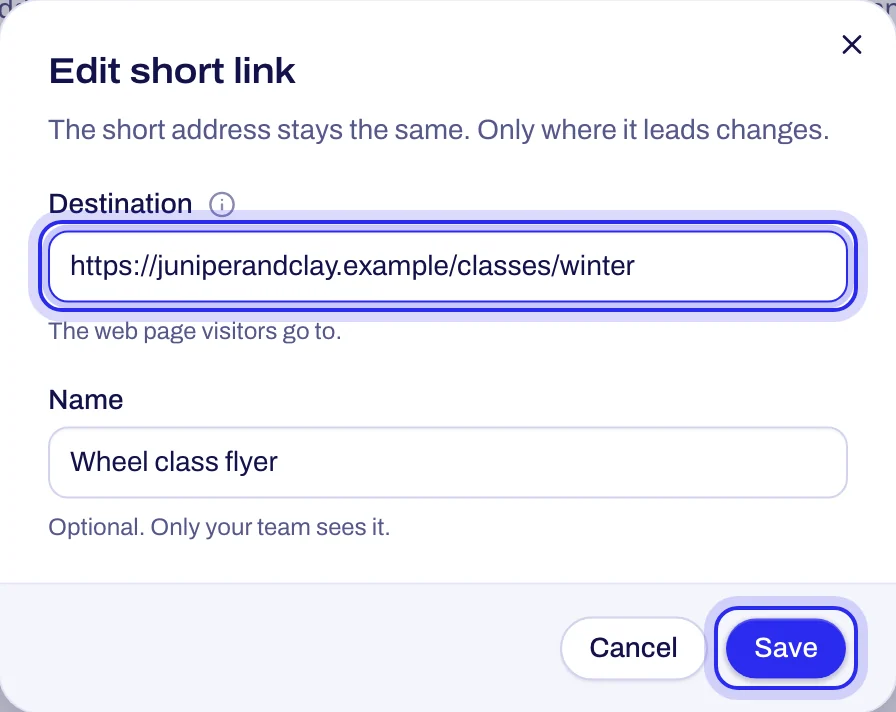
You'll see Changes saved, and the next scan of every copy you've printed goes to the new destination. The address inside the code doesn't change.
Want a separate code for each poster, flyer or shop window, to see which one people scan? A page has one QR code, so create a short link for each placement and print that link's code: open the short link's menu and choose QR code. Each one counts its own scans. Short links are on the Pro and Team plans.
Stop a code from working
- A short link's code: choose Pause in the link's menu. Scans show a "not available" page until you choose Resume.
- A page's code: there's no switch for the code itself. If you unpublish the page, scans show the "not available" page until you publish again.
Troubleshooting
Scans open "This link isn't available." The page isn't published, the short link is paused or deleted, or the account no longer has a plan. Publish the page, resume the link, or choose a plan, and the code works again.
The dialog warns "This page isn't published" or "This link is paused." The code is fine, but scans show the "not available" page until you publish the page or resume the link.
Scans open my main address, not the tab I chose. The tab is hidden, deleted or not on your published page yet. Publish your page, or show the tab again, and scans go to the tab.
I see "A QR code can only lead to a web page (http or https)." Email addresses, phone numbers and app links can't be a code's destination. Use a web page instead, such as your page with a contact button.
The count is lower than I expected. Someone who scans but doesn't open the address isn't counted, and repeat scans from one phone on the same day add scans but not unique visitors.
I can't find a code in Links → Analytics. A code appears once it exists. Codes are made the first time someone opens a page's or link's QR code dialog. Members limited to some pages see only those pages' codes.