Hand a workspace over to a client
Offer a workspace to one of its members, see what changes when they accept, and how long the offer stays open.
When a client takes their page in-house, you can hand their workspace over. They become its owner, with every page, member and setting, and it moves to their plan. Nothing changes until they accept.
Before you start
- Only the workspace's owner can hand it over.
- The new owner must already be a member of the workspace. If they aren't, invite them first, for example as a client admin, and wait until they've joined.
- Keep anything you need. Once they accept, you and your agency team lose access. To keep a copy, download the workspace's data before you send the offer.
When a client asks for their workspace
A client admin can request ownership from the sidebar. You get an email, and the request appears at the top of the workspace's Members page, with their note if they left one. Select Hand over to send them the offer below, or Decline, with a note if you like. The request lapses after 14 days without an answer. See Client admins.
Send the offer
- Open the workspace, then Settings → Members.
- In the Members list, select Hand over beside the person.
- Read the summary in the dialog. When the referral program is running, it also says what you'd earn.
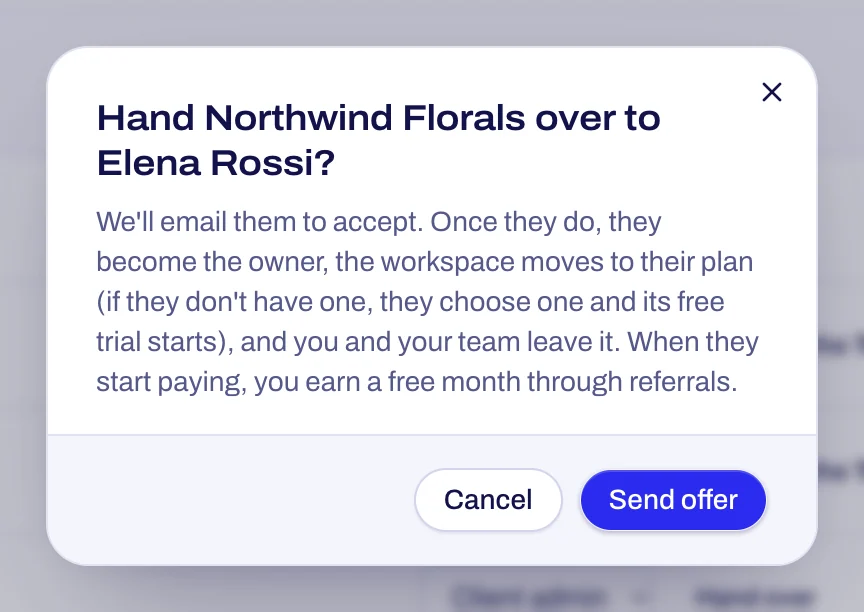
- Select Send offer.
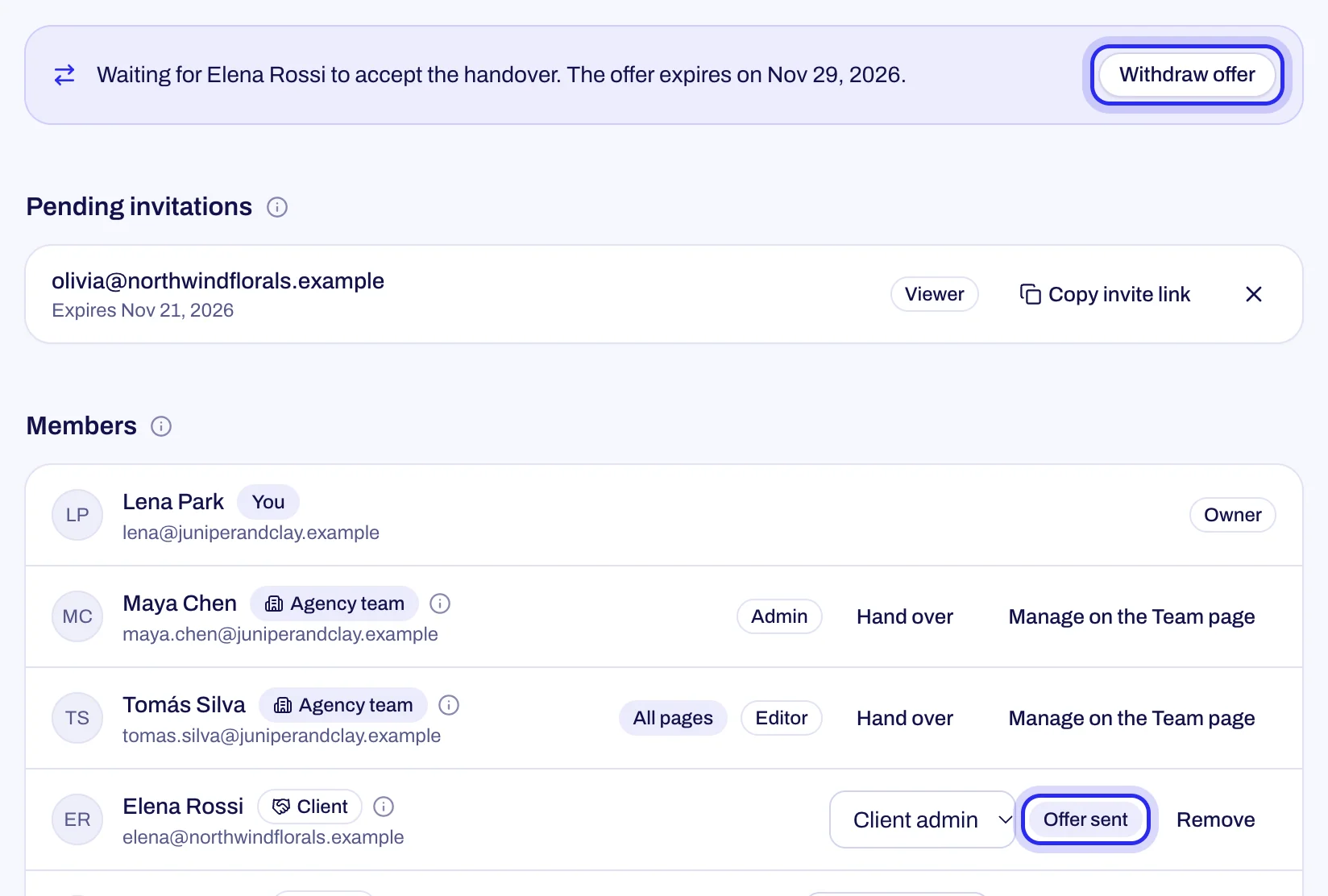
A message confirms the offer: nothing changes until they accept. A banner on Members shows who you're waiting for and the date the offer expires, and their row shows Offer sent.
What the new owner sees
- An email from you, offering them the workspace, with a Review the offer button.
- A notification in their bell.
- A notice at the top of the workspace, with Review offer.
The offer page explains what taking the workspace means for their plan, and offers Accept and become the owner or Decline. If they don't have a plan yet, they choose one on that page first. Once they accept, the workspace opens for them as its owner.
What happens to the plan
It depends on the new owner's account:
| Their account | When they accept |
|---|---|
| Has a plan | The workspace moves to it and counts toward its limits. There's nothing to choose. |
| Has no plan yet | They choose a plan, and that plan's free trial starts. No card is needed, and the workspace's links stay online. |
| Already used the chosen plan's trial | They subscribe to that plan first, then come back to accept. Until then, you keep paying for the workspace. |
Nothing is chosen for them, and they can't accept until they pick. The offer page lists every plan with its free trial and what it includes, and marks the plan the workspace is on today, since its pages may rely on it.
If they've used the free trial of every plan, each plan on the list leads to checkout, and the offer stays open while they subscribe.
If the plan they choose is smaller than what the workspace uses, for example fewer pages or seats, the page says so before they accept. They can still accept: what's there stays, but they can't add more until they're within the plan's limits, and custom domains beyond the plan stop working after a grace period.
Compare plans on the pricing page, and see How plans and the free trial work.
What happens when they accept
- They become the owner, and the workspace uses their plan instead of yours.
- You leave the workspace, and so does everyone who reached it through your agency team.
- The client's own people stay, with their roles.
- The pages, audience, analytics, domains and settings stay with the workspace.
- You get an email saying they accepted, and a notification.
You and your agency team lose access the moment the offer is accepted, and you can't take it back. If the client wants your help later, they can invite you again.
Withdraw the offer, or let it lapse
- To withdraw it, select Withdraw offer on the banner on Members.
- An offer stays open for 14 days. It also ends if the person leaves or is removed from the workspace.
- A workspace has one open offer at a time. Sending a new one replaces it.
- If they select Decline, nothing changes.
Earn free months
While the referral program is running, the confirmation dialog says what you'd earn. When the new owner makes their first payment, you earn free months, added after a hold period, as with a friend you refer. Follow it under Referrals → Workspaces you handed over.
A handover doesn't earn a reward when the new owner has paid for Linkbase before, was referred before, or is on your agency team.
Troubleshooting
"This handover offer isn't open anymore." It was accepted, declined or withdrawn, or it expired. Ask the owner to offer it again.
"This plan has no free trial left for your account." Pick another plan on the offer page if its trial is still open to you, or subscribe to this one, then open the offer again and accept.
Hand over isn't beside someone. Only the owner sees it, and not beside their own name. If the person shows Offer sent, the offer is already waiting for them.
I picked the wrong person. Select Withdraw offer before they accept, then select Hand over beside the right person.