Privacy-first marketing: grow without tracking everyone
Measure what works without cookies, add pixels only with real consent, build a list people chose to join, and tell visitors plainly what happens to their data.
7 فصول20 دقيقة قراءة
The owner of a bike repair workshop in Utrecht wants to know one thing: do the flyers on the university notice boards bring anyone in? The usual answer is a tracking pixel, a cookie box and an ad account that ends up knowing more about each visitor than the owner ever wanted to. A narrower answer works better. Give the flyer a QR code that counts its own scans, and add "Where did you hear about us?" to the booking form.
That's privacy-first marketing in miniature: start from the question you need answered, and collect the least that answers it. You still learn which posts, places and partners send people, you still build a list, and you can still run ads. What changes is that every piece of data has a reason, a person who agreed to it where agreement is needed, and a way out.
This guide covers the whole practice: what it means day to day, how to measure without cookies, when pixels earn their place and how to ask for consent, how to run forms and signups, what to tell visitors, how the rules differ around the world, and a checklist for your own page. It isn't legal advice, and where the law matters, it says what to check.
What you'll learn
- Decide what you need to know, and measure it without following anyone
- Credit visits, signups and sales to channels with tags, codes and questions you control
- Judge when tracking pixels are worth it, and ask for consent properly
- Run forms and email signups on consent people can see and take back
- Write the short notes and the privacy notice your visitors should read
- Understand the main rules in Europe, the Americas, Asia-Pacific and Africa in plain words
What privacy-first means in practice
Privacy-first is a working habit, not a label in your footer. It comes down to five rules you can run any decision through, from adding a form field to booking an ad.
Five rules for every decision
- Measure the page, not the person. You need to know which links work and which channels send visitors. You rarely need to recognize anyone.
- Have a question before you collect an answer. Every field, pixel and tag should exist because of a decision it informs.
- Ask where consent is needed, and make no as easy as yes.
- Keep your promises small and true. "One email a month" is a promise you can keep. "We never share your data" may not be, once an email tool and an ad pixel are involved.
- Make leaving easy. Unsubscribing, declining and asking for deletion should each take one step.
What you give up, honestly
Privacy-first marketing has costs, and pretending otherwise leads to bad decisions:
- No retargeting from your page by default. Ad platforms build audiences of past visitors with their own pixels, so without one they can't show your ads to people who visited.
- Less to go on for ad algorithms. Platforms that optimize a campaign for visits or sales learn from their own pixels.
- No profile of any one visitor. You'll see that a podcast mention sent visitors who clicked your booking link, never who they were.
If you don't run paid ads, the first two cost you nothing. If you do, the chapter on pixels shows how to bring them in on consent.
Start with an inventory
Say you run a ceramics studio in Guadalajara with a class signup, a contact form, a booking block for wheel sessions and a Meta Pixel a friend added last year. Before you change anything, list every place your page collects data or passes it on:
| On the page | What it collects | Where it goes | Still needed? |
|---|---|---|---|
| Built-in analytics | Views, clicks, sources, country, device, language | Your dashboard, with no cookies | Yes |
| Email signup | An email address, perhaps a name | Your audience list, then your email tool | Yes |
| Contact form | Whatever its fields ask | Your audience list, alert emails, any webhook | Check each field |
| Booking (Pro and Team) | Name, email and your questions | Your bookings and the confirmation emails | Yes |
| Meta Pixel (Pro and Team) | Page views from visitors who accept | Meta | Only while you run Meta ads |
| Embedded players | Whatever each service collects | That service | Check each one |
The last column is where the work starts. The pixel stays only if someone runs ads that use it, and the contact form loses the phone field nobody has ever called. What Linkbase itself records is set out in How Linkbase protects your visitors' privacy. The rest of the inventory is yours.
Measuring without cookies: what you can know, and how
The questions most marketing decisions rest on are about channels and links, not people. Every one of them can be answered without a cookie.
What the built-in analytics count
Linkbase's analytics use no cookies and store no IP addresses. Each view or click records the page, tab and link, the referring site's domain, any campaign tags, the visitor's country, region and city, their device, browser and system, and their language. To count unique visitors, each visit becomes an anonymous code made with a secret that changes every day and is then deleted, so nobody can link a visitor to the next day or follow them to another page. Browsers that send Global Privacy Control or Do Not Track are still counted, with no code at all and only their country. How Linkbase counts visits without cookies has the detail.
Plan around two consequences. Unique visitors are counted per day, so a weekly figure adds up days rather than people. And someone who moves from an app's built-in browser to their phone's own browser counts twice. Compare periods with each other rather than reading any figure as a headcount.
Credit each channel with things you control
When an app hides where a visit came from, you can still tell channels apart with tools that live in your links and forms rather than on visitors' devices:
| You want to know | Use | Where you read it |
|---|---|---|
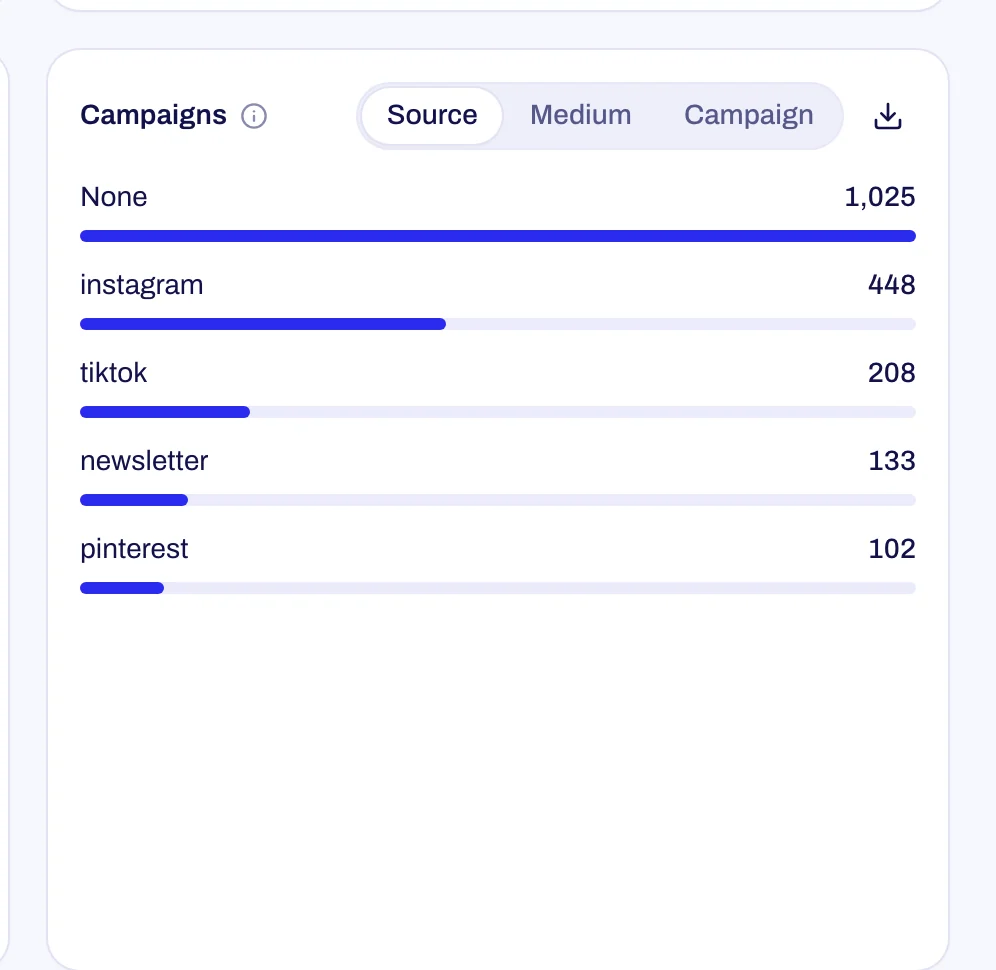
| Which post, bio or email sent visits | UTM tags on each link, such as ?utm_source=newsletter | The Campaigns card, on every plan |
| Which link people tap | Nothing extra: every link counts its clicks | Analytics, on every plan |
| Which flyer or poster works | A short link with its own QR code for each piece | Links → Analytics (Pro and Team) |
| Which channel brings inquiries | A hidden form field that reads utm_source or ref from the address | Each reply in Audience |
| Which partner brings sales | A coupon code for each partner | Your shop's or payment provider's reports |
| What people remember | A "Where did you hear about us?" dropdown | Form replies |
On the Pro and Team plans, Attribution and Channels set sources, mediums and campaigns side by side with their click rates. The tagging conventions are in Track campaigns with UTM tags.
A worked example: one class, three channels
Say you run a yoga studio in Cape Town and promote a new evening class in three places: an Instagram story, a neighborhood newsletter and posters in two cafés. Tag the story link ?utm_source=instagram&utm_campaign=evening-class and the newsletter link ?utm_source=newsletter&utm_campaign=evening-class. Give each café its own short link, pointing at your classes tab tagged utm_source=poster-observatory or utm_source=poster-woodstock, and print that link's QR code. Finally, add a hidden field to the trial-class form that reads utm_source.
Two weeks later, Campaigns shows visits from each source, each short link shows its scans, and each trial-class request arrives with the source that brought it. You know which café earns a second poster, and you've learned nothing about anyone that they didn't tell you.
Tags travel only with the first page a visitor opens. Point each tagged link at the tab that holds your
form, such as …/yourname/classes?utm_source=newsletter, so the hidden field can read the tag.
What this can't tell you
It can't tell you that the person who read the newsletter on Monday booked on Thursday after seeing a poster. Accept the blur. Weekly decisions don't need it: which link to move up, which channel gets more effort, which poster to reprint. A five-minute Monday routine shows how to read the numbers each week.
When you need pixels, and how to ask properly
A tracking pixel is a piece of another company's code that runs on your page and reports visits back to that company. Sometimes that's worth it. Often it isn't.
Three reasons a pixel earns its place
- You run ads on Meta or Google and want the platform to measure or optimize for visits from them.
- You retarget, showing ads to people who visited your page.
- Your website already reports through GA4 or Tag Manager, and you want your page in the same reports.
If none applies, skip pixels. Each one sends visitor data to another company, adds a consent box to your page and produces numbers you won't use.
What happens when you add one
On the Pro and Team plans, the editor's Tracking pixels section takes a Meta Pixel ID, a Google Analytics 4 measurement ID or a Google Tag Manager container ID. From then on:
- Visitors see a Cookies and tracking box naming your services, with Decline and Accept. Nothing loads until they accept.
- The page works the same either way. Every link, form and button is there for visitors who decline.
- The answer lasts for that page for up to six months. Add or change a pixel, and everyone is asked again.
- Privacy choices, at the foot of the page, lets visitors change their mind at any time.
- Browsers that send Global Privacy Control or Do Not Track are never asked and never load a pixel.
- Meta Pixel and Google Analytics record a page view, and Tag Manager loads your container. Link clicks stay in your Linkbase analytics.
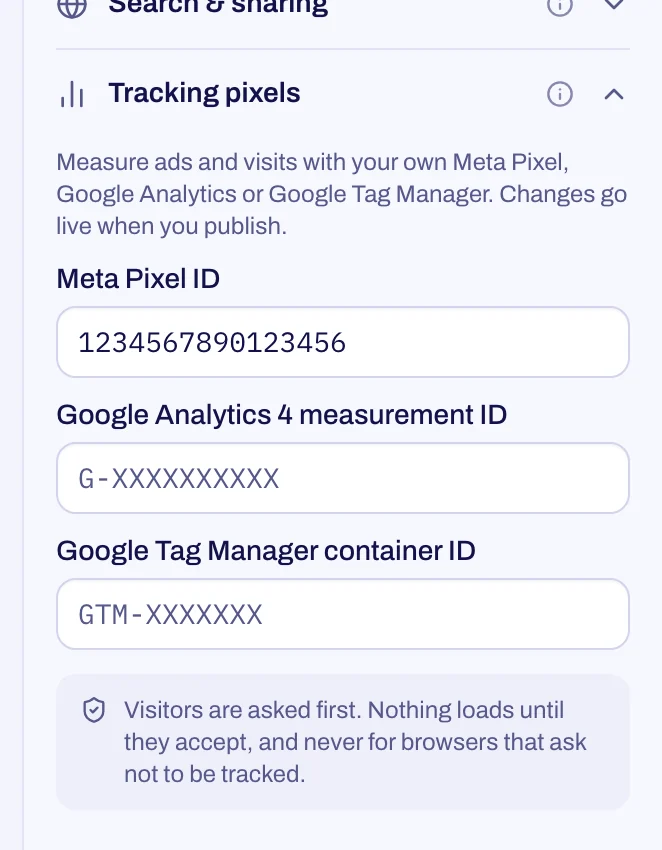
The steps are in Add Meta Pixel, Google Analytics or Tag Manager, and Set up Meta Pixel, GA4 and Tag Manager covers testing before you spend anything on ads.
Asking properly is your part
Linkbase draws the box. The honesty around it is yours:
- Name only what you use. Remove the pixel from a campaign that ended. A shorter list is an easier yes, and a truthful one.
- Don't trade content for consent. Linkbase keeps every link working for visitors who decline, so don't undo that in your own words with lines like "Accept cookies for a discount".
- Expect smaller numbers in the ad platform. Pixels count only visitors who accept, while your Linkbase analytics count everyone without cookies. Judge a campaign by both, and by sales.
Everything inside a Google Tag Manager container loads the moment a visitor accepts, including tags someone added years ago. Open the container, remove what you don't recognize, and name every remaining service in your privacy notice.
A worked example: ads twice a year
Say you resell Korean skincare from Manila and run Meta ads around two big sale dates a year. You add Meta Pixel before the first campaign and check it on the live page: accept the box, then look for the visit in Meta's own reports, since preview links never load pixels. Every ad link also carries utm_medium=paid, so on Pro and Team those visits land in the Paid channel of your Linkbase analytics, where visitors who declined are counted too.
You judge each campaign by three numbers: Meta's own results, the Paid channel's click rate on your page, and the sales in your shop. When the second sale ends and no campaign is planned, you clear the pixel field and publish, and the box disappears from your page until the next one.
Forms, signups and consent that holds up
Everything a visitor types into your page is data you've asked for directly. That makes it the most valuable thing your page collects, and the easiest to mishandle.
Ask for less than you think you need
The form block offers 12 field types and holds up to 30 fields. Neither is a target. A newsletter needs an email address, and a name only if you'll use it. A contact form needs a way to reply and the question. Every extra field is one more thing to protect, export, delete on request and mention in your notice. Each type is described in Build a form.
Leave sensitive details out: health conditions, ID numbers, card numbers. Forms have no file upload, which is a sensible default. If you must see a document, ask for a link and say how you'll handle it.
Make the consent box a real choice
The Consent field is one box a visitor ticks beside your Text to agree to. It starts out required, which suits the rare form where agreeing is the point, such as a competition's rules. For marketing, turn Required off. Otherwise nobody can send you a question without joining your list, and consent given because there was no other way through isn't freely given under many privacy laws.
Write the text as a specific promise, not a legal phrase: "Email me the studio's class schedule once a month. I can unsubscribe anytime." rather than "I agree to receive marketing communications."
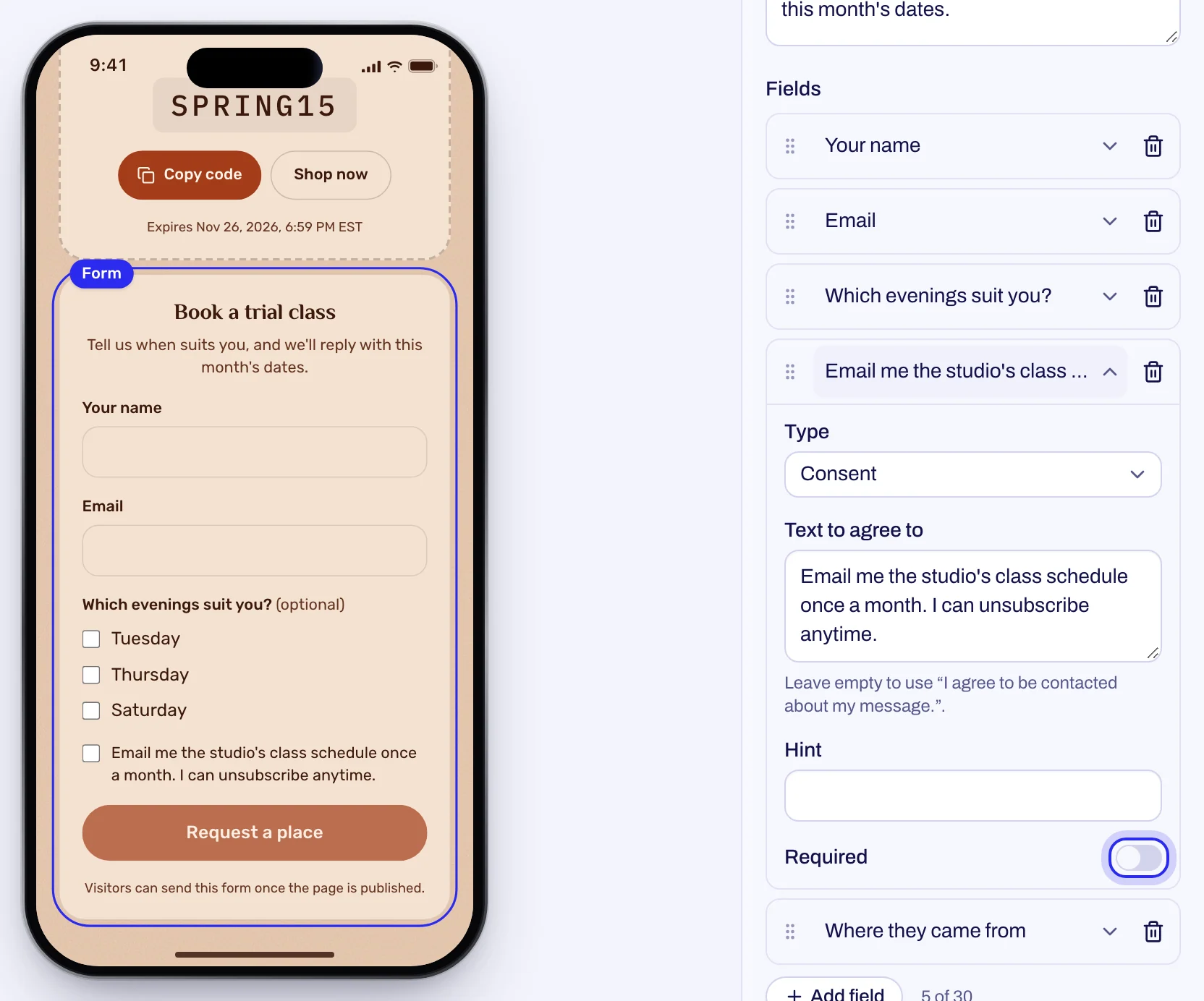
A form reply never joins your subscribers by itself. Replies that ticked the box reach your email tool only if you export them or send them on with a webhook, so decide which before you collect the first one.
Double opt-in: proof the address asked
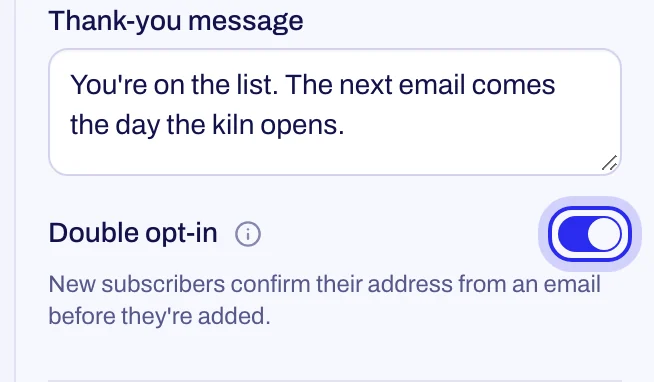
Turn on Double opt-in in each email signup block, and new subscribers get a confirmation email and stay Pending until they select Confirm subscription. Typos and fake addresses never reach your list, and each confirmation shows the person really asked. A connected webhook receives subscriber.confirmed only when that happens, so unconfirmed addresses never reach your email tool. It's off by default and set per block. See Confirm signups with double opt-in.
Email gates are signups, so say so
On the Pro and Team plans, a link, folder or tab can ask for an email address before it opens. Visitors who leave one join your subscribers as Subscribed straight away, with no confirmation email, whatever your signup blocks do. The gate tells them your page will get their address, but not what you'll send. Say that in the link's title or a line of text just above it: "Free trail map. Leave your email and you'll also get our trip notes, twice a month."
A worked example: orders and news, kept apart
Say you run a bakery in Wellington that takes Saturday pre-orders. The order form asks for a name, an email address, the order and a pickup time, and says the details are used for that order only. Below it, a separate email signup with double opt-in offers "the seasonal menu, four emails a year". Customers who only order are never emailed beyond their order, and everyone on the list chose to be there, which you can show.
Look after what arrives
- Signups and replies live in Audience, where you can search them, export them as CSV, and unsubscribe or delete each person. See View, search and export your audience.
- Unsubscribe keeps a record that someone left, and Delete removes them for good. Unsubscribing sends
subscriber.unsubscribedto a webhook and deleting sends nothing, so unsubscribe first when your email tool needs to know. - Every webhook destination is another place the data lives. Webhooks for form submissions explains how to send each tool only what it needs.
- Keep exported files somewhere safe, and delete old ones. Deleting a page deletes its subscribers and replies, so export first if you need them. Own your audience sets out a backup routine.
What to tell your visitors, and where
People should learn what happens to their data at the moment they hand it over, and be able to find the full story later. That takes short notes beside each block that collects, and one privacy notice.
Short notes where you collect
Say you run a bookbinding studio in Hamburg. One or two sentences under each block do the job:
- Under the email signup: "New workshop dates, about once a month, sent through our email provider. Every email has an unsubscribe link."
- Above the contact form: "We use your details only to answer this message."
- Beside the booking block: "Your name and email are used to confirm your workshop and to reach you if it changes."
- Above an email gate: what people will receive besides the download, and how often.
Write each note in the language of the tab it sits on. A German tab with an English privacy note tells a German reader the note wasn't written for them.
A privacy notice that fits on one screen
For a one-page business, a clear notice covers:
- Who you are, and how to reach you about privacy.
- What you collect, block by block, using your inventory from the first chapter.
- Why, and on what basis where the law asks for one, such as consent for marketing emails.
- Who else receives it: your email tool, each webhook destination, any pixels, embedded players, and the payment providers your buttons open.
- How long you keep it.
- What people can ask for, such as a copy or deletion, how to ask, and where they can complain, where a regulator handles that.
- The date you last changed it.
For the analytics part, a sentence like this is accurate: "Linkbase, which runs this page, counts visits without cookies and without storing IP addresses." If you have a Language button, add that a cookie remembers a visitor's pick for a year. If you lock links, add that a cookie keeps an opened link open for an hour. Name the service behind each embed block, because those players load as soon as the page does, while video and music blocks wait until someone presses play. An Instagram feed block (Pro and Team) shows images loaded from Instagram's servers, so name Instagram too.
Where to put the notice
- A Privacy tab on your page. Text blocks on a tab of their own, at an address like
yourname/privacythat you can link from your notes and your email footer. You need no website, and it's the easiest version to keep current. - A page on your website, linked from a link block near the foot of your page.
- A PDF in a file download block. It works, but PDFs go stale quietly and read poorly on phones.
Linkbase's own handling of data is in its Privacy Policy and Cookie Policy, which your notice can link to for the part Linkbase runs.
Answer requests without panic
When someone asks to see or delete their data, check that the request comes from the address you hold, search Audience for it, look through your form replies, then export, correct or delete what you find, and do the same in every tool it was sent to. Put each subscriber's own link in your emails (Copy subscription link, or the manage_url column in an export), so people can always leave without asking. California privacy law in plain English has a step-by-step routine that works anywhere, and Download your data covers the full export.
Regional rules in plain words
This isn't legal advice. It's a map to help you ask the right questions. Laws change, often depend on your size and sector, and can reach you from abroad when you serve people in another region. Check your regulator's current guidance, or ask a qualified professional.
What nearly every law asks
Across regions, the same expectations recur. Say who you are and what you collect. Use data only for what you said. Have a lawful reason, often consent, for marketing. Keep data safe, and no longer than you need it. Let people see, correct and delete it. Take extra care with sensitive data and children's data. A page built on the earlier chapters already meets the spirit of most of them, and the sections below are where regions part ways.
Europe: the EU, the EEA and the UK
The GDPR covers personal data across the EU and the wider European Economic Area, and can apply to businesses elsewhere that offer goods or services to people there. Separate ePrivacy rules, set in each country's law, require consent before storing or reading anything on a visitor's device unless it's strictly necessary. They also generally require consent for marketing emails to individuals, with an exception for similar products sold to existing customers. The UK has its own versions: the UK GDPR, the Data Protection Act 2018 and PECR. The Data (Use and Access) Act 2025 relaxes consent for some low-risk cookies and is coming into force in stages, so read the ICO's current guidance. Privacy-friendly analytics for UK and EU audiences goes deeper.
The United States
There's no general federal privacy law. A growing number of states, California first among them, have consumer privacy laws for businesses above size or data thresholds, with rights to see and delete data and to opt out of targeted advertising, and several expect covered businesses to honor Global Privacy Control. California's older online privacy law expects a privacy policy from almost any commercial site that collects personal information from its residents. Marketing email falls under CAN-SPAM, which doesn't require consent first but does require honest headers and subject lines, a working unsubscribe that you honor and a postal address in each email.
Canada and Latin America
Canada's anti-spam law, CASL, is stricter than CAN-SPAM. You need consent, express or implied, before you send commercial email, and every message must identify you and offer an unsubscribe. PIPEDA covers personal data in the private sector, and Quebec has stricter rules of its own. In Brazil, the LGPD works much like the GDPR, with its own regulator, the ANPD, which has published guidance on cookies. Mexico, Argentina and Colombia have their own data protection laws too.
Asia-Pacific
India's Digital Personal Data Protection Act 2023 is built around notice and consent, with rules that bring its duties in over time, so check what applies today. Japan's APPI governs personal data, and a separate law requires prior consent for advertising email. South Korea is known for strict, specific consent requirements. Singapore's PDPA covers personal data and runs a Do Not Call registry for phone and text marketing. Australia's Privacy Act exempts many small businesses, though not all, while its Spam Act requires consent for commercial email and texts, with your identity and an unsubscribe in each message.
Africa
South Africa's POPIA limits electronic direct marketing to people who consented, with an exception for existing customers. Kenya's Data Protection Act 2019 and Nigeria's Data Protection Act 2023 set duties much like the GDPR's, each with its own regulator.
If you serve several regions
A practical approach for a small business is to build to the stricter European habits everywhere: consent before marketing email, consent before trackers, and as little data as possible. Those cover the spirit of most other regimes. Then add each region's specific items, such as a postal address in emails to the US or an Impressum for German-speaking audiences, which Impressum, privacy and bookings explains.
A privacy checklist for your page
Run this when you build the page, and again whenever you add a block that collects something. Each item takes minutes, and together they cover what the earlier chapters argue for.
Before you publish
- List every block that collects data, and where each one sends it.
- Remove fields, pixels and embeds you can't name a use for.
- Turn on Double opt-in in every email signup block.
- Make every marketing Consent box optional, with a specific promise as its text.
- Put a short note beside every signup, form, booking and email gate, in that tab's language.
- Publish a privacy notice and link it from the foot of your page.
- Tag every link you share with UTM parameters, so you need nothing heavier to compare channels.
If you use pixels
- Publish, open the live page, accept, and find the visit in the service's own report.
- Open your Tag Manager container and remove what you don't recognize.
- Name every service in your notice.
- Clear pixel fields when campaigns end, and publish.
Every month
- Read your Campaigns card against your sales.
- Delete form replies you've finished with, and anyone who asked to be deleted.
- Delete old exports from your computer and shared drives.
Protect the account that holds it
The data you collect is only as safe as the sign-in in front of it.
- Ask everyone who can open Audience to sign in with a passkey or turn on two-factor sign-in. See Lock down your account.
- Check who can see and export your audience. Owners, admins, client admins and editors can; viewers can't. Give people who only read analytics the viewer role. Roles and what each can do has the full table.
- Remove people from the workspace the day they stop working on it.
- Turn off Email me about new submissions on forms whose alerts you don't read, since each alert copies a reply into an inbox.
Once a year
- Re-read your privacy notice against your inventory, and update its date.
- Check every embed, webhook and pixel still has a job.
- Decide how long replies and old subscribers stay, and delete what has passed that point.
- Download a full copy of your workspace, so you know exactly what you hold. Download your data shows how.
When someone asks about their data
- Reply to the address you hold, not a new one.
- Search Audience and your form replies.
- Export, correct or delete, then do the same in every connected tool.
- Write down what you did and when.
Frequently asked questions
Can I grow without tracking pixels?
Yes, unless you run ads that rely on them. Tagged links, short links with QR codes, hidden form fields, a coupon code per partner and a "Where did you hear about us?" question show which channels work, and your built-in analytics count visits and clicks without cookies. Pixels matter mainly when an ad platform needs to retarget or optimize.
Do I need a cookie banner on my page?
Not for Linkbase's analytics, which use no cookies, and a page without tracking pixels shows no consent box. Add a pixel on the Pro and Team plans, and the Cookies and tracking box appears on its own. Other things can still matter under your local rules, such as embed block players and the cookie that remembers a visitor's language pick, so mention them in your notice.
Is double opt-in required by law?
Rarely by name. But many laws expect you to be able to show that someone agreed to marketing email, and a confirmed signup is the clearest record you can have. In some countries, Germany among them, it's the usual way to prove that consent.
Are UTM tags and hidden fields tracking?
They're labels in the link a visitor taps, so nothing is stored on their device and nobody is followed from site to site. A tag saved with a form reply does become part of that person's data, though, so mention it in your notice.
What should I do when someone asks me to delete their data?
Confirm the request comes from the address you hold, find them in Audience and in your form replies, and delete both. Then delete them in every tool your webhooks or exports sent them to, such as your email tool or a spreadsheet, and tell them it's done.
