Take appointments online: the guide for service businesses
Take appointments online without losing control of your week: booking types clients understand, rules for your time, deposits, fewer no-shows and rebooking.
7 capítulos21 min de leitura

Online booking hands a key to your week to people you've never met. That's the appeal. A client three time zones away books at midnight without waiting for you to wake up, and nobody trades six messages over whether Thursday at four still works. It's also the risk. Set it up carelessly and the same key lets a stranger book your lunch break, stack three long sessions with no time to clean down between them, or claim a slot two weeks out and never arrive.
This guide is about handing over that key on your terms. It's written for anyone who sells their time by the appointment: a physiotherapist, a tutor, a tattoo artist, a mobile groomer, a consultant, a photographer. It starts with whether online booking suits your service at all, then works through what people can book, the rules that protect your time, the money around a booking, no-shows, clients abroad and the visit after this one.
Each chapter shows how it works on a Linkbase page, where bookings are part of the Pro and Team plans, and links to the help center for the exact clicks. Where a page isn't the right tool, it says so.
What you'll learn
- Decide whether self-booking suits your service, and what to use when it doesn't
- Design booking types whose names, lengths and questions clients understand at a glance
- Set hours, notice, buffers and a daily limit that protect your time and energy
- Choose how to take payment around a booking, and write a policy people accept
- Cut no-shows with calendar invitations, easy rescheduling and a personal reminder
- Serve clients in other time zones without anyone arriving an hour early
- Turn a finished appointment into a review and the next booking
When online booking helps, and when to keep taking requests
Self-booking works when a client can choose a time without needing to talk to you first. That sounds obvious, but it rules out more services than people expect, and forcing the wrong ones into a calendar creates more messages, not fewer.
The services it fits
A service that books well online usually has four things going for it:
- The length is known in advance. A 45-minute lesson, a 30-minute beard trim, a 60-minute massage. If the honest answer to "how long will it take?" is "it depends", the client can't pick a slot that fits.
- You serve one client at a time. One person, one chair, one room.
- The client can decide alone. They know what they want, or a short description tells them.
- The price doesn't need a quote, or you can state it as a starting figure.
Lessons, treatments, consultations, fittings, viewings, discovery calls and repeat visits usually pass all four. So do first sessions that double as an assessment, because the assessment is the fixed-length thing being booked.
Where a request beats a calendar
Some work is better taken as a request and confirmed by hand:
- Jobs that need a quote first. A kitchen refit, a mural, catering for a wedding. A form can ask for the size of the job, the date and a link to photos, and you reply with a price and a time.
- Sessions longer than four hours. A booking type runs from 15 to 240 minutes, so a full-day shoot goes through a form or a message.
- Several staff or rooms at once. Each Linkbase page has one calendar and takes one booking per time slot, across all its booking types.
- Group classes. Ten people can't share one slot. List class dates in an events block whose buttons open your own registration or ticketing page.
- Urgent work. Someone with a burst pipe wants a person, now. Put a call button above everything else.
| Your situation | What to put on your page |
|---|---|
| You work alone, in sessions of known length | A booking block |
| Each job needs a quote | A form, then confirm by message or email |
| Several practitioners working at once | A link button to your scheduling software, or a page per practitioner (pages keep separate times) |
| Classes and workshops | An events block with Tickets or RSVP buttons |
| Same-day or emergency work | Call and message buttons at the top |
What the booking block does, and doesn't
On a Linkbase page, the booking block shows your open times in each visitor's own time zone, takes their name, their email and your questions, and emails you both. The client's email carries a calendar invitation and links to reschedule or cancel. The block doesn't take payment, send reminders before the appointment or read your other calendars. Each of those gaps has a workaround in the chapters ahead, but know them before you commit. If you already run practice software that handles staff rotas, payments and reminders, keep it, and point a button at its booking screen.
Say you're a tattoo artist in Montreal. Flash pieces and small work run under three hours, and you can price them from the design. Custom sleeves need a conversation, a sketch and several long sittings. A sensible split is a booking type for a free 20-minute consultation by video, another for flash work, and a form for custom pieces that asks for placement, size and a link to reference images. The calendar handles the predictable half of your week, and your inbox handles the half that needs judgment.
Designing booking types people understand at a glance
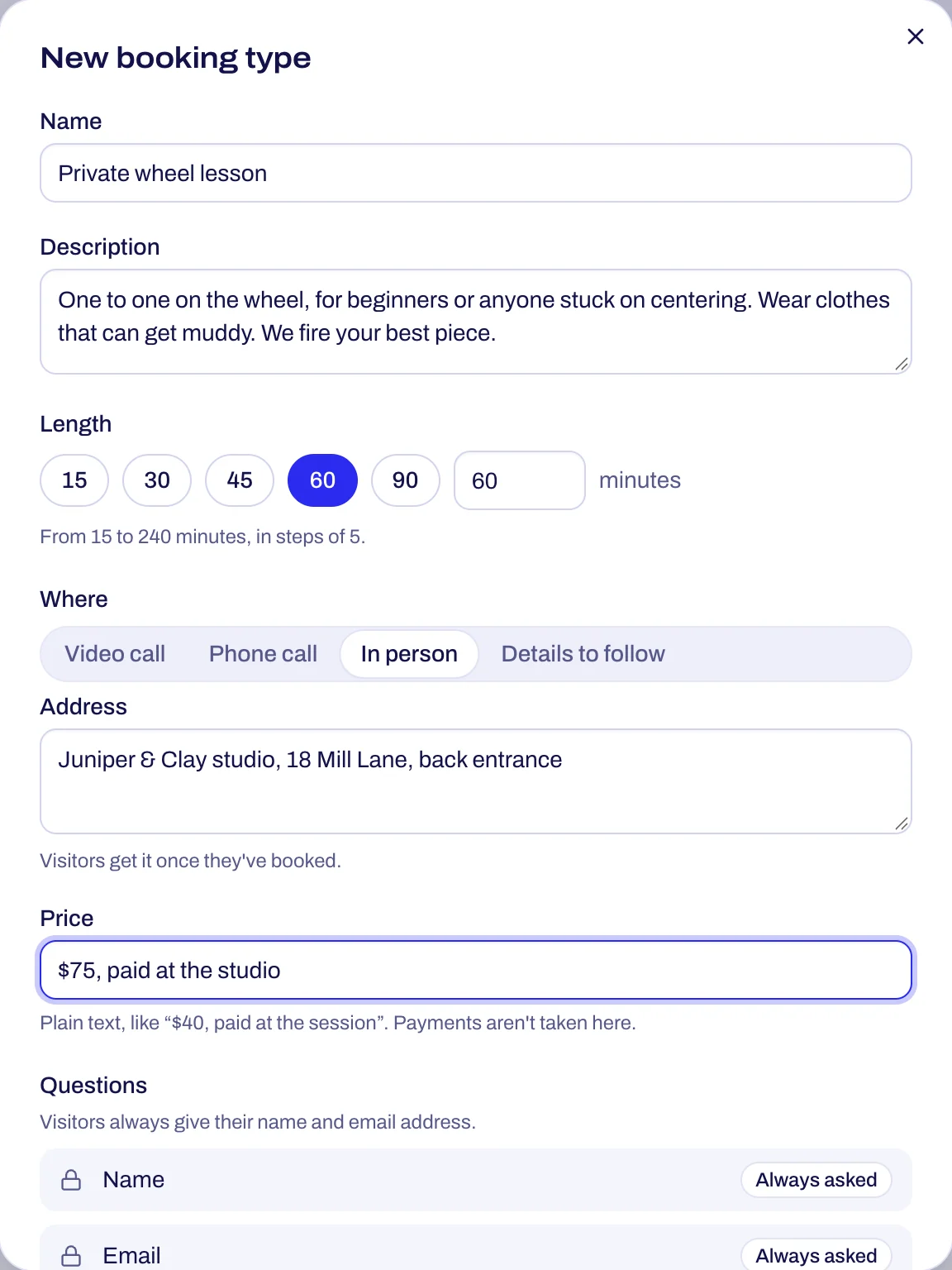
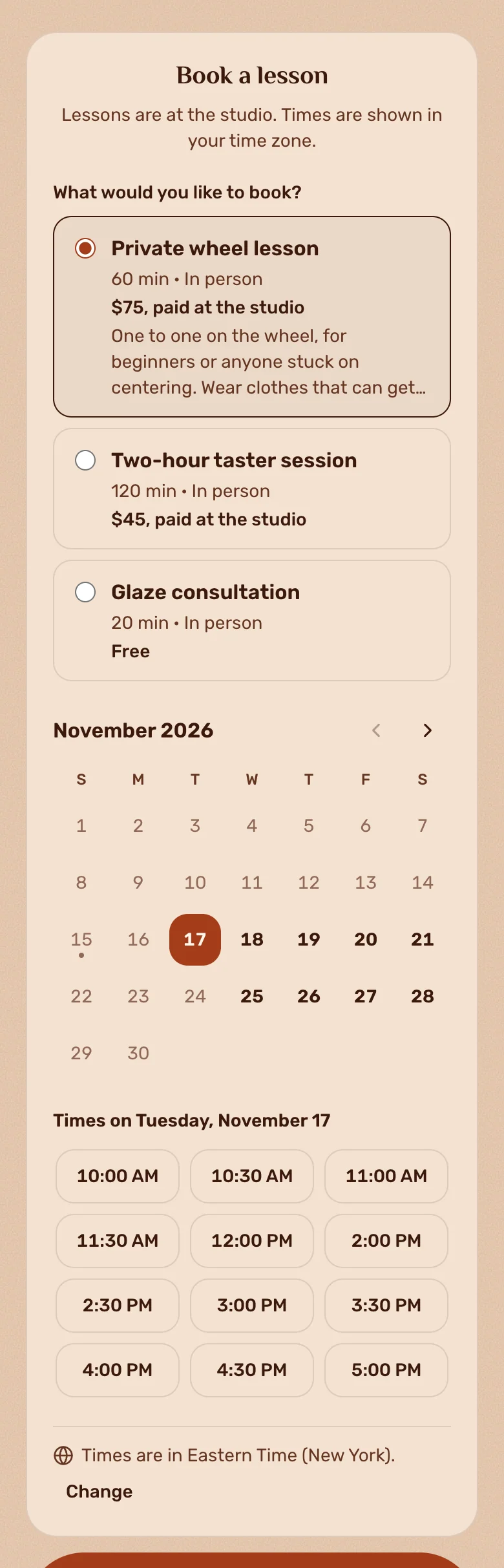
A booking type is one thing a client can book, such as an intro call or a 60-minute treatment. When a visitor opens your booking block, each type shows its name, its length, where it happens, a price note and your description. For a self-booked appointment, that's the whole sales conversation, so write each part on purpose.
Name it for the person booking
Clients read the name to answer one question: is this the one for me? Name the situation, not your internal shorthand. "Initial" means nothing to a new patient. "First visit: assessment and treatment" tells them they're in the right place. The length and the place appear next to the name anyway, so "Lesson (45 min)" repeats what the card already says.
Offer as few types as clients need
Every type is a decision you ask a stranger to make. Two to four cover most solo businesses: one for first-timers, one or two for regulars, perhaps a short call. If two types differ only in a detail you could ask about, merge them and add a question. All the types on a page share one calendar, so more types add choices, not capacity.
Set the length to the appointment, not your whole slot
The length is the time the client spends with you. Cleaning down, travel and notes belong in buffers, covered in the next chapter, which keep time free around each booking without making the appointment look longer than it is. Lengths run from 15 to 240 minutes in steps of 5. Start times are offered every 30 minutes for bookings of 30 minutes or more, every 20 minutes for 20-minute ones, and every 15 for 15- and 25-minute ones.
Write a description that answers the next three messages
You have up to 500 characters, enough for three short sentences:
- What happens, in order: "We talk through the injury, I assess movement, then we start treatment."
- What to bring or prepare: "Wear loose clothing and bring any scans."
- Who it isn't for: "For a sports massage only, book Massage instead."
The price note, written in the Price field in up to 80 characters, says what it costs and how to pay. It's plain text, because no payment is taken.
Choose where it happens
For each type, choose Video call, Phone call, In person or Details to follow. Visitors see only which kind it is until they've booked. The meeting link, number or address arrives in their confirmation, which suits anyone working from home: your street address reaches only people with an appointment. Every booking of a type gets the same meeting link, so use a room link that doesn't change.
Ask only the questions that change how you prepare
Name and email are always asked, and you can add up to ten more: a phone number, a longer note or a short answer to a question you write. Make an answer required only if you'd cancel the booking without it. A one-line answer about where it hurts helps a therapist prepare; a full medical or financial history doesn't belong in a booking question, and should be gathered in your own records system, the way your profession expects.
Say you're a physiotherapist in Melbourne. Three types cover your week:
| Name | Length | Where | Required question |
|---|---|---|---|
| First visit: assessment and treatment | 60 min | In person | Where is the pain, and how long have you had it? |
| Follow-up treatment | 30 min | In person | None |
| Exercise check-in | 20 min | Video call | None |
Then decide how the block appears. Calendar shows the calendar on the page, which suits a page whose main job is booking. Button opens it from a button labeled Book a time unless you rename it, which suits a page that also sells, informs or shows your work. Each block offers only the types you tick, so one page can show first visits on its main tab and follow-ups on another. Set up bookings has the steps, and the templates for health, education and services give you a layout to start from.
Availability, notice and buffers that protect your week
Your availability decides which times strangers can take. Each page has one set of hours and rules, shared by all its booking types, and changes apply as soon as you save them, without publishing. Treat it as a policy, not a mirror of your free time.
Start from the week you want
Set your weekly hours on your own clock, in your own time zone. Leave out the hours you need for work that isn't appointments: admin, ordering, a school run. For a break in the middle of a day, end the first range when the break starts and add a second range after it.
A useful test: if clients booked every open slot next week, would you be glad or exhausted? If the answer is exhausted, close hours until it isn't.
Minimum notice: the time you need to be ready
Minimum notice sets how soon a visitor can book, from no notice to seven days ahead. It starts at four hours. Choose the time you need to prepare: a tutor reusing a lesson plan can take bookings two hours out, while a consultant who reads a client's documents first may want two days. Same-day bookings fill gaps, but only if you check your bookings during the day.
The booking window: how far ahead
The window sets how many days ahead people can book, from 7 to 365. A long one suits work people plan early, like a wedding hair trial. A short one suits a schedule that changes, because every booking far in the future is a promise you have to keep and the client has longer to forget.
Buffers before and after
Buffers keep free time around each booking, up to an hour on each side. Use Buffer before for setup or travel to the client, and Buffer after for cleaning down, writing notes or simply standing up. A booking keeps the buffers it was made with, even if you change them later.
A daily limit you can sustain
The Daily limit caps bookings per day across every type, from 1 to 20, or none. Without one, your hours are the only limit. Six sessions may fit your hours on paper while four is what you can do well with your hands, your voice or your attention.
Date overrides, and the calendar Linkbase can't see
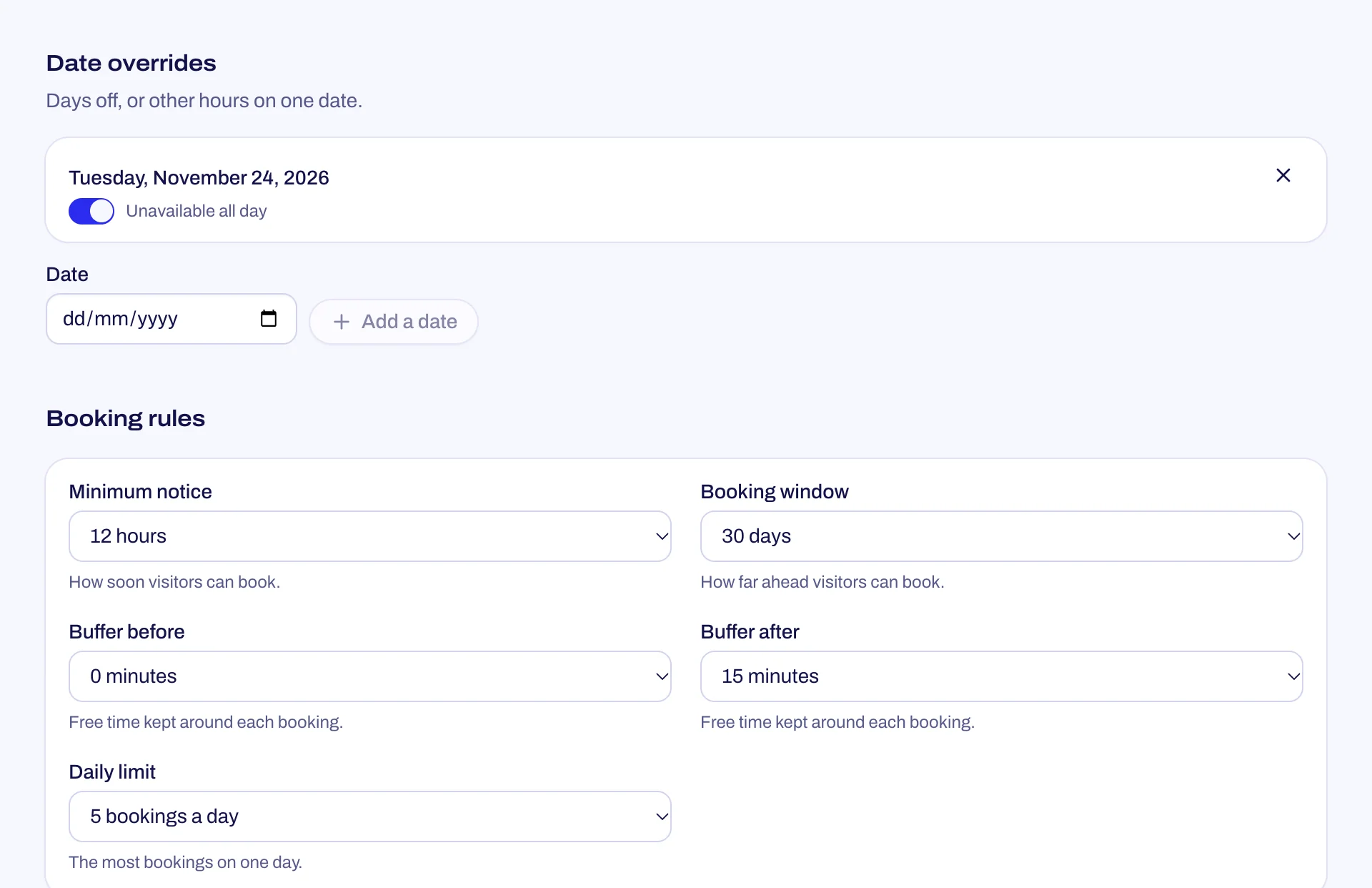
A date override replaces your weekly hours on one date: closed all day, or open at different times. Add holidays, conferences and your own appointments the moment you know about them. Linkbase doesn't read your other calendars, so an override is how you tell it you're busy. For work that depends on weather or tides, our surf lesson guide shows how to plan hours around conditions and call off a session cleanly. In the other direction, your own email about each new booking carries it as a calendar file, so bookings can join the calendar you already use.
Say you run a mobile dog-grooming van in Auckland:
- Weekly hours: Monday to Friday, 8:00 to 15:00, one range, because you eat between houses.
- Buffer before: 30 minutes, to drive to the next client.
- Buffer after: 15 minutes, to clean the table and the van.
- Minimum notice: 12 hours, because you plan the route the night before.
- Booking window: 30 days, because school holidays reshape your weeks.
- Daily limit: 5, because large breeds take it out of you.
The rules sit in Audience → Bookings → Booking settings, and Set your availability and booking rules explains each one, including why a time you expected isn't offered.
One calendar per page means a booking of any type takes that time from all the others on the same page. Separate pages don't block each other's times, even in the same workspace. If one person takes bookings on two pages, give each page different hours, or the same hour can be booked twice.
How to take deposits and payment around a booking
A Linkbase booking confirms a time. It never takes money: no card details, no deposit, no cut. Payment happens wherever your buttons send people, through your own payment provider, shop or bank, on their terms and fees. That's a limit worth stating plainly, and it's also a freedom, because you can match the payment model to the service instead of to the software.
Four ways to handle money, and which fits
| Model | On your page | Fits | Watch for |
|---|---|---|---|
| Free | A price note that says "Free" | Discovery calls and consultations | Curious bookers; screen with a question |
| Pay at the appointment | A price note with the fee and "paid at the session" | Regulars and short, low-risk sessions | No protection when someone doesn't come |
| Deposit after booking | A button or product card beside the booking block, opening your payment link | Long sessions, bought-in materials, busy times | Checking payments and canceling unpaid bookings |
| Pay in full first | A product card that leads to your checkout | Packages and high-value work | Matching payments to bookings by hand |
Book first, then pay
If you're unsure whether a first call should be free at all, our life coaching guide weighs it up. Of the paid models, booking first and paying second is easier to run, because the booking holds the time and carries the client's name and email. The price note sets the expectation, such as "Deposit due within 24 hours to keep this time". A button beside the block takes the payment, and once a day you compare your payment provider with Audience → Bookings. If a deposit doesn't arrive, cancel the booking with a short note. The client's email includes Book another time, which brings them back to your page. Our salon guide walks through this order with deposit habits in three countries.
Say you're a portrait photographer in Nairobi with a two-hour studio session. You book a makeup artist for each one, so an empty slot costs you money. The booking type's price note reads "Deposit by payment link within 24 hours", and a Pay deposit button beside the block opens a payment link from a provider your clients already use, which in Kenya often means one that accepts M-Pesa. Before the day, you check that the money has arrived in your account, not just that someone sent a screenshot.
Packages: sell the bundle, then let clients book each session
A block of sessions, such as six lessons, works better as a product than as a booking type. A product card called "Six-lesson pack" leads to your checkout. Pack holders then book each lesson through a type named "Lesson for pack holders", whose price note says "Included in your pack". You still match names to payments, but clients choose their own times, lesson by lesson. Sell with product cards covers the card itself.
Write the policy before the first booking
A deposit without a policy starts arguments. Decide five things and write them down:
- how much the deposit is, and whether it comes off the final price;
- when it's due, and what happens to the booking if it isn't paid;
- how much notice a client must give to move or cancel without losing it;
- what happens when someone arrives late;
- what happens when you cancel, which should be a full refund.
Put a one-line version in each booking type's description and the full policy in an FAQ block directly under the booking block, so it's read before anyone selects Confirm booking. Refunds go back through whoever took the payment, because Linkbase never held the money. How payments work on Linkbase sets out who handles what.
This isn't legal advice. In many countries, consumer law expects deposits and cancellation fees to be fair and explained before someone books, and some services carry rules of their own. Check what applies where you work.
How to cut no-shows without nagging
A no-show is seldom meant as rudeness. More often the client forgot, or their plans changed and telling you felt harder than staying quiet, or they weren't sure where to go. Each of those has a fix, and only one of them involves money.
Put it in their calendar at the moment they book
The confirmation email carries a calendar invitation, and the confirmation screen offers Add to calendar for Apple, Outlook and Google Calendar. An appointment in someone's own calendar reminds them through their own phone, on their own settings. Tell people the email is worth opening: "Your confirmation has the address and a calendar invite."
Make moving easier than vanishing
Every confirmation has Reschedule and Cancel booking links, so a client whose week falls apart can pick a new time in a minute instead of hoping you won't notice. Say so where they'll read it, in the description or your FAQ: "Can't make it? Use Reschedule in your confirmation email, at least 24 hours ahead." The links keep working until the appointment starts, so your notice period is a policy you state and enforce, not one Linkbase applies. Change or cancel a booking you made shows exactly what your clients see.
Send a personal reminder, because Linkbase doesn't
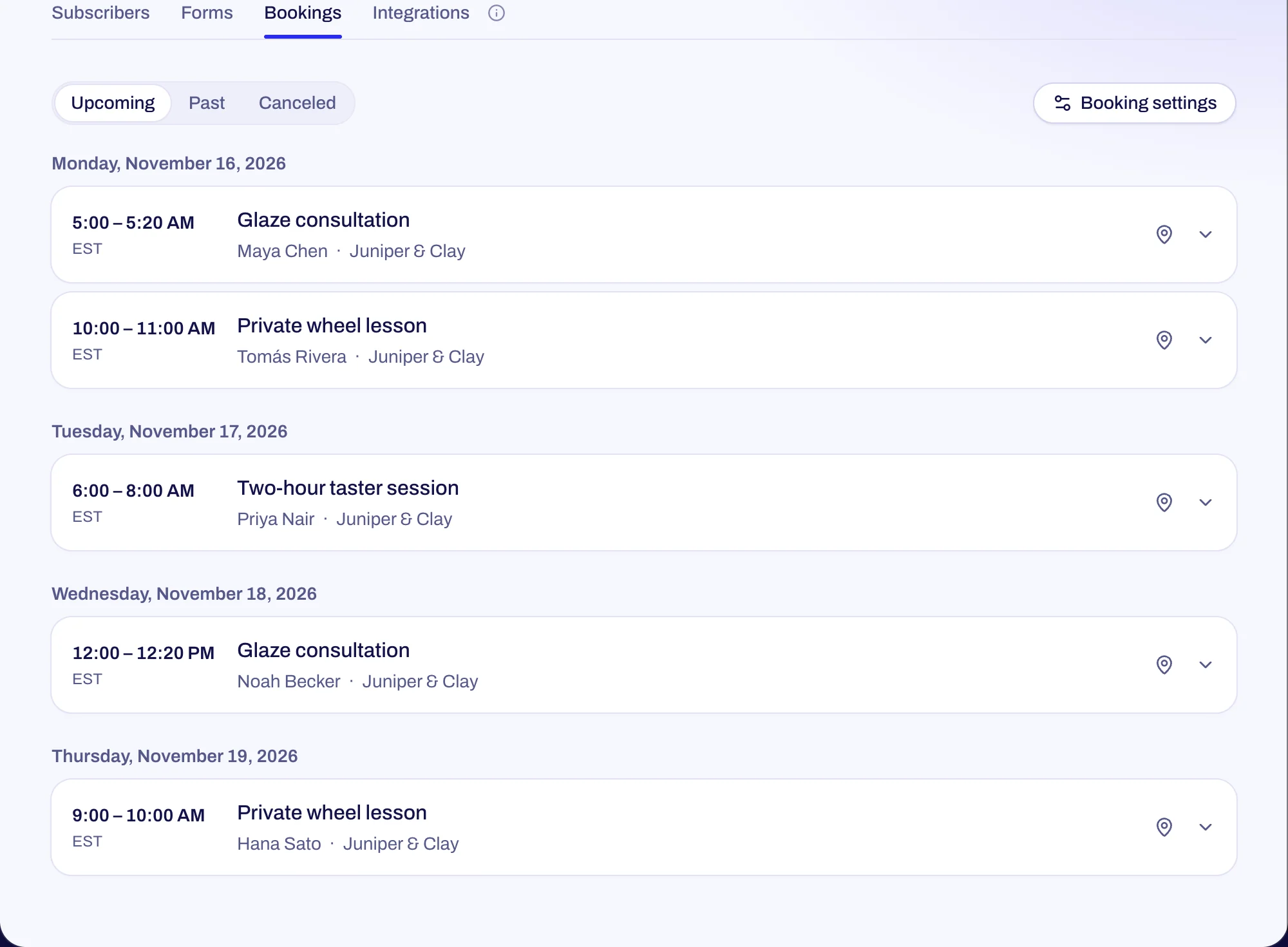
Linkbase doesn't send reminders before an appointment. For a solo business, a two-minute routine at the end of each day fills the gap: open Audience → Bookings, look at tomorrow under Upcoming, and send each client a short note on the channel they use. If you plan to text or message, add Phone number as a booking question and make it required. A note from a person also gets answers: "See you at 10, the side gate is open" can bring back "running five minutes late" rather than silence.
Shorten the gap between booking and appointment
The further ahead a booking is made, the more can change before it. If your no-shows come from bookings made weeks in advance, shorten the booking window. If they come from same-day bookings made on impulse, raise the minimum notice. Look at your Past bookings for a month before deciding which you have.
Ask for commitment where an empty slot really costs you
A deposit changes the client's calculation, but it adds a step for everyone, including the reliable regulars. Keep it for the appointments where a gap hurts: long sessions, prepared materials, your busiest hours. For a 30-minute follow-up with someone you've seen ten times, the personal reminder is the lighter tool.
Decide what happens when someone doesn't arrive
Choose in advance how long you'll wait, message once, and note it in your own records, since Linkbase doesn't mark no-shows. Then apply your policy the same way every time. A rule you waive for some clients reads as unfair to the rest. When they want a new time, send your page's address and let them book again, which puts the choice, and the commitment, back with them.
Before you share your page, make a test booking on the live page with your own email address. You'll see the confirmation, the calendar invitation and the reschedule links exactly as clients do. Then cancel it in Audience → Bookings.
Time zones and clients in other countries
Your hours are set on your clock. Each visitor sees them converted to theirs, in the booking block, on the confirmation and in every email after. When a client books from another country, nobody has to do the arithmetic.
What visitors see, and what they can change
The calendar says which time zone it's showing, with Change beside it, so someone planning a trip can switch to the zone they'll be in. Emails to the client use their time zone and the language your page showed them. Dates and times are formatted for your page's language, or for each visitor's own when your page uses "Each visitor's language". How prices, dates and times are shown explains the formats.
The weeks the clocks disagree
Your hours follow your local clock through daylight saving changes, which is what you want: 9:00 stays 9:00 for you. Your clients' clocks may change on other dates, or not at all. The US and Canada change in March and November; the UK and the EU, on the last Sundays of March and October. Brazil, Japan and India don't change their clocks, and southern-hemisphere places that do, such as New Zealand, change in the opposite seasons.
Say you're a career coach in Toronto with clients in London. Most of the year, London is five hours ahead, so your 9:00 is their 14:00. For a few weeks around each change, when one country has moved its clocks and the other hasn't, the gap is four hours and your 9:00 becomes their 13:00. Every booking is converted correctly. What trips people up is habit: a weekly client who always books "two o'clock" finds that slot has moved. A line to regular clients before those weeks saves a confused morning.
Booked from home, attended abroad
In-person appointments booked by travelers are the real trap. Say you teach private cooking lessons in Osaka, and a visitor in Chicago books a month before the trip. The calendar shows your times in Chicago time, which is correct but not what they need when planning a day in Japan. Add a line to the description: "Lessons are in Osaka, on Japan time. Use Change under the calendar to see local times." Our spa booking guide goes further into hotel guests and travelers.
Language, for clients who don't share yours
The labels Linkbase adds, such as Confirm booking and the calendar's month names, come in 40 page languages and follow each visitor's browser unless you set one language for the page. Your own words, including type names and descriptions, appear exactly as you wrote them, because Linkbase never translates them. If your clients split between two languages, write both in short form, such as "Trial lesson / Probestunde", or give each language its own tab with its own booking block. See Write your page in more than one language.
Video and phone calls across borders
Choose a meeting link that never changes, because every booking of a type gets the same one, and check that clients can open it from where they are without an account they're unlikely to have. A phone call type across borders means someone pays for an international call, so for clients abroad, video is usually the kinder default. If you leave a phone type's number empty, clients give theirs and you call them.
After the appointment: reviews, rebooking and regulars
The easiest booking to win is the next one from someone who just left happy. A page can make that second step as easy as the first.
Ask for a review while the result is fresh
The best moment to ask is when the client says something kind, in the room or in a message afterward. Ask whether you may quote them, and how they'd like to be named. On your page, the reviews block shows star ratings and reviews you add yourself, with an average and a breakdown by stars. It doesn't import reviews from Google or anywhere else, so add a link to your public review profile for clients who want to leave one where others look. Placed just above the booking block, two or three reviews answer a first-timer's doubt at the moment they decide. Our guides to the customer reviews block and to testimonials with consent cover choosing, quoting and the rules.
Make the next appointment the obvious next step
Give regulars their own way in. Add a tab called "Clients" with a booking block that offers only your follow-up types, and send its address at the end of every appointment. Each tab has its own, such as yourname/clients, as Link straight to one tab of your page explains. First-timers never see the follow-up types, and regulars skip the first-visit explanation.
Say you coach tennis in Seoul. The main tab offers a 60-minute first lesson, and the "Players" tab offers a 45-minute weekly lesson. After each first lesson that goes well, the player gets the Players tab's address in a message, and booking next week takes them a minute.
For work in person, a printed card closes the loop. Your page's QR code opens its main address by default and keeps working as the page changes; to have it open the clients' tab directly, choose that tab under Where scans go in the QR code dialog. A second code for a different tab needs a short link, on the Pro and Team plans.
Stay in touch, with permission
A booking isn't a newsletter signup. People who booked gave you their email to get to the appointment, and depending on where you and they are, that may not be enough to send them marketing. If you want to tell clients when new dates open, add an email signup block with a clear promise, such as "Hear first when next month's times open", and let them choose. Linkbase collects the addresses, and your own email tool sends the messages.
Read your month in ten minutes
Once a month, open Bookings and look through Past and Canceled. Which types fill? Which days stay empty? Which bookings get canceled, and how close to the day? A type nobody books is a choice you can remove. A day that's always full is a reason to open another, or to raise your price. Your page's analytics show the visits and clicks that come before a booking, where visitors come from and which tagged campaigns sent them. On the Pro and Team plans, advanced analytics add channels and attribution. Change one thing, then look again next month. The full list of what a page can hold is on the features page.
Frequently asked questions
Can clients pay when they book an appointment online?
Not through the booking itself. A Linkbase booking holds a time and takes no payment. Put a button or product card beside the booking block that opens your own payment link for a deposit or the full fee, and say how payment works in the booking type's price note. See How payments work on Linkbase.
Does Linkbase send appointment reminders?
No. Clients get a confirmation email with a calendar invitation, which their own calendar uses to remind them, and links to reschedule or cancel. For a personal reminder, message tomorrow's clients from your bookings list each evening.
Can my booking calendar sync with Google Calendar or Outlook?
Linkbase doesn't read your other calendars, so it can't block times when you're busy elsewhere. Add date overrides for those. In the other direction, the emails about each booking, yours and your client's, carry it as a calendar file you can add to Google Calendar, Outlook or Apple Calendar.
Can two clients book the same time, for a class or a group?
No. A page takes one booking per time slot, across all its booking types. For classes and workshops, list the dates in an events block whose buttons open your own registration or ticketing page.
What happens to existing bookings if I change my hours?
They stay where they are. Changing your hours or rules doesn't move or cancel bookings already made. To call one off, cancel it from your bookings list with a message, and the client gets an email with a link to book another time. See See and cancel bookings.
Do I need a paid plan to take appointments online?
Bookings are on the Pro and Team plans. You can build your page for free, and it goes live when you start a trial or subscribe. Every plan starts with a free trial, no card needed. See pricing.


