Why a page shows in your language, and how to change it
How a Linkbase page picks the language of its buttons and messages, why the owner's own words may be in another, and how to switch.
A Linkbase page shows its built-in words, such as Subscribe, Book a time, Report and Made with Linkbase, in one of 40 languages. The owner's own words, such as their name, bio and link titles, always appear as they wrote them. Linkbase doesn't translate them, so a page can show its buttons in your language and its text in another.
How the language is chosen
The page uses the first of these that applies:
- A language you picked with this page's Language button.
- The owner's default language, if they chose a fixed one.
- Your browser's preferred languages, if the owner chose Each visitor's language. The page uses the first language on your browser's list that it has. If it has none of them, it uses English.
The language sets the page's buttons, form labels and messages, the booking calendar, prompts in front of locked content, the privacy box and the report form. Dates, times and numbers follow it too. Arabic, Hebrew, Persian and Urdu pages read right to left.
Change the language
If the owner added a Language button, it's a round button with a language icon at the top of the page.
- Select Language, the round button at the top of the page.

- Find your language. The list starts with Page's default, then each language in its own name, such as Deutsch or 日本語, with its name in the page's current language below. To search, type in Search languages, by the English name or the language code.
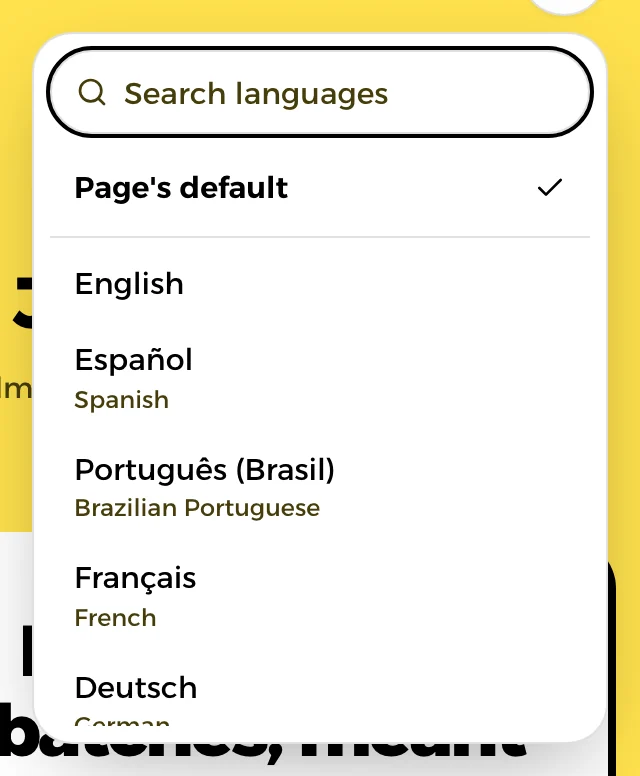
- Select it. The page reloads in that language.
Your choice is remembered in this browser for a year, for this page only. On a page at its owner's own domain, it's remembered for that domain. Other pages show their own default language, or your browser's language if they follow each visitor's.
To go back to the page's own language, select Language and choose Page's default, at the top of the list. On a page with a fixed language, that language's name shows under it. Your choice is forgotten, and the page uses its default language, or your browser's language if it follows each visitor's.
If there's no Language button:
- If the page follows each visitor's language, change the order of preferred languages in your browser's settings, put yours first, and reload the page.
- If the owner chose a fixed language, the page always uses it, whatever you picked on other pages.
Changing the language never changes the owner's own text. If a page is written in a language you don't read, your browser's built-in translation can translate the whole page.
Troubleshooting
The page still shows a language I picked earlier. Your choice is remembered for that page for a year. Select Language and choose Page's default to go back to the page's own language. A choice you made on one page never changes another.
The page is in English, but my browser isn't. The owner may have chosen English as a fixed language, or your language isn't one of the 40 a page can use. Also check that your language is first on your browser's list, above English.
Chinese shows in the wrong script. Pages that follow each visitor's language use the script your browser asks for, or else its region: Traditional characters for Taiwan, Hong Kong and Macau, Simplified for everywhere else. If your browser lists only "Chinese", add the variety you read, such as Chinese (Taiwan).
Portuguese shows the wrong variety. On pages that follow each visitor's language, Portuguese (Brazil) shows Brazilian Portuguese, and Portuguese from any other region shows European Portuguese. Plain "Portuguese" shows Brazilian Portuguese, so add your region to your browser's list.
My booking's page is in English. Emails about a signup, a booking or a report come in the language the page showed you, including one you picked with the Language button. The booking page that the email's links open, to reschedule or cancel, is part of Linkbase itself. It shows in one of Linkbase's nine dashboard languages (English, Spanish, Brazilian Portuguese, French, German, Indonesian, Turkish, Arabic and Simplified Chinese), and in English if yours isn't one of them.
If this is your page
To choose your page's default language, see Choose your page's language setting. To add the button, see Let visitors change your page's language.