Grow an email list from social media: the complete guide
Grow an email list from social media: offers worth an address, where the signup goes, consent and double opt-in, your email tool, and which posts bring subscribers.
7 章阅读约 20 分钟
A follower is someone a platform lets you reach when it decides to. A subscriber is someone who gave you their address and said yes. The difference stays invisible until the week it matters: a launch, a sale, a new set of booking dates, an account locked for a reason nobody explains.
Say you make leather bags in Vancouver and release a small batch every few weeks. On release day you post, and the people who see it are whoever the feed picked that hour. The customer who bought a tote last spring, and wanted the larger size, is watching something else. With her email address, you'd have written to her the night before.
This guide covers the whole job of turning followers into an email list you own, for anyone who posts: makers, creators, coaches, shops and services. It starts with why, then works through the offer, the signup on your page, consent and the law, getting addresses into your email tool, measuring which posts work and keeping the list healthy. Each chapter shows how it works on a Linkbase page, and links to the help center for the exact steps.
What you'll learn
- Decide what your list is for, and what it takes to keep the promise it makes
- Write an offer and a signup promise people say yes to
- Choose between a signup block, a form and an email gate, and place it where it works
- Handle consent and double opt-in in plain terms, region by region
- Send each subscriber to your email tool, as it happens or by export, without losing anyone
- Tell which posts and platforms bring subscribers, not just visits
- Keep the list clean, in step with your email tool and welcome in the inbox
Why a list you own outlasts every algorithm
Every social platform rents you an audience. The rent is your content, and the terms change without notice. Here's what owning a list changes, and what it costs.
Followers are rented; addresses travel with you
Reach on a social platform depends on systems you don't control. What gets shown shifts when the platform changes its priorities, and an account can be restricted or lost with little warning. Your followers don't come with you if you leave, and you can't download them.
An email address is different. It works in any email tool, you can export it and move it, and your message arrives in an inbox the person checks on their own schedule. It isn't magic, because people ignore emails too. But nobody decides on your behalf whether your subscribers get to see it.
What a list does that a feed can't
- Reach the people who already bought. Past customers know your work, and a feed mixes them in with everyone else.
- Choose the timing. The night before a drop, the morning a class opens for booking, a week before a price change.
- Say more than a caption holds. The story behind a collection, a full recipe, a proper answer to a question people keep asking.
- Speak to one group. Only subscribers from one city, or in one language, when the news only matters to them.
- Keep going when you change platforms. A list started from one network still works when your audience moves to another.
What a list costs
A list is a promise, and keeping it takes three things: something worth sending on a rhythm you can hold, an email tool to send it from, and care with consent and unsubscribes. If you can't picture sending anything in the next three months, wait. A list that hears nothing for half a year and then gets a sales email may not remember who you are.
If what you have is short, frequent news, such as today's specials or a restock, a WhatsApp Channel may suit it better than email. Our guide to growing a WhatsApp Channel covers that route, and plenty of businesses run both for different jobs.
How the pieces fit
- A post gives people a reason to tap through.
- Your bio link opens your page.
- The signup on your page collects the address.
- Linkbase's audience list keeps it, with its status and date, ready to export.
- Your email tool sends the welcome email and everything after it.
Linkbase handles steps two to four. It doesn't send newsletters, so step five always happens in an email tool you choose. The features page lists everything else a page can hold around the signup.
Offers people actually sign up for
Nobody wants a newsletter. They want what's in it. A signup works when the promise is specific enough to picture: what arrives, how often, and why it deserves a place in a crowded inbox.
Four kinds of offer, and when each works
| Offer | Example | Works when | Watch for |
|---|---|---|---|
| First access | "Hear about each new batch a day before I post it" | Things sell out or fill up: drops, classes, dates | It has to be first; post at the same time and it breaks |
| A useful thing | A printable checklist, a template, a short guide | Your posts teach something | Keep it small, usable today and delivered at once |
| A regular letter | "Each Sunday, the three best finds of the week" | You have a steady supply of things to say | The rhythm becomes a promise you must keep |
| A welcome code | A first-order code, sent in your welcome email | You sell online and the margin allows it | It teaches people to wait for codes; give it an expiry |
First access asks the least of you, because the list simply hears about work you were going to announce anyway, and it gives every email a reason to exist. Its one condition is discipline: the list must genuinely hear first, every time.
Match the offer to the post that sends people
The best offer continues the thing someone just watched or read:
- A tutorial leads to the printable version of what you showed.
- A behind-the-scenes post leads to first access to what you're making.
- A product post leads to a restock alert for that product.
- A local post, about a market stall or a pop-up, leads to news of the next date in that city.
Our guide to sharing recipes from Instagram shows one version of this: a weekly menu list fed by the Reels that already bring people in.
If you post several kinds of content, you don't need several lists. One letter can carry all of it, as long as the signup's promise covers what you'll actually send.
Write the signup in four parts
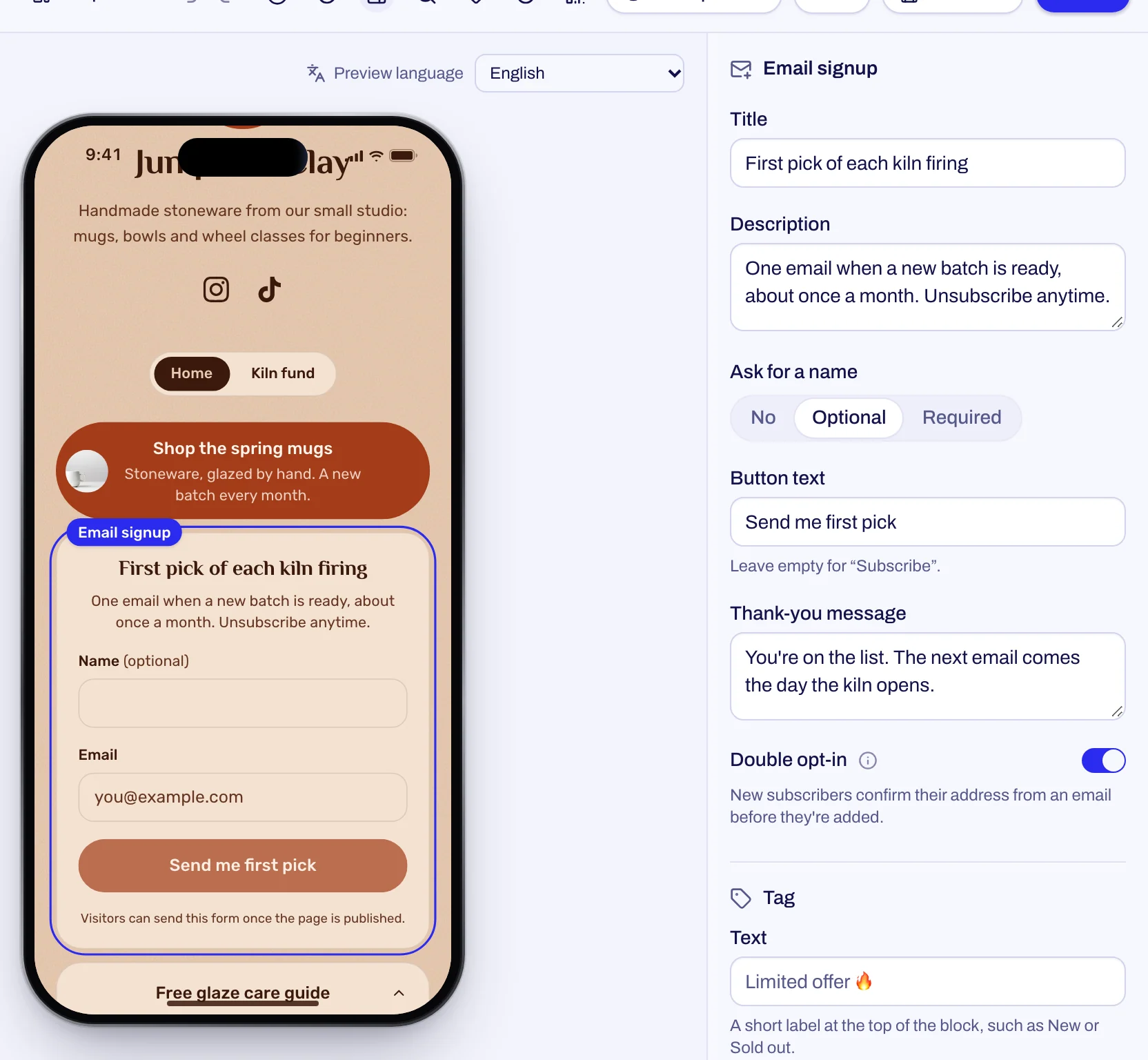
The email signup block has four pieces of text. Say you run a bakery in Cape Town whose videos show the week's bakes:
| Setting | Limit | Example |
|---|---|---|
| Title | 120 characters | Know Friday's bake on Thursday night |
| Description | 500 characters | One email a week, on Thursday evening, with what's coming out of the oven. Unsubscribe anytime. |
| Button text | 40 characters | Send me the bake |
| Thank-you message | 300 characters | You're on the list. Thursday's email comes from the bakery; check promotions if you can't find it. |
The description does the most work: what, how often, and that leaving is easy. The button names what people get, rather than the default Subscribe. The thank-you message says what happens next, because silence after a form feels like failure. Collect email signups lists every setting.
Offers to skip
- "Enter to win" giveaways. They bring addresses from people who wanted the prize, not your work, and platforms and countries have their own rules for running them.
- Anything you can't deliver on time, every time. A monthly promise kept for a year beats a weekly one dropped after three weeks.
- A free ebook that's really a brochure. People can tell, and the first email confirms it.
Where the signup goes on your page
A signup works when it meets someone at the moment they want more. That depends on which tool you use, where it sits and what surrounds it.
Signup block, form or email gate: pick by the job
| Email signup | Form | Email gate (Pro and Team) | |
|---|---|---|---|
| Visitors | Leave an email, and a name if you ask | Answer the fields you add | Leave an email to open a link, folder or tab |
| Lands in | Subscribers | Forms | Subscribers, as Subscribed |
| Double opt-in | Optional, per block | No | No |
| Best for | Building a list | Signups that need answers or a source | Handing over a download for an address |
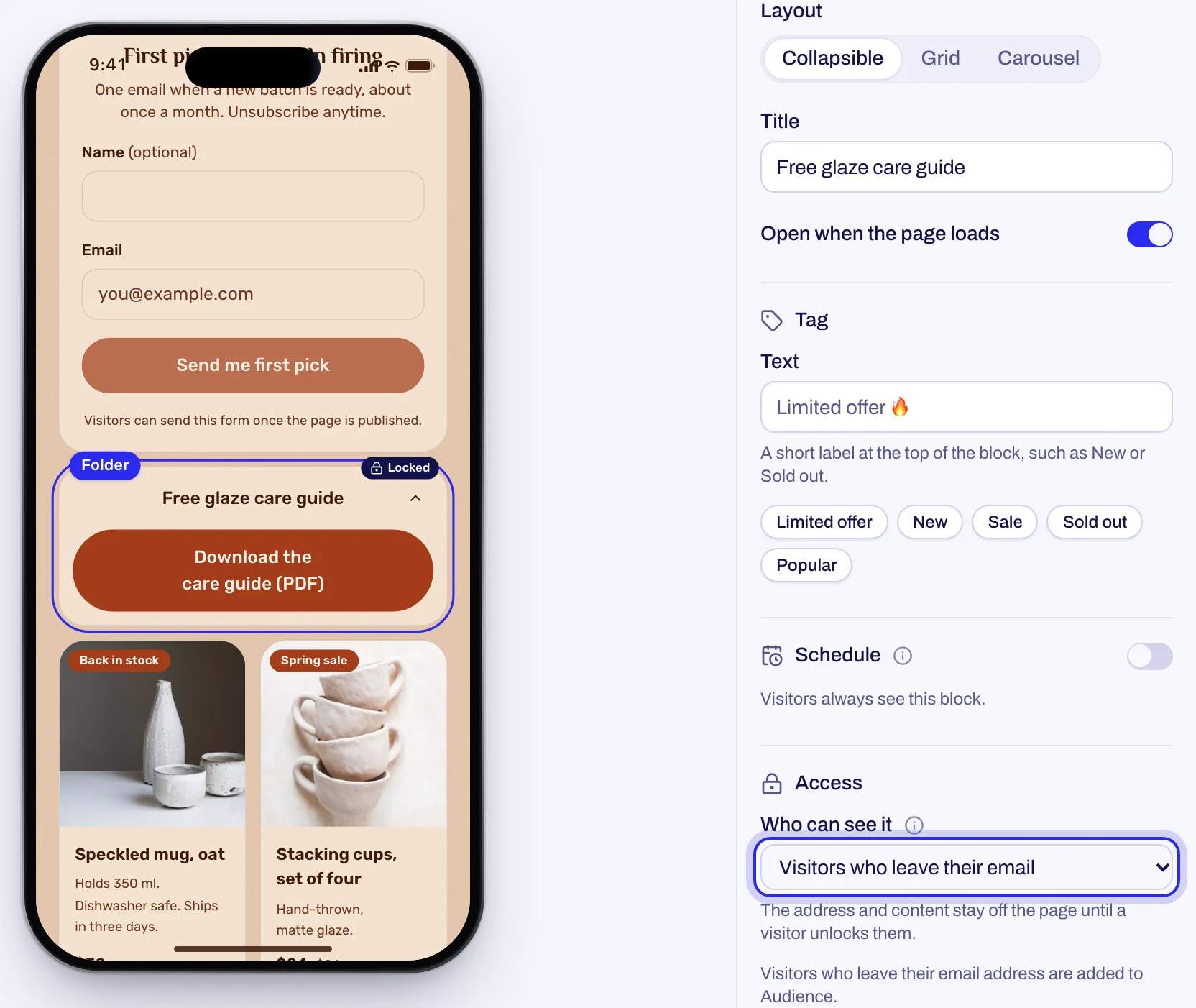
Most pages need only the email signup block. A form earns its place when you need answers that change what you send, such as which city someone is in, or the source of every subscriber, covered in the measurement chapter. An email gate suits a freebie: the visitor leaves an address and the download appears at once, with no wait for an email. Lock a link, folder or tab explains the gate.
Put it where the visitor's intent is
If the list is your page's main job, put the signup directly under your name and bio, where a phone shows it without scrolling. If the page has other jobs, place the signup beside the thing it's about. Under tour dates: "Tell me when you play my city". Under a sold-out product card: "Get the restock email". A signup next to its reason reads as a service. Six blocks down, below everything else, it reads as an afterthought.
Check it in the editor's phone preview, then on your own phone after publishing, by tapping your bio link the way a follower would.
Give the list its own tab
A tab with its own address, such as yourname/letter, works as a small landing page: a heading, two or three lines about what subscribers get, a short excerpt from a recent email in a quote block, and the signup. Link to it from posts about the list, from Story link stickers and from your email signature. Split your page into tabs shows how, and the creator templates give you a layout to start from.
Ask for a name, or not
Ask for a name has three settings: No, Optional and Required. A name lets your email tool open with "Hi Amara", while an extra field is one more thing to type with a thumb. Optional, the starting setting, is a fair middle: people who want a personal greeting give it.
Run limited-time signups on a schedule
A waitlist for a launch, a course intake or a drop can run between two dates. On the Pro and Team plans, any block can be scheduled to appear and disappear on its own, and a countdown beside it shows how long is left. Outside its dates the signup can't take entries, so keep a permanent one elsewhere on the page for people who find your post late. See Show a block only between two dates.
One page, one list
Each page keeps its own list, and the same person can be on two. If you run two pages, decide whether two lists is what you want before you promote both.
Consent, double opt-in and the law in plain words
Email rules vary by country, and which ones apply usually depends on where your subscribers are, not only where you are. What follows is the shape of it, so you can design a signup that holds up.
What a clear signup looks like anywhere
- Say what people are signing up for before they type: the content, roughly how often, and who it's from.
- Keep it separate. The signup's only job is joining the list. Don't fold marketing consent into an order, a download or a contest without saying so plainly.
- Never pre-tick anything. A form's Consent field starts unticked, and that's how consent should start.
- Make leaving easy from every email, and act on it quickly.
- Ask for little. An email address, a name if useful. A signup is no place to ask about health, religion or anything similar.
The rules, region by region
| Where subscribers are | The broad rule | What it means for your signup |
|---|---|---|
| EU and UK | Consent for marketing email to individuals, under the GDPR and ePrivacy rules (PECR in the UK), with a narrow exception for existing customers | A clear, unticked opt-in, and a record of it |
| Canada | Consent under CASL, express or, in limited cases, implied | An opt-in, plus your identity, contact details and an unsubscribe in every email |
| Australia | Consent under the Spam Act, with sender details and an unsubscribe | An opt-in and a working unsubscribe |
| United States | CAN-SPAM doesn't require consent first, but bans misleading headers and requires a postal address and an opt-out you honor | Honest sender details, an address and a clear unsubscribe |
| Elsewhere | Many countries have data protection laws of their own, such as Brazil's LGPD | Check the local rules |
The practical pattern is to design for the strictest place you have subscribers. A clear opt-in meets the strict rules and the looser ones alike, while an opt-out approach works only in some places.
Double opt-in: proof that the address is theirs
With Double opt-in on, a new subscriber gets one email from Linkbase, in the language your page showed them, asking them to confirm. They join as Pending and become Subscribed only after selecting Confirm subscription on the page the email opens. Opening the link alone changes nothing, because email security scanners open links too.
Turn it on when proof matters: when much of your list is in Europe, where a record that the address owner agreed carries weight, and in Germany especially, where confirming newsletter signups this way is common practice. It also keeps typos and fake addresses off your list, and nothing reaches your webhook until someone confirms. The cost is that some genuine people never open the email and stay pending. It's set per block, so turn it on in each signup block. Confirm signups with double opt-in shows what you and your subscribers see.
Email gates and freebies
Visitors who leave their address at an email gate join as Subscribed at once, with no confirmation email, whatever your signup blocks do. The gate's prompt tells them your page gets their address, but not that you'll email them. Say that yourself, in the folder's title or a line just above it: "Get the packing list, plus one email a month from me. Unsubscribe anytime." In the EU and UK, making a download conditional on agreeing to marketing emails is a gray area. If most of your audience is there, get advice, or give the download away openly and invite people to subscribe beside it.
Keep the evidence
Your subscriber export includes signed_up_at, confirmed_at for double opt-in, and the page each person joined. Whenever you change your signup's wording, keep a dated screenshot of the old version. If someone asks how you got their address, you can answer precisely. Our guide to California privacy law has wording you can adapt for the note beside a signup.
This is a general overview, not legal advice. If email is central to your business, or your list spans many countries, read your regulator's guidance or ask a lawyer about the rules where your subscribers live.
Moving subscribers into your email tool
Linkbase collects addresses; it doesn't send newsletters. Your email tool writes the welcome, the regular letter and everything else. Connecting the two takes one of two routes.
Export or webhook: choose a route
| CSV export | Webhook | |
|---|---|---|
| How | Audience → Subscribers → Export CSV, then import it | Each signup goes to an address you choose, as it happens |
| Timing | Whenever you remember | Moments after each signup |
| Effort | A few minutes every time | Some setup once, then little else |
| Good for | Small lists, occasional sends, a first import | A welcome email that arrives straight after signing up |
The welcome email decides it. If you promise a download or a code, it should arrive while the person still remembers signing up, which means a webhook.
The webhook route, in outline
A webhook sends each event to an address, usually one an automation service gives you, which then adds the contact to your email tool. Owners and admins connect it under Audience → Integrations. There's one per workspace, carrying events from every page in it. Three events matter for a list:
subscriber.created: someone joined with no confirmation step, through a signup block without double opt-in or through an email gate.subscriber.confirmed: someone confirmed through double opt-in.subscriber.unsubscribed: someone left through their Linkbase link, or your team unsubscribed them.
Add the contact on either of the first two, and remove or tag them on the third. If Linkbase already confirmed someone, add them to your email tool as subscribed rather than triggering a second confirmation, if your tool allows it. Send signups and replies to other tools has the setup, and our webhooks guide walks through the automation.
Each event is sent once. If your endpoint is down at that moment, the signup isn't resent, so compare your email tool with an export now and then and import anyone missing.
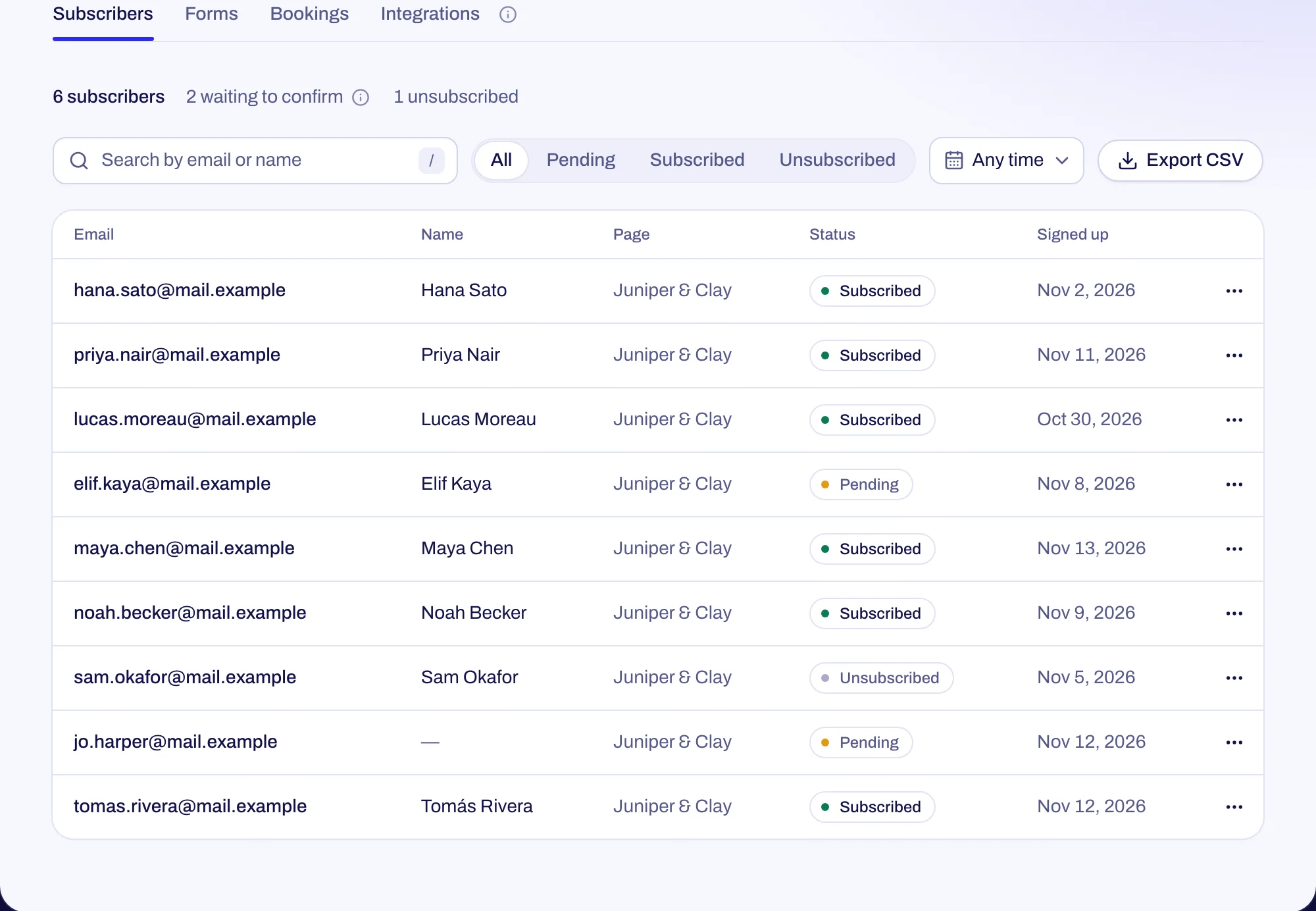
The export route, and the status column
The CSV has a status for each person, and it decides what you import. Subscribed rows are your list. Pending rows haven't confirmed, so leave them out. Unsubscribed rows belong on your email tool's suppression list, if it has one, so nobody who left gets added back. Our guide to exporting your data explains the rest of the file.
Carry the context with each subscriber
Each webhook event carries the page a person signed up on and the language your page showed them. Map both into your email tool. A shop in Dubai with Arabic and English visitors can then send each subscriber the edition in their language, and a workspace with a studio page and a shop page keeps the two audiences apart. The CSV export has the page but not the language, so if language matters to you, the webhook is the better route.
Write the welcome email before you promote
A welcome that arrives while someone remembers signing up gets a fair reading; one that turns up a week later competes with everything else in the inbox. Write it, and set it to send automatically, before your first post about the list. Give it four jobs:
- Deliver what the signup promised, at the top.
- Repeat how often you'll write, and what about.
- Ask one question people can answer by replying, such as "What are you making this month?"
- Show where to unsubscribe, without burying it.
Replies tell you more about your subscribers than any report.
Measuring which posts grow your list
Your subscriber count tells you whether the list is growing. It doesn't tell you why. To learn which posts and platforms bring subscribers, you connect three things: where visitors came from, what they did on your page and when people signed up.
What Linkbase shows, and what it doesn't
Analytics count views, visitors and clicks, where visitors came from, and visits by campaign tag. Subscribers shows each signup's page and date. What no screen does is attach a post to each subscriber, because the email signup block doesn't record the link someone arrived from. So you measure in one of two ways: by pattern, or by tagging each signup. Our guide to reading your analytics covers what each count means.
Tag every link you post
Apps don't always pass along where a visitor came from, so label the links yourself. Add UTM tags to the address in each bio and in each post or Story sticker: utm_source for the platform, and utm_campaign for the offer or the post. If your signup lives on a tab, tag that tab's address, because tags travel with the first page a visitor opens.
The Campaigns card, on every plan, then counts visits by each tag, and the Clicks tile ranks campaigns by the clicks they led to. On the Pro and Team plans, attribution shows each source's views, clicks and click rate side by side. Keep the spelling consistent, because Instagram and instagram become two rows. Track campaigns with UTM tags has the details.
Read signups against your posting calendar
Once a week, filter Subscribers to Last 7 days and set the count beside what you posted. A simple sheet, kept for a month or two, shows the pattern:
| Column | Where it comes from |
|---|---|
| The week and its main posts | Your own posting calendar |
| Visits by source and campaign | The Campaigns card, for that week |
| New subscribers | Subscribers, filtered by date, or signed_up_at in the export |
| Signups per hundred visits | Your own division of the two |
This is correlation, not proof. A jump after one video might also be the week a podcast mentioned you. But a pattern that holds for several weeks is enough to act on.
Tag each subscriber when you need certainty
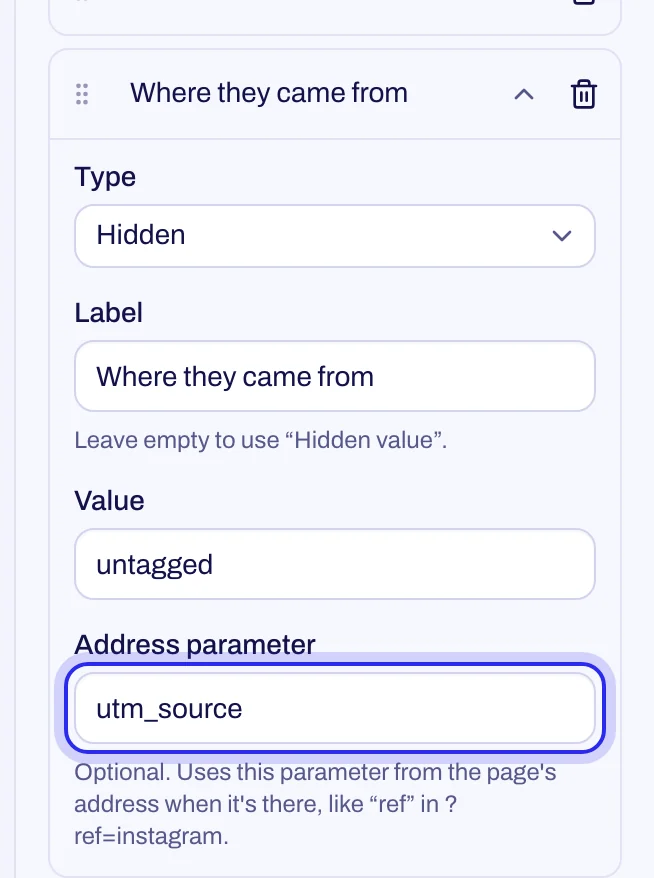
When you need the source of every subscriber, collect signups with a form instead: an Email field, a Consent field such as "Send me the monthly studio letter", and a Hidden field whose Address parameter is utm_source, with a Value such as "untagged" for visits without one. Each reply then carries the platform it came from, in the export and in the form.submitted webhook. The trade-offs are real. Form replies go to Forms, not Subscribers, and Linkbase sends no confirmation for them, so your email tool has to if you want double opt-in. Our guide to turning short-form video views into subscribers shows this setup for TikTok, Reels and Shorts.
Say you coach trail runners in Bogotá and post short clips on Instagram and long route videos on YouTube. Tagged links show Instagram sends more visits. The hidden field shows YouTube viewers subscribe more often once they arrive, perhaps because a twenty-minute video has already done the convincing. That tells you where a stronger signup pitch belongs, and which channel to keep feeding.
The numbers worth watching
- Signups per visit, by source. A platform that sends fewer visitors can still send more subscribers.
- Pending against subscribed, with double opt-in. A pending pile that keeps growing suggests the confirmation email is being missed or filtered.
- Unsubscribes after the first emails, in your email tool. If people leave right after joining, the offer and the emails don't match.
Change one thing at a time, whether it's the offer, its wording, where the signup sits or what you say in your posts, and give each change a few weeks. A single post's spike tells you very little.
Keeping the list healthy
A healthy list is one where every address belongs to someone who still wants your email. It shrinks a little on its own as people leave or move on, and that's fine. What hurts is writing to people who never agreed or stopped caring, because their complaints and silence shape how inbox providers treat everything else you send.
Keep the two lists in step
Once you use an email tool, you have two lists, and unsubscribes flow one way. When someone leaves through their Linkbase subscription link, or your team unsubscribes them in Subscribers, a connected webhook sends subscriber.unsubscribed. When someone leaves through your email tool's own unsubscribe link, Linkbase isn't told. So treat your email tool as the record of who gets your emails, and never import a fresh export over it without suppressing the people who left.
Clear out pending and junk entries
With double opt-in, people who never confirm stay Pending, and pending entries count toward your plan's subscriber limit, if it has one. Filter by Pending every month or two and delete the old ones. Forms and signups already turn away most bots with a hidden trap, a per-visitor limit and an automatic check, and double opt-in keeps fake addresses from becoming subscribers. Delete anything else by hand. See How forms keep spam out.
Handle requests to be removed
When someone asks you to delete their data, do it everywhere: their entry in Subscribers, any form replies they sent, and their contact in your email tool. Unsubscribe them before deleting if your webhook should tell your other tools, because deleting sends nothing. Keep exported files somewhere safe, and delete old copies you no longer need. View, search and export your audience has the steps.
Look after deliverability
Inbox providers watch how people respond to your email. Since 2024, Gmail and Yahoo have asked bulk senders to authenticate their sending domain, offer one-click unsubscribe and keep spam complaints low. Your email tool handles much of this, but three things are yours:
- Send from your own domain, set up with the SPF, DKIM and DMARC records your email tool gives you.
- Send what you promised, as often as you promised. A list told "monthly" that gets a sales email every other day starts pressing the spam button.
- Let quiet subscribers go. After a long silence, send one "still want these?" email and remove those who don't respond. Opens are an imperfect signal, because some email apps load images automatically, so lean on clicks and replies where your tool shows them.
Never add people who didn't sign up
Clients who booked, people who sent an inquiry, the contacts in your phone, a list someone offers to sell you: none of them subscribed. Depending on where they are, emailing them marketing may break the law, and complaints from people who never asked hurt every send after.
A monthly routine, in fifteen minutes:
- Delete old Pending entries.
- Compare your email tool with a fresh export, and add anyone missing.
- Reread your signup's wording, and check it still matches what you send.
- Look at signups by source, and choose one change for next month.
- Remove anyone who asked to leave from every copy of the list.
Frequently asked questions
How do I add an email signup to my Instagram or TikTok bio?
A bio holds links, not forms. Put your page's address in your bio and the email signup at the top of your page, so followers are one tap from it. See Put your page in your social bios.
Does Linkbase send my newsletter?
No. Linkbase collects signups and keeps your audience list, and your email tool sends your emails. Connect it with a webhook or import an export. The only email Linkbase sends a subscriber is the confirmation, when double opt-in is on.
Do I need double opt-in?
It isn't required everywhere, but it gives you proof that each address belongs to someone who asked to hear from you, and keeps typos and fake addresses off your list. With many subscribers in Europe, it's the safer choice. See Confirm signups with double opt-in.
Can I see which post a subscriber came from?
Not from the email signup block itself. Tag the links you post, so analytics show which campaigns bring visits, and compare them with signup dates. For a source on every subscriber, use a form with a hidden field that reads utm_source.
How many subscribers can I collect?
Email signups are included in every plan. If your plan caps subscribers, the pricing page shows the limit, and pending entries count toward it.
Can people get a free download in exchange for their email?
Yes, on the Pro and Team plans. Put a file download in a folder and lock the folder with an email gate. Visitors leave their address, see the download at once and join your list. See Lock a link, folder or tab.


