How to sell on social media: the complete guide
From post to paid order: choose what to sell, shorten the path to payment, sell in chat, run drops, earn a stranger's trust, ship abroad and measure what sells.
8 bab20 menit baca

Somebody in Toronto has just watched fifteen seconds of you stitching a leather card holder, and they want one. Between that want and your bank account sit a profile, a link, a page, a price, a checkout and a payment. Each is a place where they get distracted, hit a question you haven't answered, or decide to come back later, and later is a long way off on a phone that's already playing the next video.
Selling on social media isn't one skill. It's a chain: a product that shows its worth on a small screen, a post that makes someone want it, a path to payment with as few taps as possible, answers to the doubts a stranger has before paying someone they've never met, and a way to tell which posts actually made money. Break one link and the others stop mattering.
This guide works along the whole chain. Linkbase is the page in the middle, holding your products, chat buttons and codes, while every payment goes through your own checkout or payment provider. Where you need something Linkbase doesn't do, such as a store with stock control, the guide says so.
What you'll learn
- Choose products that sell on a small screen, and the platforms where their buyers already scroll
- Count the taps from post to payment, and remove the ones that lose buyers
- Set up product cards, payment links and chat orders that work inside an app's own browser
- Run coupons, drops and limited runs without inventing urgency
- Answer a stranger's doubts with reviews, plain policies and proof that the account is yours
- Sell to other countries, and measure which posts lead to paid orders
Choose what to sell, and find where its buyers scroll
What sells on a small screen
Social selling rewards products that show their value in a photo or a short video: things you can film being made, results with a clear before and after, objects with an obvious use, pieces with a story. It's harder going for products that buyers compare on specifications, products sold mainly on being cheapest (marketplaces win that fight), and anything that comes in dozens of variants. None of those is impossible. They just need more than a post and a link.
Match the setup to the kind of catalog
What you sell decides where the checkout should live, and that decision shapes everything after it.
| What you sell | Example | Where the sale closes |
|---|---|---|
| A small range, restocked in batches | Hand-stitched leather goods from Monterrey | A payment link per product, or a small online store |
| One-of-a-kind pieces | Vintage denim from an Osaka reseller | A chat to confirm it's available, then a payment link |
| Made to order | Made-to-measure shirts from a Hanoi tailor | An order form, then a payment link once you've quoted |
| Digital files | Sewing patterns, presets, printables | A store that takes payment and delivers the file |
| Services | Lessons, repairs, sessions | A booking (Pro and Team) with a payment button beside it |
The leather-goods maker is the running example in this guide: a dozen products, a few colors each, made in small batches and sold mostly through Instagram and TikTok.
Go where the buyers already are
Choose platforms by how your buyers find things, not by which app you enjoy. Visual products are discovered on Instagram, TikTok and Pinterest, where a pin keeps sending visitors long after it's posted (our guide to Pinterest traffic explains why). Local sellers do well in neighborhood groups and chat apps. Business buyers are on LinkedIn.
Country matters as much as platform. In Brazil a sale often closes on WhatsApp, as our guide to selling with Pix and WhatsApp describes; in Korea many shoppers start on Naver, which our guide for Naver Smart Store sellers covers. Start with one platform where you can post consistently and one chat app where you can answer quickly. Two channels done well beat five done thinly.
Know when you need a real store
A link page isn't a store. Linkbase has no cart, no stock tracking and no shipping. If buyers want several items in one order, if you sell many sizes and colors, or if you need to know when something runs out, use an online store and make your page the front door that points into it. If you sell a handful of things, payment links are enough, and you can always add a store later behind the same page.
Map the path from post to payment, and shorten it
Count the taps
Follow one buyer through the Osaka reseller's old setup. They see a reel of a jacket, tap the profile, tap the bio link, scroll a page of thirty links, find nothing about the jacket, send a message asking if it's still available, wait, receive bank details, switch to their banking app, pay, and send a screenshot. That's a dozen steps, and the wait in the middle is where buyers wander off.
Now the same jacket with a shorter path: the caption says "J14, price on my page", the bio link opens a page with the newest pieces first, the card for J14 shows the price, size and condition, and its button opens a payment link. A handful of taps, no waiting, and the screenshot is replaced by the provider's own receipt.
Where buyers drop, and the fix for each
| Step | Where buyers give up | The fix |
|---|---|---|
| The post | It isn't clear the item is for sale | Say so, with the item's code: "J14, on my page" |
| The profile | The link is lost in a long bio | One link, and one line saying what's behind it |
| The page | The item is buried | Newest pieces first, older ones in a folder or on their own tab |
| The product | No price, no size, no condition | All three on the card, in the words a buyer would search |
| The checkout | A login wall, or the wrong currency | A payment link in the currency you priced in, tested inside the app |
| After payment | Silence | A confirmation and a delivery estimate, from your store or by message |
Send each post to the right place
Captions on Instagram can't carry a tappable link, so the caption's job is to tell people what to look for when they get there. Instagram stories can carry a link sticker, and YouTube descriptions take links too, so those can point straight at a tab. Every tab has its own address, such as …/yourname/new-in, and a story about this week's batch should open that tab, not the top of your page. The help center shows how to link straight to a tab.
Test inside the app's own browser
When someone taps your bio link in Instagram or TikTok, the page usually opens in that app's built-in browser, not the phone's own. Saved passwords, wallet apps and payment logins can behave differently there. Before a launch, open your bio link from inside each app on a phone, tap a buy button and make a small real payment. Your analytics' devices card names the in-app browsers your visitors use, so you know which apps to test.
Keep a cheap test product, or a test mode in your payment provider, for exactly this check. Run it again whenever you change payment providers or add a new app to your bios.
Product cards, checkouts and payment links that work on a phone
Write a card that answers before anyone asks
A product card holds a photo, a name, a short description, a price, an optional earlier price shown struck through, a badge and a buy button you can rename. Use every field for what a buyer needs to decide:
- Name: what it is, in a buyer's words: "Card holder, hand-stitched, cognac".
- Description: the details that settle doubts: "Holds six cards. Vegetable-tanned leather. Ships within three business days."
- Badge: a short, true label, such as "Back in stock" or "Last one".
- Button: what happens next, such as "Buy now" or "Order on WhatsApp".
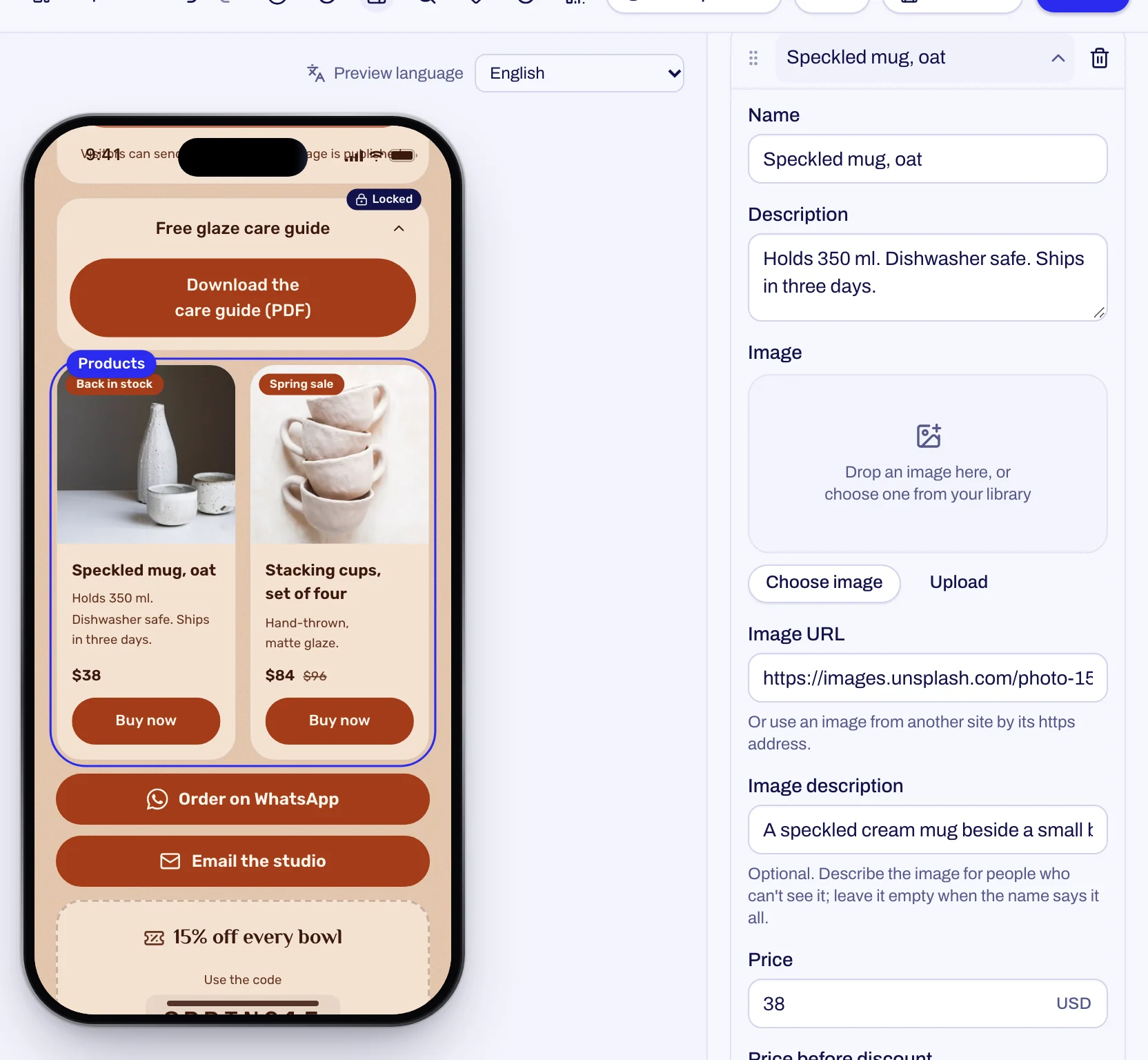
Choose the layout by the products. A grid suits things people choose by looks, a list suits items with details to compare, and a slider suits a few pieces you want to show off. A products block holds up to 12 cards, and the product card steps cover every field.
Choose where the button goes
| Where the button opens | Good for | Watch out for |
|---|---|---|
| A product page in your online store | Many sizes or colors, carts, stock counts | The store's own fees and setup |
| A payment link from your provider | A few products at fixed prices | One link per product, and per variant if prices differ |
| A chat with your order details filled in | One-offs, custom work, local delivery | Your reply time becomes your checkout |
| Another tab of your page | A size guide or care notes before buying | One extra tap |
Many payment providers can create a payment link for a product, and some can ask for a shipping address at checkout. Check that yours does before you rely on it, or you'll be messaging every buyer for an address.
Handle sizes and colors without a cart
Linkbase has no variant picker, so decide how buyers choose. Give each color its own card when the photos differ, use a separate payment link per size so each order says which one it is, or send the card to a store page that handles variants for you. Put the measurements in a table block beside the cards, and see our guide to a clothing brand drop for a size guide that heads off exchanges.
Prices, currency and the money itself
Each products block has one currency, and nothing is converted: an amount in Mexican pesos stays in pesos for every visitor. How the amount is written follows the page's language, so the same price is punctuated one way in English and another in German, as the help center's page on prices and formats shows. Set each block to the currency your checkout charges in, so the price on the card is the price at checkout.
Linkbase never handles the money or takes a cut, on any plan. Receipts, refunds, taxes and delivery are between you, your buyer and your payment provider, as how payments work sets out. For services, a menu block lists priced items in sections, and a pricing block compares up to three packages, which our guide to pricing tables covers.
Sell in chat without losing orders in the thread
When chat beats a checkout
Chat is the right checkout when the buyer needs a conversation: a one-of-a-kind piece that might already be gone, a made-to-order item that needs measurements, local delivery or pickup to arrange, cash on delivery, or a buyer who simply prefers to ask a person. Chat is the wrong checkout when it's a slow version of a fixed-price sale. If the answer to every message is the same price and the same link, put the price and the link on the page.
Buttons that start the right conversation
Message buttons open a chat on WhatsApp, Telegram or Signal, or start a text, a call or an email. WhatsApp, text and email buttons can carry a message that's already written, so give buyers your order format: "Hi, I'd like to order: item code, color, delivery city." For LINE, KakaoTalk, Zalo or Messenger, use an ordinary link button pointing at your account's own link; our guides to LINE and KakaoTalk and Zalo show where to find it.
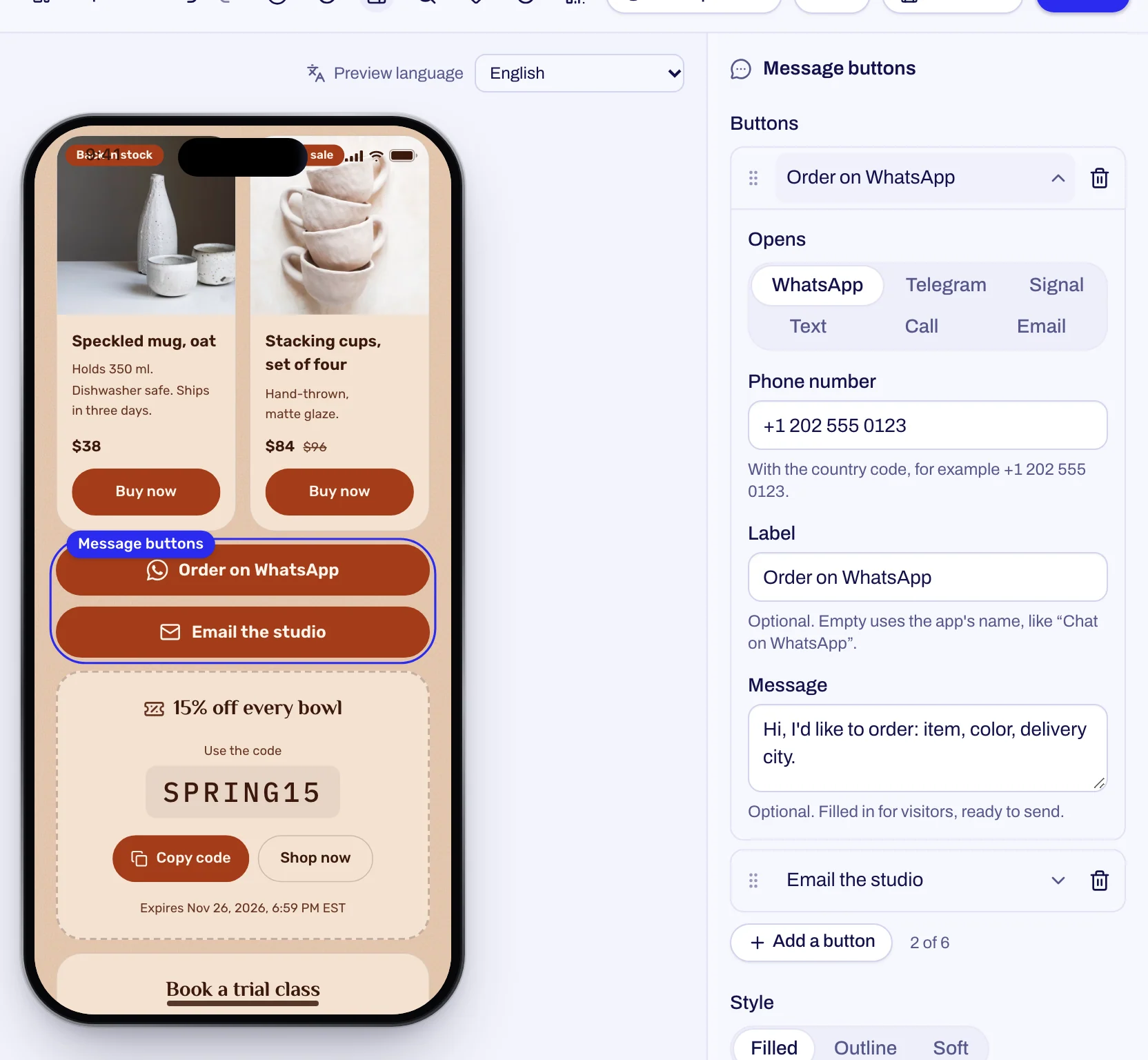
For one-of-a-kind pieces, go a step further. A product card's buy button can open any address, including a WhatsApp chat link with the item already named in the message, such as https://wa.me/your-number?text=I'd like J14, the denim jacket. Every inquiry then arrives saying exactly which piece it's about. Encode the spaces and punctuation your chat link needs, then test it on a phone.
Give every order the same shape
When orders need more than a sentence, a form does the asking for you. The Hanoi tailor's form might use number fields for chest, waist and sleeve, a dropdown for the fabric, a date for when the shirt is needed, and a consent checkbox for keeping the measurements on file. Forms have 12 field types and no file upload, so reference photos still come by chat. Each reply lands in your audience list, an email alert can tell you about it straight away, and a webhook can copy it to a spreadsheet, as our guide to webhooks for form submissions explains. The help center covers building the form.
Keep the inbox workable
Chat selling scales only as far as your replies do. WhatsApp Business has quick replies for the questions you answer every day and labels for sorting chats by stage, such as "Quoted", "Paid" and "Shipped". Tell buyers when to expect an answer with a line on your page, such as "Replies Monday to Saturday, 9 a.m. to 7 p.m.", so a quiet hour doesn't read as a vanished seller.
Confirm the money, not the screenshot
Edited payment screenshots are a familiar scam wherever bank transfers are common. Before you ship, check that the money is in your account or your provider's dashboard. Our guide for Lagos Instagram vendors covers a "Send proof of payment" button and the other habits that prevent disputes.
Coupons, drops and limited runs without fake urgency
Coupons that tell you something
A coupon block shows what the offer gives, the code in large type with a copy button, an optional expiry and a link to your shop. Create the code in your shop first, because the shop is what checks and applies it, then set the coupon's expiry and end the code in your shop at the same moment. An expired coupon hides itself from the page. The help center has the coupon steps.
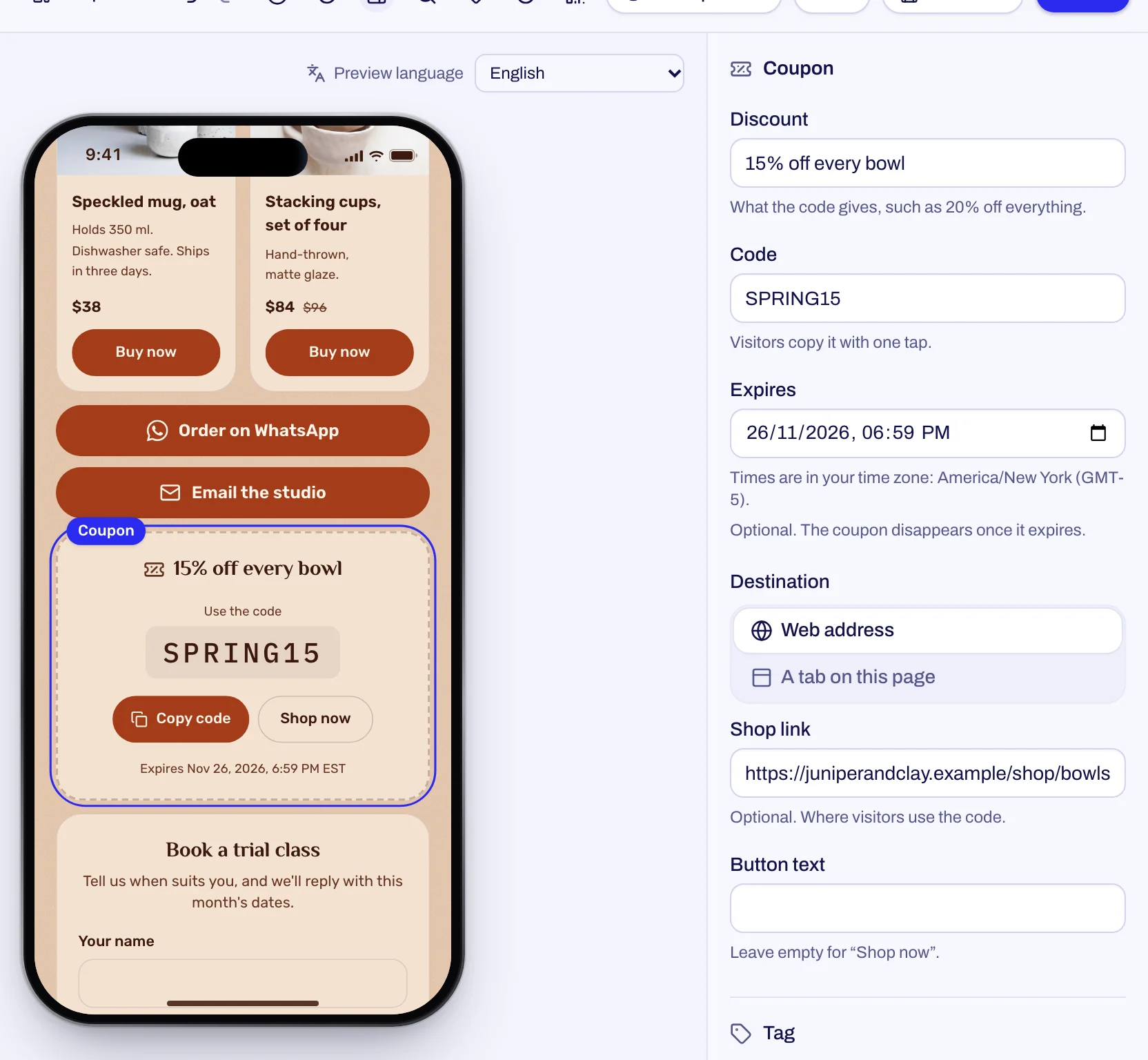
A code is also a measuring tool. Your page counts taps on Copy code; your shop counts redemptions. Give a collaborator or a live sale its own code, separate from the one on your page, and the shop's reports show which audience actually bought.
On Pro and Team plans, a link block with the coupon layout can sit behind an email gate: visitors leave their address to see the code, and they join your audience list. It turns a sale into a list you can tell about the next one.
Drops: before, at the moment, after
A drop is a launch on a deadline. Say a sneaker customizer in Chicago releases a batch of hand-painted pairs at noon on a Friday:
- Before: a countdown block to noon, with an end message such as "The drop is live", and an email signup titled "Tell me when it drops", whose list you email from your own tool that morning.
- At the moment: on Pro and Team plans, the products block is scheduled to appear at noon, and a link to the shop is spotlighted. For the first hour, "Send visitors straight here" can take everyone who opens the main address directly to the shop.
- After: the spotlight moves on, and the countdown either shows its end message or disappears.
A schedule saves each time as one moment, the same for every visitor, and the countdown shows each visitor the time left from wherever they are. Our guide to a clothing brand drop covers the lookbook and size guide, and the product launch plan covers the weeks before.
When it sells out
Change the card's badge to "Sold out" and remove its buy link, so the card stays but has no button. Leave sold-out pieces up for a day or two, because they show the drop was real, then move them off before they crowd the next batch. Swap the signup's title to "Get the next drop first", so the people who missed out leave an address instead of leaving.
Limited should mean limited
Urgency works only while buyers believe it. A countdown that quietly restarts, "only two left" on a stack of twenty, or an earlier price you never charged will be noticed, screenshotted and remembered. Use the earlier-price field only for a price the item really sold at, as our guide to an honest summer sale explains.
Many countries regulate how sellers show discounts, earlier prices and limited offers, and the rules differ. This isn't legal advice: check the current consumer rules where you sell before you run a sale.
Trust signals that answer a stranger's doubts
The doubts a first-time buyer brings
Someone who has never bought from you is asking themselves a short list of questions, and each one has an answer you can put on the page:
| The doubt | What answers it on your page |
|---|---|
| Is this a real seller? | Your name and face, all your accounts in social icons, a verified badge and your own domain (Pro and Team) |
| Is it really as pictured? | Your own photos, a gallery with captions, before and after, a short video |
| What if something goes wrong? | An FAQ on delivery, returns and refunds, and a checklist of what's included and what isn't |
| Will anyone answer me? | A message button, a stated reply time, a contact card with Save contact |
| Has anyone else bought from them? | Reviews and testimonials, quoted exactly |
Reviews and testimonials, shown honestly
The reviews block shows star ratings you add, with their average and a breakdown. It doesn't import reviews from anywhere else, so you choose and type each one, and that choice carries a responsibility. Quote buyers exactly, include a four-star review that mentions a real flaw, and link to where the full reviews live if you have them elsewhere. Our guide to the customer reviews block goes through each of those.
To collect new ones, slip a card into each parcel that asks "How did we do?" and gives the address of a short form on its own tab, such as …/yourname/review, with a consent checkbox that asks permission to quote the answer. Our guide to testimonials with consent covers what to ask and how to trim without changing the meaning.
Policies in plain words
An FAQ block answers the questions buyers would otherwise send one by one: when will it arrive, can I return it, do you ship to my country, how do I pay. Write answers a buyer can act on: "Orders ship within three business days, with tracking. To return something, message us first and we'll send the address." Many countries give online buyers rights to cancel or return, so check what applies where you sell, and never write a policy that promises less than the law already gives.
Prove the account is yours
Impersonators copy sellers' photos and handles and take payments from people who think they're buying from you. On Pro and Team plans you can ask Linkbase to verify your page: staff check who it represents against links that prove it, and the page shows a verified badge. Connecting your own domain verifies the page too. Keep your payment details in one place, on your page, and say so in your bios: "We only take payment through the links on our page."
Page health checks every link daily and flags broken or unsafe ones. A dead buy button looks like a closed shop, and a buyer who sees one may wonder what else is out of date.
Sell across borders: currency, shipping and the right shop
Decide what you'll ship before anyone asks
The first message from abroad tends to be "Do you ship to my country?", so answer it on the page. Say where you ship, roughly how long it takes and who pays duties and import taxes. A buyer surprised by a customs charge at the door may simply refuse the parcel. A table block works well: one row per region, with delivery time and cost. Say a ceramics studio in Kraków ships across the EU, to the UK and to North America; three rows answer most of its questions before they're asked.
Prices buyers can read
Each block has one currency, and nothing is converted. To show two currencies, use two products blocks, often one on each of two tabs such as "Shop in euros" and "Shop in pounds", each pointing at a checkout that charges in that currency. How prices and dates are written follows the page's language: with "Each visitor's language", the page's default setting, each visitor sees them punctuated the way their own language writes them.
Send each country to the right shop
If you run separate stores or regional storefronts, link rules on Pro and Team plans let one "Shop" button send visitors in each country to their own store, with everyone else going to the button's normal address. The first matching rule wins. Link rules work on link blocks, not product cards, so use a link block for the country-aware button and keep product cards for the items. Our guide to link rules shows how to set them up and test them.
Speak your buyer's language
The labels Linkbase adds, such as button words, form messages and dates, come in 40 page languages. Your own words are never changed or translated, so write the lines that sell in the languages your buyers read: product names, the shipping note and the returns answer. A tab per language keeps each version complete, and our guide to one page in many languages shows other layouts.
Payment methods buyers expect
Buyers in different countries reach for different ways to pay: iDEAL in the Netherlands, BLIK in Poland, Pix in Brazil, UPI in India, cards almost everywhere. Choose a payment provider whose checkout offers the methods your buyers use, since Linkbase doesn't connect to any provider and your buttons simply open its checkout. Our guide to selling in Spanish across Latin America covers that region's habits.
Selling to consumers in other countries can bring tax obligations, such as charging the buyer's local VAT or sales tax, and the thresholds and rules change. Some platforms act as the seller of record and handle this for you. This isn't tax advice: check with an accountant who knows the countries you sell to.
Measure what sells, not just what gets tapped
A tap is not a sale
Your analytics count every tap on a buy, copy code or shop button. They can't see whether the buyer then paid; your store or payment provider knows that. So the useful view puts the two side by side, product by product, once a week:
| Buy taps on your page | Orders in your store | What it usually means |
|---|---|---|
| Many | Many | It works. Give it the top spot and keep it in stock |
| Many | Few | Something at checkout puts people off: shipping cost, login, payment options |
| Few | Few | The page isn't selling it: the photo, the name or where it sits |
| Few | Many | People buy it from somewhere else, such as your store's own pages or a chat |
For the leather-goods maker, a cognac card holder with plenty of taps and plenty of orders earns the first slot, while a black one with the same taps and few orders sends them back to the checkout to look for the problem.
Which platform sells
Add a UTM tag to the address in each bio and each campaign, such as …/yourname?utm_source=tiktok&utm_campaign=autumn-batch. The Campaigns card lists visits by source on every plan, and selecting the Clicks tile ranks those sources by the clicks they led to. On Pro and Team plans, attribution shows each source's views, clicks and click rate side by side. The help center explains UTM tags in full.
Tags on your page's address stay with your page. To credit your page in your store's own analytics, add a tag to each buy link too, such as ?utm_source=linkbase. For orders that come through a form, a hidden field whose address parameter is utm_source saves each bio's tag with the reply, so you can see which bio it came from. For chat orders, ask new buyers where they found you and keep a tally.
Read the page itself
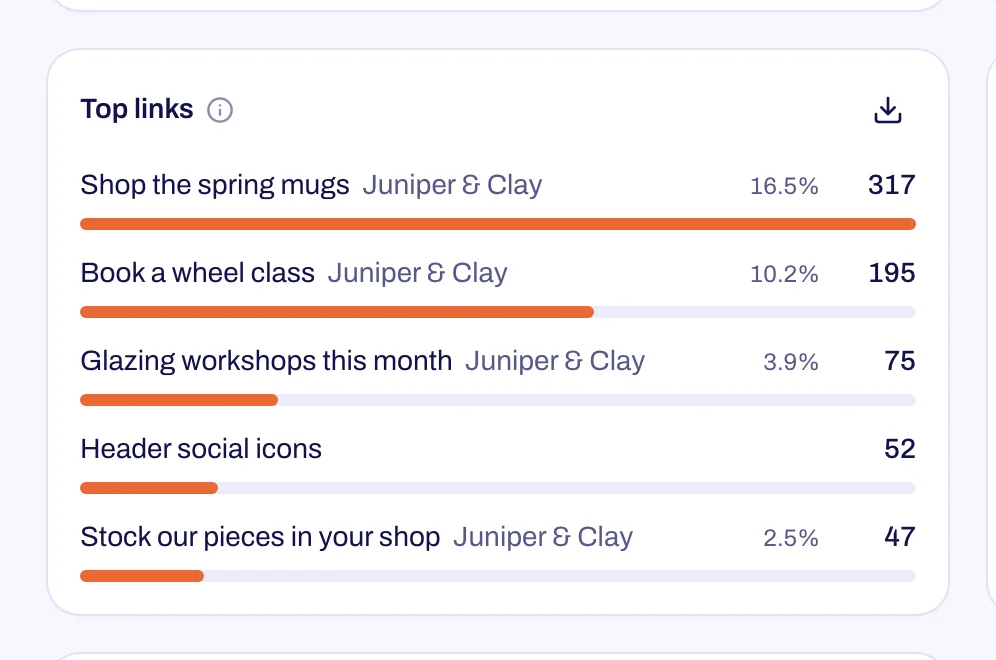
The top links list ranks every block by clicks, and on Pro and Team plans the click heatmap shows each block's share of the page's taps. Remember that the block at the top gets more taps partly because it's at the top. During a drop, live visitors (on every plan) show how many people are on the page in the last five minutes. The countries card is worth a monthly look too: a steady stream of visitors from a country you don't ship to is a decision waiting to be made. Our guide to reading your analytics explains each number, and the weekly analytics email brings the headlines every Monday.
A monthly sales review
Once a month, with your store's report open beside your analytics:
- Move the product that sells best to the first slot, if it isn't there already.
- Rephotograph, rename or retire one product that gets taps but no orders, or no taps at all.
- Tap every buy button yourself. Page health catches broken links, not wrong prices.
- Compare each platform's visitors, clicks and orders, and decide where next month's posts go.
- Change one thing at a time, so you know what moved the numbers.
Frequently asked questions
What's the easiest way to start selling on social media?
Pick a few products that show well in a photo or a short video, create a payment link for each with your payment provider, and put them on a page as product cards with clear prices, starting from one of the templates if you like. Add a chat button for questions, put the page's address in your bios, and test every button from inside each app.
Do I need a website to sell on social media?
Not to start. A page with product cards, payment links and chat buttons covers a small range. You'll want an online store when buyers need a cart, many sizes and colors, or stock counts, and your page can keep pointing into it.
How do I take payments from Instagram or TikTok followers?
Send them to a checkout or payment link they can pay on their phone. On Linkbase, each product card's buy button opens your own payment link or store, and buyers pay you there. Linkbase doesn't process the payment.
Is it better to sell through DMs or a checkout?
Use a checkout for fixed-price items and keep chat for what needs a conversation: one-of-a-kind pieces, custom work and local delivery. A WhatsApp button with your order format filled in keeps chat orders consistent.
Does Linkbase take a commission on my sales?
No, on any plan. Buyers pay you through your own store or payment provider, and only that provider's fees apply. Linkbase has paid plans that each start with a free trial, no card needed; see pricing.
