Digital fundraising for nonprofits, from first gift to loyal supporter
Where online donors come from, a page that turns a story into a gift, campaigns with honest goals, volunteers, thank-yous, transparency and what to measure.
7 bab17 menit baca

An online gift is a relay. A post hands a reader to your page, the page hands them to your donation form, the form hands them a receipt, and weeks later a thank-you hands them a reason to give again. Drop the baton anywhere and the gift doesn't happen, or it happens once and never again.
Fundraising advice tends to fix one leg at a time: a sharper appeal post, a shorter donation form. This guide works on the whole relay, for a volunteer-run group and for a charity with a communications team alike. It covers where online donors come from, how a page turns one story into one gift, how to run a campaign with an honest goal and a real deadline, how to sign up volunteers and fill events, how to keep the people who gave, and how to show, and measure, what their money did.
One thing to know up front. Linkbase is the page in the middle, and it never touches the money. Your donate buttons open your own donation platform or payment link, which takes the gift, sends the receipt and handles monthly giving. Your email tool sends your updates. Linkbase holds the story, collects signups and replies, and shows you what people tapped.
What you'll learn
- Map where your online donors come from, and give each source its own way in
- Build a page that turns one story into one clear, honest ask
- Run campaigns with a goal you keep current and a deadline that means something
- Sign up volunteers and fill fundraising events without a pile of DMs
- Thank supporters and keep them, with a list you own
- Answer "is this legit?" before anyone asks, and measure what each channel brought
Where online donors come from, and what each one needs first
People don't arrive at your page in the same state of mind. Someone tapping through from a video already feels the story. Someone who typed your name into a search engine is checking you out. Someone who got your link forwarded in a family group chat trusts their cousin, not you, yet.
Treat each source as its own front door, and decide what should be standing behind it.
| Where they come from | What they already know | What they need first | Where to send them |
|---|---|---|---|
| Your social posts | The story in the post | The same story, then the button | The campaign tab's own address |
| Your email list | You, and your work | The ask and the progress so far | A tagged link to the campaign tab |
| A forwarded message | The friend who sent it | Who you are, and proof you're real | Your main page, with About one tap away |
| Posters, flyers, collection boxes | Your name and a cause | A reason to scan right now | A QR code, one per placement |
| A partner business or creator | The partner | What the partner asked them to do | A tagged link for each partner |
| Search | Your name | That you're legitimate, and how to give | Your page, ideally at your own domain |
Give every source its own entrance
Each tab of your page has its own address, such as yourname/appeal, so a post can open the campaign directly instead of making people hunt for it. Add UTM tags to every link you place, such as ?utm_source=whatsapp&utm_campaign=spring-appeal, and Linkbase sorts the visits in its Campaigns card. Track campaigns with UTM tags shows the format.
Print needs one more step. A page has one QR code, so every poster would look the same in your numbers. On Pro and Team plans, a short link for each placement, with its own QR code, gives the library poster and the café counter card separate scan counts. Our guide to QR codes for print covers size and testing.
Meet people in the app they're already using
Say you run a youth music program in Bogotá. Parents share news in WhatsApp groups, rehearsal clips do well on Instagram, and the concert program is printed. That's three doors, so three entrances: a tagged link for WhatsApp, a tagged link in the Instagram bio, and a short link's QR code on the program. For the parents who'd rather ask a question than read a page, a message button opens a WhatsApp chat with a pre-filled message, such as "Hi, I'd like to help the orchestra".
Donors in more than one country
If you have donors abroad, or separate entities in two countries for tax reasons, one donate link can route people. On Pro and Team plans, link rules send visitors to different addresses by country, so supporters in the UK reach your UK donation page and everyone else reaches the main one. Rules work on link blocks, not on the tip jar, so use an ordinary link button for this. Write the button's label for everyone: "Donate" works in both places; "Donate with Gift Aid" doesn't.
Creators and partners raising money for you need a link too. Give each one their own tag, so you can thank the right person. Our guide to a GivingTuesday campaign page covers creators fundraising for a charity.
A page that turns a story into a gift
A donation page isn't a list of everything you do. It's one story, told quickly enough that the feeling is still there when the button appears.
One person, one need, one ask
The structure that works for a gift is short:
- A person or a place, shown with consent: one child, one clinic, one stretch of river.
- The problem, in one sentence. "The mobile clinic reaches four villages, and the van needs new tires before the monsoon."
- What a gift does, concretely.
- The button.
On the page, a cover block puts a big title over a photo with up to two buttons, or an image and text block sets a photo beside a heading, a few lines and a button. A quote block carries the words of someone involved. Then the ask. Everything else, the history, the board and the annual report, belongs further down or in its own tab.
Set amounts that mean something
The tip jar block makes a good donation box. Rename its title to "Donate" or "Support the clinic", write a message of up to 300 characters, and set up to four amounts, plus Other amount. If your donation platform's links can carry an amount, type {amount} where it goes, and each button opens the form with its amount filled in. Accept tips and donations explains the link format.
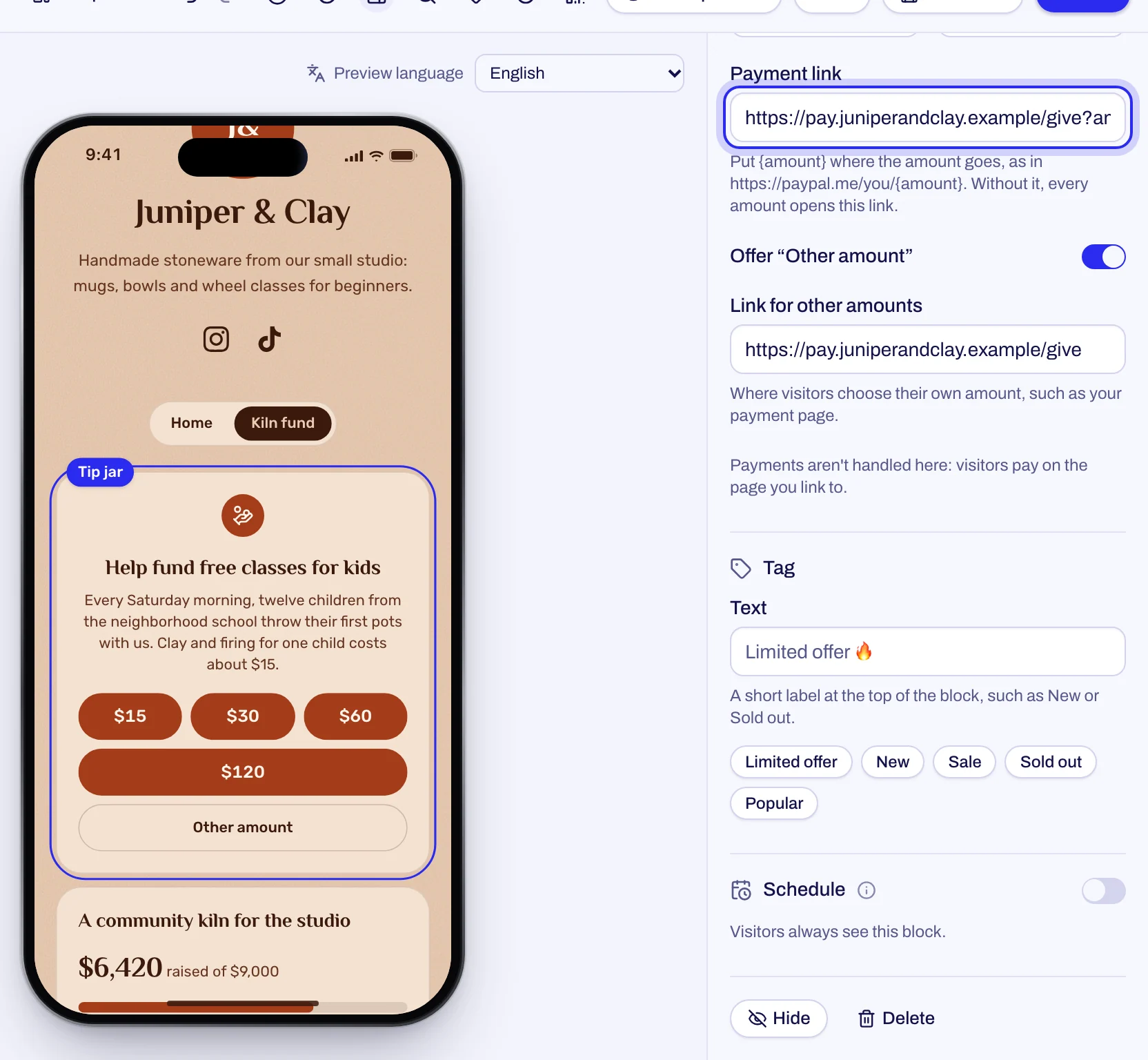
Say you run an eye care charity in Kathmandu. Your four amounts might match the cost of an eye test, a pair of glasses, a cataract referral and a day of the mobile clinic, with the message saying so in a sentence. Tie amounts to costs only when the figures are true and the money is actually used that way. If gifts go into general funds, say "helps pay for", not "pays for".
Monthly giving deserves its own button beside the tip jar, opening your platform's recurring option. Our guide to turning followers into donors has more on placing it.
Write the button, not just the story
"Donate" is clear. "Fund a clinic day" is clear and specific. Our guide to button text people want to tap has formulas for both.
Respect the people in the story
The people you serve aren't props. Ask before you use anyone's photo or words, explain where they'll appear, and let them say no without consequence. Prefer pictures of people doing something over pictures of people suffering. Testimonials are blocks you fill in yourself, so the same care applies; our guide to testimonials with consent sets out how to ask.
Walk the route on a phone
Before you share the page, give a small amount through your own button, on your phone, on mobile data. Note every screen between the tap and the receipt. Each one is a place a donor can give up, and your platform may let you remove some of them, such as a required account sign-up.
Running campaigns with honest goals and real deadlines
A campaign gives people a reason to give now rather than someday. That reason only works if it's true.
A deadline needs a reason
Good deadlines come from the world: a match that ends at midnight, a giving day, a planting season, a repair booked for a date. A deadline invented to create urgency, then quietly extended, teaches your supporters to ignore the next one. If a campaign runs on, say so and say why.
Build the campaign as a tab
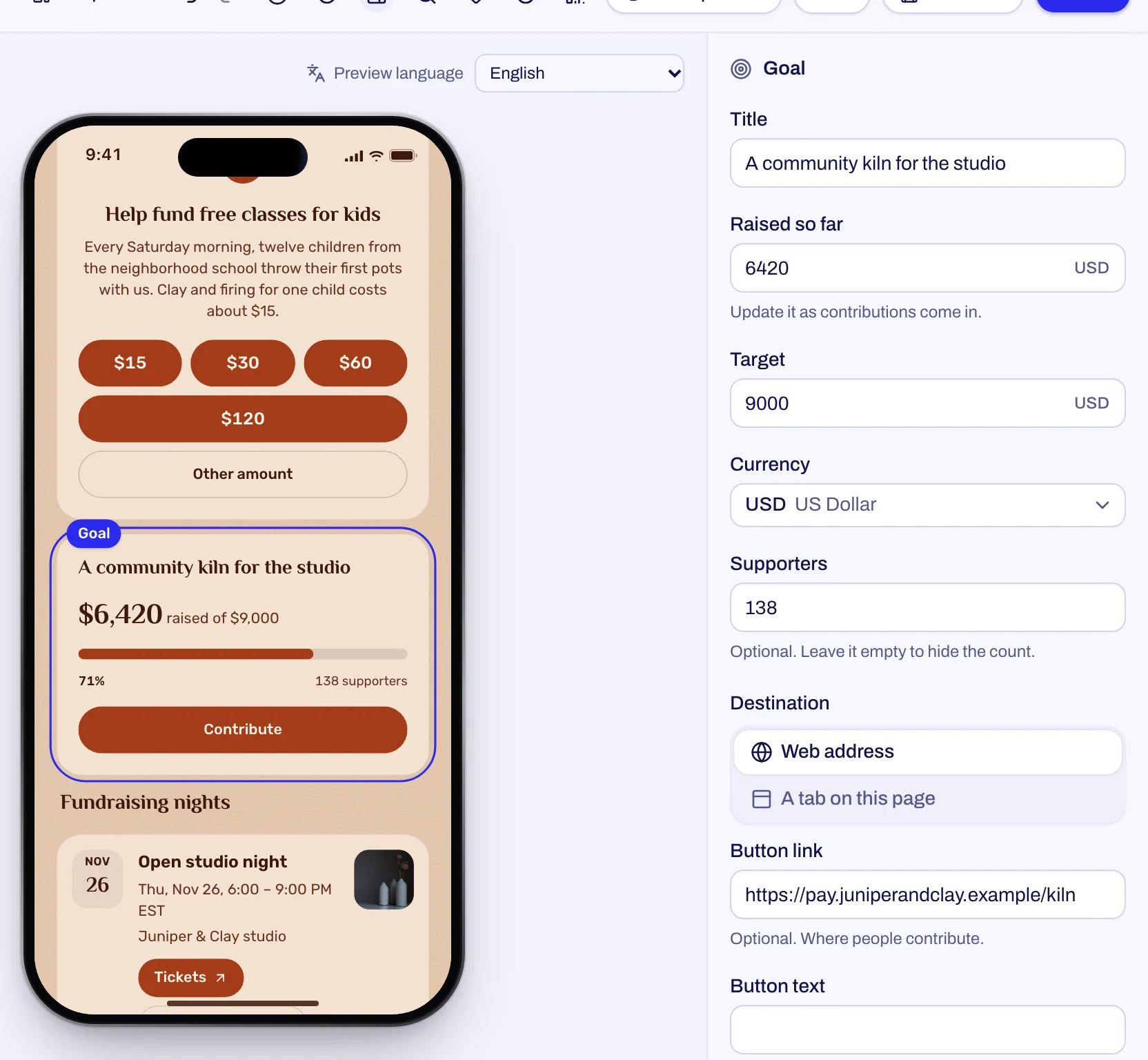
Give the campaign a tab of its own and share its address in every post. At the top, a goal block shows "raised so far" against a target, an optional supporter count and a button you can relabel from Contribute to "Give now". Linkbase doesn't connect to your donation platform, so you update the total by hand. Pick a time, such as every evening at seven, and keep to it: a bar that sits still for days while gifts arrive tells people nobody's watching. Once you pass the target, the bar stays full and keeps counting past 100%; raise the target for a stretch goal. Show progress toward a goal has the steps.
A countdown below it counts to the moment that matters and shows your own message when time's up, such as "Thank you: the trees are funded".
Let the page change on schedule
On Pro and Team plans, almost any block can be scheduled between a start and an end time, so the campaign switches itself on at launch and off at the close. You can spotlight the donate link, which pins it to the top of its tab with a frame. For the final hours, "skip to link" can send everyone who opens your page straight to the donation form. Keep that window short, because visitors can't see the rest of your page while it's on. Our guide to scheduling links covers time zones and clock changes.
A campaign calendar
Say you run a river restoration trust in Auckland, raising money for native planting before winter, when the volunteers can get the seedlings in.
| When | On the page | In your channels |
|---|---|---|
| Two weeks before | An email signup, "Tell me when the appeal opens", set to hide at launch | A teaser post with the site photos |
| Launch | The appeal tab, goal block, countdown, spotlighted donate link | Launch email, post, partners' links |
| Halfway | An updated goal, an image and text block with progress | A progress post from the riverbank |
| The last day | Skip to link, for a few hours | Last-call posts and an email |
| The close | A thank-you, the final total, the planting day date | A thank-you email and post |
The last row is the one most worth doing well. A campaign that ends with a result and a date for what happens next gives everyone who gave a reason to come back.
Signing up volunteers and filling fundraising events
A volunteer is someone who already trusts you with a Saturday. Make joining as easy as giving, and treat the sign-up with the same care.
A volunteer form that asks only what you'll use
A form turns "message us if you'd like to help" into replies your coordinator can work from. It has 12 field types, from checkboxes and dropdowns to a date and a consent checkbox. Say you run a beach cleanup network in Lisbon, with a cleanup on a different beach each month. The form needs:
- name, email and phone, the only required fields;
- which beaches suit them, as checkboxes;
- whether they can drive and bring equipment, as multiple choice;
- a consent checkbox to be contacted about cleanups;
- a hidden field that reads
?ref=from the address, so you know which poster or post sent them.
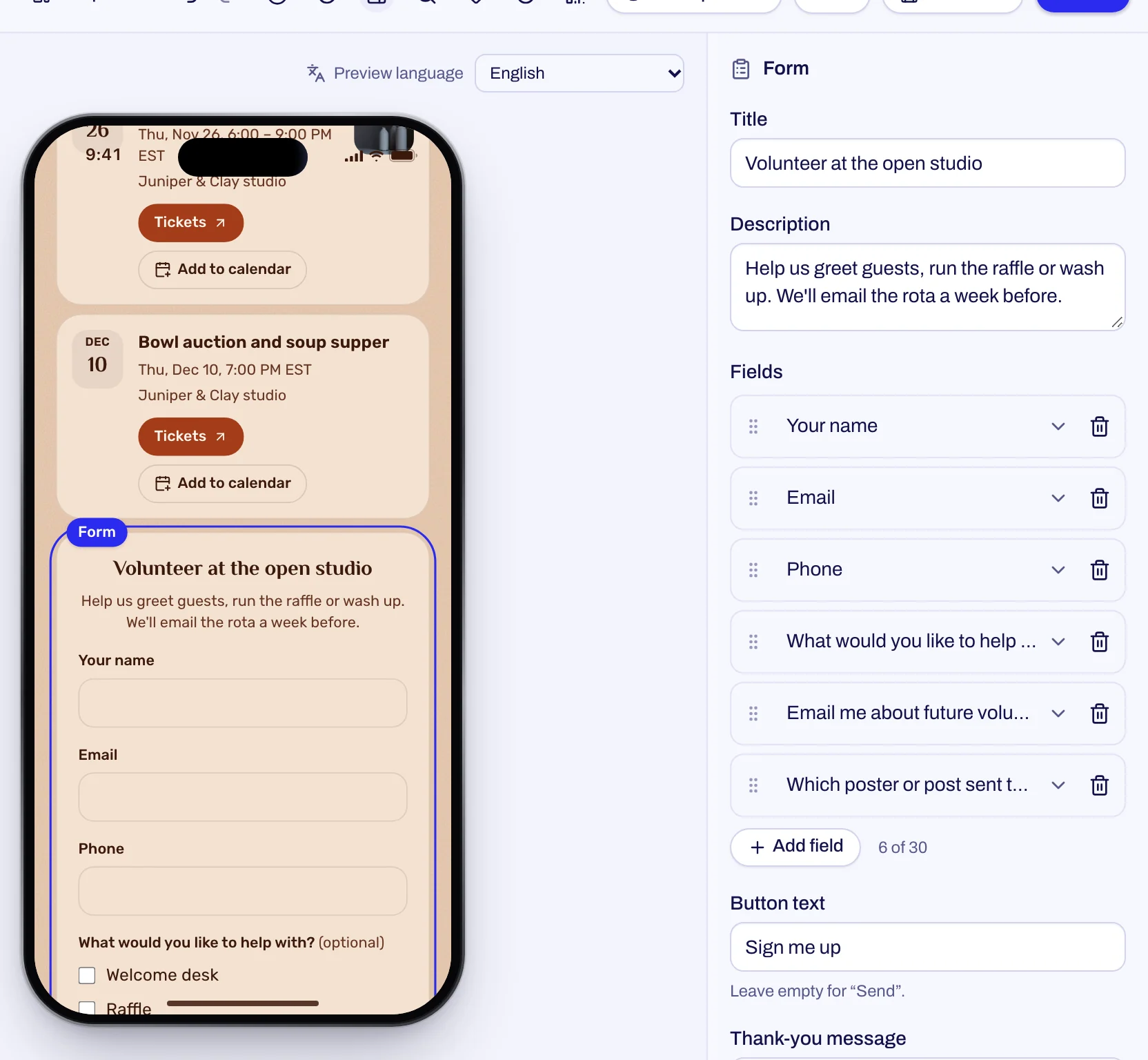
Every reply lands in your audience list, and by default the workspace's owner gets an email for each one. Webhooks can pass every reply to the coordinator's spreadsheet as it arrives; our guide to webhooks for form submissions has the setup. Build a form covers each field type.
Group shifts and one-to-one calls are different tools
The booking block, on Pro and Team plans, allows one booking per time slot for the whole page. That suits a one-to-one induction call, booked in the volunteer's own time zone with a confirmation email and a calendar invite. It doesn't suit a cleanup where thirty people come at once. For group days, list each date in an events block with an RSVP button that opens your volunteer tab's address, where the form waits.
Events that raise money
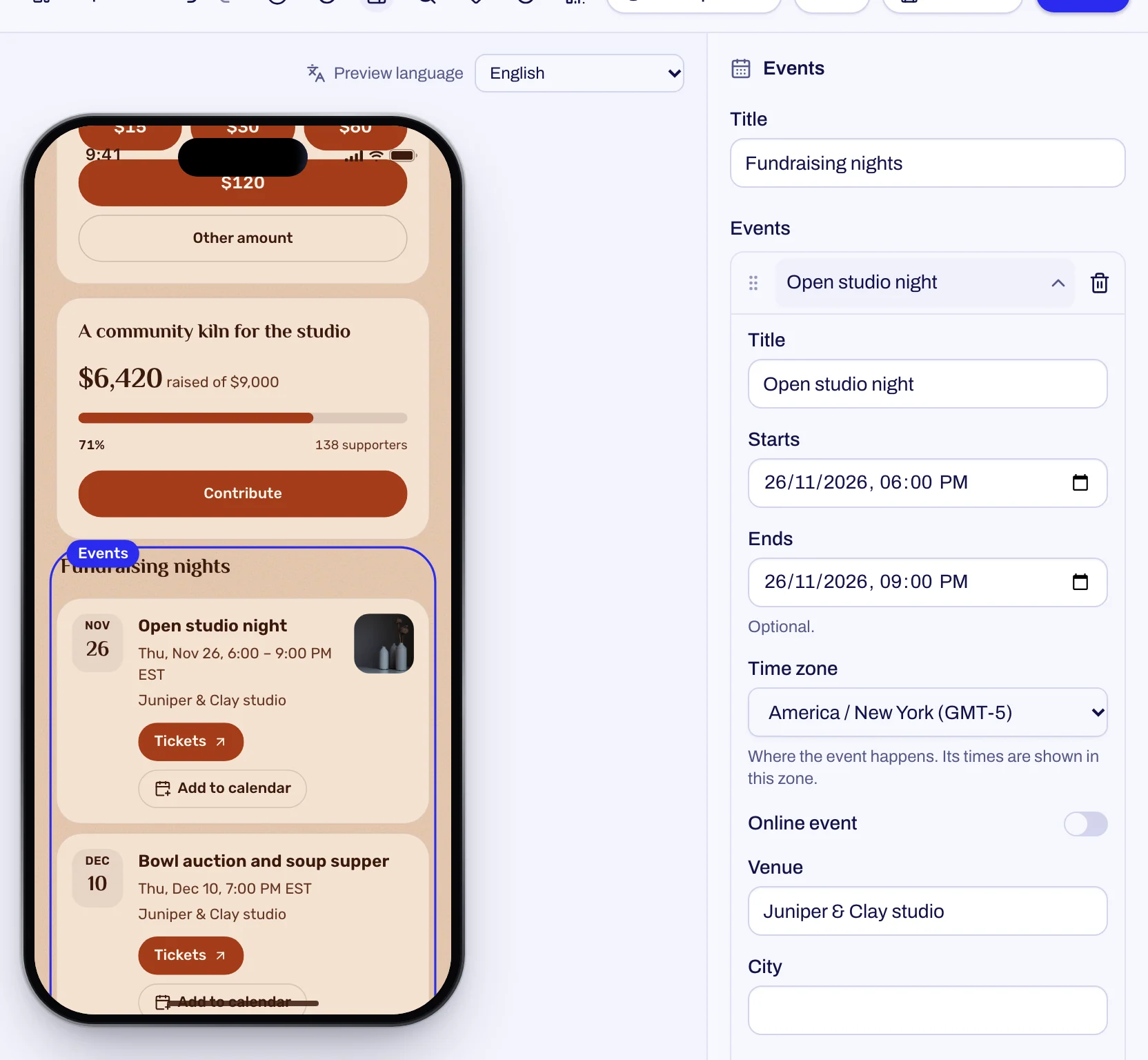
A gala, a sponsored walk or a quiz night belongs in the same events block, with a Tickets button that opens your own ticketing page. Each event shows its date and time in the event's own time zone, with Add to calendar, and a status of On sale, Sold out or Canceled. Past events drop off by themselves. Thank sponsors with a logo wall, and after the night, swap the ticket link for a gallery and the total raised. Our guide to one page for your whole event goes phase by phase.
A tab just for regulars
Regular volunteers need the rota, the handbook and the coordinator's number, not the appeal. Give them a tab of their own. On Pro and Team plans, a password gate keeps it for volunteers, but treat a shared password as a light lock: keep personal details, such as phone lists, off the page entirely. For groups that meet, our guide to community group meetings covers agendas and chat links.
Thanking supporters so they give again
A first gift says someone was moved once. A second gift says they trust you. The work that earns it happens after the campaign, just when it's tempting to go quiet.
Know which tool does which job
| The job | Where it happens |
|---|---|
| Taking the gift and sending the receipt | Your donation platform |
| The thank-you email | Your donation platform or your email tool |
| Updates and newsletters | Your email tool |
| Collecting signups, with consent | An email signup or form on your Linkbase page |
| Moving new signups to your email tool | A webhook, or a CSV export of your audience list |
| Honoring unsubscribes everywhere | The webhook's unsubscribe event, or your next export |
Linkbase collects; it doesn't send newsletters. That split has an upside: your list lives in your audience list, which you can export at any time, and your email tool can change without losing anyone.
An email signup with a promise in it
An email signup block takes a title, a description of up to 500 characters and a thank-you message. Use the description to promise something specific: "One email a month from the sanctuary: who arrived, who found a home, what your gifts paid for." Turn on double opt-in, so each address is confirmed before it joins. Use the thank-you message to point to the next step, such as following you where you post most. Collect email signups has every setting, and our guide to turning short-form video views into subscribers has sign-up offers that suit video.
A stewardship rhythm you can keep
Say you run an animal sanctuary near Valparaíso. A rhythm a small team can sustain:
- Each month: one update email that tells one animal's story and says what gifts paid for.
- Each quarter: refresh the page. Swap the cover photo, update the stats and add the newest story.
- After each campaign: replace the goal with the result, and add an image and text block showing what the money built.
- Each year: link the annual report from the page, and thank monthly donors by name in your email, with their permission.
Close the loop on every campaign
When an appeal ends, don't delete the tab. Turn it into a record: the final total, a photo of the result, a short timeline of what happens next and a button to the next thing someone can do. A supporter who comes back a month later to see what happened should find an answer, not an error.
Showing where the money goes, and that you're real
Careful donors check an organization before they give, and fundraising attracts impostors who count on nobody checking. Your page should answer the questions before anyone asks them.
Answer the questions donors actually check
Say you run a hospice charity in Edinburgh. An About tab answers, in order:
- Who runs it? A team block with photos, roles and a line each. Our guide to a meet the team section covers the writing.
- What have you done? A stats block with two to four numbers you enter, such as families supported last year. Use only figures you could defend line by line. A timeline block tells the history.
- Where does the money go? A file row that links to your latest annual report, and an FAQ that answers "How much of my gift reaches patient care?" plainly, with a link to the accounts.
- How do I reach a person? A contact card with Save contact, and a map for the office.
Make the real page easy to recognize
On Pro and Team plans, ask Linkbase to verify your page. Staff check who it represents from links that prove it, and the verified badge then shows by your name. A custom domain you've connected, such as give.yourcharity.org, verifies the page too. QR codes for a verified page carry the badge, so people can see whose code it is before they scan.
Then use one address everywhere, and say it plainly in your bio and your FAQ: "We only collect donations through the links on this page." If a fake account copies your photos during a big appeal, supporters who've read that line know where the real one lives.
What you can promise donors depends on your country and your organization's legal status: whether gifts are tax-deductible, whether you must show a registration number, and what "matched" has to mean. Check with your regulator or an accountant before you put any of it on your page. This isn't legal advice.
Treat privacy as part of trust
The built-in analytics use no cookies and store no IP addresses. If you run ads, tracking pixels on Pro and Team plans load only after a visitor agrees. On forms, ask for consent in its own checkbox, and delete people who ask you to. Our guide to privacy-friendly analytics explains where consent still comes in.
Keep the donate button working
Page health checks your links every day and flags broken or unsafe ones. A donation link that breaks in the middle of an appeal costs gifts you won't get back, so fix flags the day they appear. Our guide to finding broken links covers what automatic checks miss.
Measuring a campaign from first tap to final gift
Fundraising numbers live in two places, and neither tells the whole story alone.
Two systems, one picture
Linkbase counts what happens on your page: views, unique visitors, clicks on every link, and where visitors came from, by site, app, country and device. Your donation platform counts what happens after the tap: gifts, amounts and recurring donors. Linkbase never knows whether someone finished giving.
| The question | Where the answer lives |
|---|---|
| How many people saw the appeal? | Views and visitors, in Linkbase analytics |
| Which channel sent them? | Sources, and the Campaigns card for your tagged links |
| How many tapped the donate button? | That link's clicks, or the tip jar's and the goal's clicks |
| How many gave, and how much? | Your donation platform |
| Which poster or flyer worked? | Each short link's scan count (Pro and Team) |
| Which posts brought volunteers? | The hidden ref field in your form replies |
On Pro and Team plans, attribution puts views and clicks for each source, medium and campaign side by side, with each one's click rate.
Read the gap between taps and gifts
Put the daily donate clicks beside the daily gifts from your platform. If plenty of people tap and few give, the problem is after the tap: a long form, a missing payment method, the wrong currency. If few tap at all, the problem is on the page or in the story. Small campaigns produce small numbers that swing from day to day, so look at the shape across the whole campaign before drawing conclusions from one Tuesday.
Watch the moments that matter live
Live visitors, the last five minutes of traffic, are on every plan. On a giving day, or during a livestreamed event, they tell you whether the post you just made is sending anyone, while you can still do something about it. A weekly summary arrives every Monday for everyday tracking. For a board or trustees, Pro and Team plans add CSV exports and scheduled email reports.
Review within a week of closing
Say you run a fund for school libraries in Chennai. A week after the appeal closes, while everyone still remembers, answer five questions in writing:
- Which source sent the most people who tapped donate?
- Where did people drop off: before the tap, or after it?
- Did gifts cluster around the countdown's final hours, the match or the launch email?
- What did volunteers and donors ask that the page didn't answer?
- What will you cut next time?
Keep the answers with the campaign's numbers. The next appeal starts from them.
Frequently asked questions
Does Linkbase take a percentage of donations?
No. Linkbase doesn't process payments or hold money, on any plan. Your donate buttons open your own donation page or payment link, and gifts go to you through your provider, with only that provider's fees.
Can supporters donate without leaving our page?
No. They always give on the donation page your button opens. That's where receipts, recurring gifts and payment methods are handled, so choose a platform whose form is quick on a phone.
Does the goal bar update itself?
No. Linkbase doesn't connect to your donation platform, so you enter the amount raised yourself. Update it at the same time each day during a campaign, so supporters see it move.
Can several people from our organization work on the page?
Yes. A workspace has roles: owners, admins and editors can change pages, and viewers can see pages and analytics for free. Extra editors take seats, which come with the Team plan. Draft preview links let a manager or trustee approve changes before they go live. See pricing for what each plan includes.
How do supporters know the page is really ours?
On Pro and Team plans, ask Linkbase to verify the page, or connect your own domain, which verifies it too. Then use that one address in every post, and say on the page that you only collect donations through its links.

